
HubSpot Landing Page Best Practices You Should Follow
Best practices lists have a reputation for being generic. Most of them are. They compile obvious advice that everyone already knows, presented in a way that feels actionable but leaves the reader with nothing specific enough to actually implement.
This guide is built differently. Every HubSpot landing page best practice covered here is tied to a specific mechanism, a specific HubSpot feature, or a specific behavior pattern that explains why it works. Understanding why a practice works is what allows you to apply it correctly to your specific situation rather than following it mechanically and being disappointed when it does not produce the expected result.
If you are managing landing pages in HubSpot right now and your conversion rates are below where they should be, working through these practices systematically, in the order they appear, will produce measurable improvements. The sequence is intentional: foundational decisions come first, optimization decisions come later.
Quick Answer: What Are the Most Important HubSpot Landing Page Best Practices?
What HubSpot landing page best practices have the greatest impact on conversion rates?
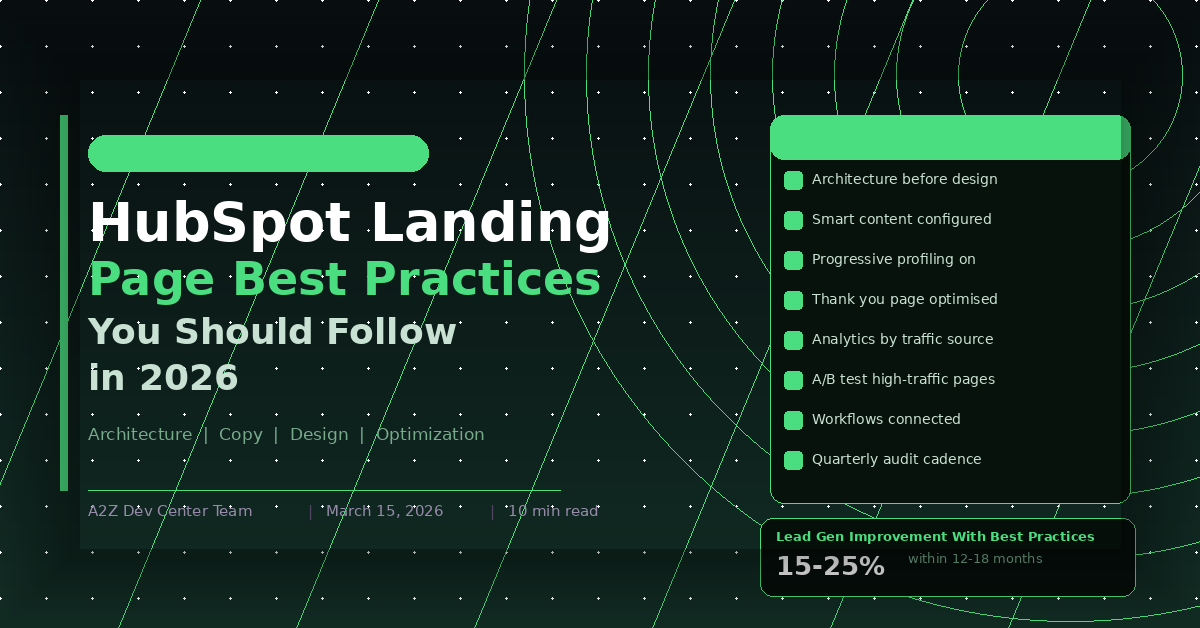
The highest-impact HubSpot landing page best practices are those that address the foundations before the details: message match between traffic source and headline, navigation removal, form field optimization for the specific offer, and social proof positioning adjacent to the CTA. These four practices address the most common and most costly conversion failures on HubSpot landing pages. Businesses that implement these foundational practices correctly see 15 to 25% improvements in lead generation from the same traffic within 12 to 18 months of consistent application.
Key Takeaways
- HubSpot landing page best practices fall into four categories: architecture, copy, design, and optimization. Working through them in this order prevents the common mistake of optimizing details before fixing foundational problems
- Smart content and progressive profiling are HubSpot-specific capabilities that most teams underuse despite being among the most powerful lead generation tools the platform offers
- HubSpot’s native analytics provide enough data to identify conversion problems on most landing pages without requiring additional tools
- Thank you page optimization is consistently the fastest path to additional lead value from existing traffic and requires no additional spend
- A/B testing in HubSpot is most valuable when focused on the elements with the highest variance in visitor response: headlines, CTA copy, and form field count
- The best HubSpot landing page programs treat each page as a hypothesis to test rather than a decision to make once and leave
Best Practice 1: Start With Architecture Before Design
The most common sequence for landing page creation is: choose a template, design the page, write the copy, add the form, publish. The most effective sequence is: define the traffic source and conversion action, map the visitor’s awareness stage, determine the message match requirement, choose a template that supports the required architecture, then design and copy.
Architecture decisions, specifically navigation presence, form position, CTA count, and page length, have a larger impact on conversion rates than design decisions. A well-architected page with average design will consistently outperform a beautifully designed page with poor architecture.
In HubSpot, architecture decisions mean: confirming the template is configured to hide navigation, deciding whether the form appears above or below the fold based on traffic intent, setting a single primary CTA, and determining page length based on the complexity of the conversion decision. These decisions should be made before the page builder opens. The what makes a conversion focused landing page successful post covers the architecture decisions that drive conversion performance in detail.
Best Practice 2: Configure Smart Content for Every Significant Traffic Segment
HubSpot’s smart content feature is one of the most powerful lead generation tools on the platform and one of the most consistently underused. Most HubSpot portals have smart content available and either never configure it or configure it for one or two simple use cases and leave the rest untouched.
The highest-value smart content configuration for landing pages is lifecycle stage. A visitor who is a known contact in your CRM arriving on a landing page should see a different offer than an anonymous first-time visitor. Showing a known contact the same offer they already downloaded drives them to bounce rather than convert on a next-step offer. Smart content rules can display a more advanced offer, a consultation CTA, or a case study to known contacts while showing the standard offer to new visitors, using a single page URL.
Referral source personalization is the second highest-value configuration. Visitors arriving from different paid campaigns, different LinkedIn audience segments, or different email sequences have different contexts. Smart content headline variants for each source dramatically improve message match without creating separate page URLs for every traffic variation. The 7 custom HubSpot features that transformed our clients marketing post covers smart content configuration examples from real client implementations.
Best Practice 3: Use Progressive Profiling on All Repeat-Traffic Pages
Progressive profiling in HubSpot allows form fields to change based on what data already exists in the contact’s CRM record. A returning contact who has already provided their name, email, and company sees different fields than a new visitor. HubSpot shows them questions that fill gaps in their existing record, typically job title, phone number, or company size, rather than asking for information you already have.
For landing pages that receive significant repeat traffic, either from email nurture sequences sending contacts back to content offers or from retargeting campaigns reaching known contacts, progressive profiling meaningfully improves form completion rates. Contacts who have already converted once are more likely to convert again when the form does not feel repetitive. The HubSpot CRM lead generation strategy guide covers how progressive profiling connects to CRM property mapping and the workflow triggers that make collected data actionable.
Best Practice 4: Build Thank You Pages as Conversion Assets
The thank you page is not a formality. It is the highest-intent moment in the entire conversion pathway and the most underinvested page in most HubSpot implementations.
A visitor who just converted is more engaged, more trusting, and more open to a next step than they will be at any other point until they have a live conversation with your team. Using that moment to display a generic confirmation message is a measurable missed opportunity.
A HubSpot thank you page built as a conversion asset includes a confirmation of the action taken with a specific timeline for what happens next, a related secondary offer such as a relevant case study, a video overview, or a webinar invitation, a secondary CTA for visitors ready to move faster such as a calendar booking module, and personalization tokens that address the visitor by name and reference the specific offer they downloaded. Building the thank you page as a full HubSpot CMS page rather than using the inline form confirmation message enables full design control, tracking in HubSpot analytics, and workflow-triggered personalization. The how to build HubSpot landing pages that actually convert guide covers thank you page configuration options within HubSpot’s form and workflow settings.
Best Practice 5: Monitor HubSpot Analytics Before Adding External Tools
HubSpot’s native landing page analytics provide more actionable conversion data than most marketing teams fully use. Before adding heat mapping tools, session recording software, or third-party analytics platforms, it is worth extracting the maximum insight from what HubSpot already tracks.
HubSpot landing page analytics show visits, contacts, and conversion rate by page, by date range, and by traffic source. This data is enough to identify which pages are underperforming against comparable pages, which traffic sources are converting at different rates on the same page, and whether conversion rate changes correlate with copy or design changes made on specific dates.
The most common analytical mistake on HubSpot landing pages is monitoring overall conversion rate without segmenting by traffic source. A page with a 4% overall conversion rate might be converting email traffic at 18% and paid traffic at 1.5%. Those two traffic sources require completely different optimization approaches and conflating them produces misleading conclusions about what the page needs.
Best Practice 6: Run A/B Tests on High-Traffic Pages Only
HubSpot’s native A/B testing is genuinely useful and genuinely limited. The limitation is statistical: tests run on pages with insufficient traffic produce results that look meaningful but are not statistically valid.
A page receiving fewer than 1,000 visits per month should not be A/B tested in HubSpot unless you are willing to run the test for three to four months to accumulate enough data for valid conclusions. Most marketing teams are not patient enough for this and end up making decisions based on invalid test results, which produces worse outcomes than making no change at all.
Reserve A/B testing in HubSpot for pages receiving enough traffic to reach statistical significance within a four to six week test period. For lower-traffic pages, apply best practice changes directly based on established conversion principles rather than testing them individually. The HubSpot landing page templates post covers how template architecture affects A/B testing options, particularly the difference between free template constraints and custom template flexibility for testing structural page elements.
Best Practice 7: Connect Every Landing Page to a Follow-Up Workflow
A landing page that generates a form submission but does not immediately trigger a relevant follow-up communication leaves conversion potential on the table. The window of highest engagement for a new lead is within the first hour of conversion. HubSpot’s workflow automation makes it straightforward to send immediate, relevant follow-up content triggered by specific form submissions.
The follow-up workflow for a landing page conversion should at minimum send an immediate confirmation email with the promised content or next step, enroll the contact in a nurture sequence relevant to the specific offer they downloaded, assign the contact to the appropriate sales owner if they meet lead qualification criteria, and set lifecycle stage to the appropriate value based on the conversion action.
More sophisticated implementations use the contact’s existing CRM data to branch the workflow based on company size, industry, or previous interaction history, delivering different follow-up sequences to different segments from the same landing page conversion. The why choose HubSpot and how its CRM works post covers how CRM properties connect to workflow branching logic that makes landing page follow-up genuinely personalized rather than one-size-fits-all.
Best Practice 8: Audit Landing Pages Against This Checklist Quarterly
Landing pages are not set-and-forget assets. Copy that was relevant when the page launched may become outdated. Offers that were compelling six months ago may no longer match what the target audience values. Social proof from clients that have since moved on needs to be updated. Performance metrics that were acceptable at launch may now fall below the benchmark set by newer pages in the portfolio.
A quarterly landing page audit against a consistent checklist prevents the gradual degradation of conversion performance that occurs when pages are left unchanged while the market, the competition, and the audience evolve around them.
The audit checklist should cover: message match between current traffic sources and the headline, offer relevance and competitive positioning, social proof currency and specificity, form field count relative to current offer value, page load speed against current Core Web Vitals benchmarks, mobile layout quality against current mobile traffic share, and thank you page conversion rate against a defined target. The dedicated HubSpot developer vs agency post covers how ongoing landing page management responsibility is typically allocated between in-house teams and agency partners in growing HubSpot programs.
HubSpot Landing Page Best Practices: Implementation Priority
| Practice | Priority | Effort | Impact |
|---|---|---|---|
| Architecture decisions before design | Do first | Low | Very High |
| Navigation removal | Do first | Very Low | High |
| Message-matched headline | Do first | Low | Very High |
| Form field optimization | Do first | Low | High |
| Thank you page as conversion asset | Do early | Medium | High |
| Smart content for lifecycle stage | Do early | Medium | High |
| Progressive profiling | Do early | Low | Medium-High |
| A/B testing high-traffic pages | Do next | Medium | Medium |
| Workflow connection for all pages | Do next | Medium | High |
| Quarterly audit cadence | Ongoing | Low | Medium |
Frequently Asked Questions
Ready to Get Started?
Your Details will be Kept confidential. Required fields are marked *


