

Shopify
Summarize this blog post with:
The Short Version
- WooCommerce holds 36% of eCommerce sites globally. Shopify holds 28%. More stores does not mean better fit for your store. The platform winning on market share is not necessarily the one that fits your revenue model, team size, or content strategy.
- The shopify vs woocommerce 2026 question has one honest answer: it depends on your transaction volume, your team’s technical depth, your content output, and how much you want to pay in infrastructure or fees at your specific revenue level.
- Most merchants pick a platform once and never revisit the decision. This guide gives you 12 specific diagnostic signals, 6 per platform, that tell you whether you chose right. It also covers what migration actually costs in time, money, and organic rankings.
- A2Z Dev Center builds and migrates stores on both platforms. Our Shopify development service and WordPress and WooCommerce development team has handled both directions of migration. This is not a brand preference guide. It is a diagnostic one.
Your WooCommerce store has been breaking once a month for the last six months. That is a platform problem, and it is at the heart of the shopify vs woocommerce 2026 debate for active merchants. Every break is a plugin conflict. Every fix is a developer ticket. You are spending $800/month on maintenance for a store doing $40,000/month in revenue. That is two percent of gross revenue going to keeping the lights on, not growing the business.
Or the opposite. Your Shopify store is doing $900,000/year and you just calculated that between Shopify Advanced ($2,988/year), your app subscriptions ($6,400/year), and the 0.5% transaction fee on your third-party payment processor ($4,500/year), you are paying $13,888/year in platform costs. A WooCommerce store at the same revenue would cost $4,800 in hosting and plugins, with zero transaction fees.
Both are real scenarios. Both are the wrong platform. Here is how to know which one is yours.
The Shopify vs WooCommerce 2026 Architectural Difference That Drives Everything Else
Shopify
Managed SaaS
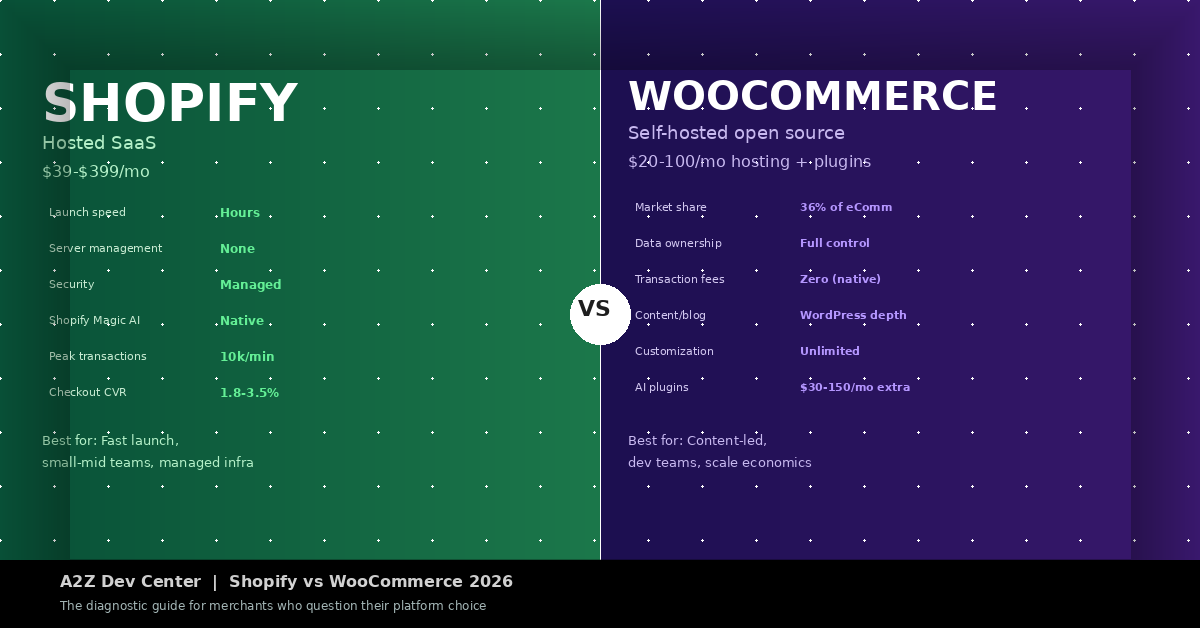
Shopify hosts your store, manages your server, handles your SSL, runs your CDN, patches your security vulnerabilities, and scales your infrastructure on peak days like Black Friday automatically. You do not touch any of it. You pay a monthly fee for that guarantee. The tradeoff: you work within Shopify’s constraints on checkout customization, URL structure, and data portability. Shopify can handle 10,000 transactions per minute at peak, and that number is their problem to maintain, not yours.
WooCommerce
Self-Hosted Open Source
WooCommerce is a WordPress plugin. It is free. Your hosting costs $20 to $100 per month depending on traffic. You own every byte of your data, every URL, every database row. You can extend anything. You can also break anything. Plugin conflicts, outdated PHP versions, missed security patches, and server capacity decisions are your responsibility or your developer’s responsibility. The freedom is real. So is the maintenance load.
This architectural difference flows into every comparison below. Shopify charges you to remove maintenance burden. WooCommerce gives you freedom in exchange for accepting that burden. Neither is wrong. Both are wrong for the wrong merchant.
What Each Platform Actually Costs at Your Revenue Level
This is the shopify vs woocommerce total cost of ownership table that no competitor article builds with real numbers by revenue tier. The woocommerce vs shopify cost comparison depends almost entirely on how much you sell and how you process payments. The shopify vs woocommerce comparison below uses real published pricing data and 2026 merchant benchmarks.
| Annual Revenue | Shopify Total Cost (est.) | WooCommerce Total Cost (est.) | Verdict |
|---|---|---|---|
| Under $50k/yr | $468/yr (Basic, Shopify Payments) | $600-$1,200/yr (hosting + plugins) | Shopify wins |
| $50k-$250k/yr | $948-$3,588/yr + apps | $1,200-$3,600/yr hosting + plugins | Roughly equal |
| $500k/yr | $2,988/yr + $2,500 apps + fees | $2,400-$4,800/yr (DigitalApplied data) | Depends on processor |
| $1M/yr (Shopify Payments) | $3,588/yr + apps, zero extra fees | $4,800-$7,200/yr + dev time | Shopify wins if using native payments |
| $1M/yr (third-party processor) | $3,588/yr + $5,000-$20,000 in fees | $4,800-$7,200/yr, zero fees | WooCommerce wins |
| $5M+/yr | Shopify Plus from $2,300/mo | $12,000-$24,000/yr fully managed hosting | Case by case |
The shopify vs woocommerce transaction fees question is the most misunderstood line item in this comparison. Shopify charges 0.5% to 2% on revenue processed through third-party payment gateways (Stripe, PayPal, etc.). Merchants who use Shopify Payments pay zero. If you are on Shopify Advanced and using Stripe instead of Shopify Payments at $1M/year revenue, you are paying $5,000/year in extra fees for no functional benefit. Switch to Shopify Payments and that cost disappears. Our ecommerce development team reconfigures this in existing stores regularly. It is the fastest cost reduction available to Shopify merchants who are not on native payments.
6 Signs Your WooCommerce Store Should Move to Shopify
These are not general considerations. They are specific operational signals that mean WooCommerce is costing you more than Shopify would.
Sign 1
You spend more time on maintenance than marketing
If developer tickets for plugin conflicts, PHP updates, server restarts, or failed payment gateway integrations are a monthly occurrence, the “free” in WooCommerce is an accounting fiction. Count the actual hours spent on maintenance last quarter and multiply by your developer’s hourly rate. If that number exceeds $300/month, Shopify’s managed infrastructure is cheaper.
Sign 2
Your checkout conversion rate is under 1.8%
The average Shopify checkout converts at 1.8 to 3.5%. WooCommerce checkout performance varies with theme quality and plugin configuration. If your store receives 5,000 sessions per month at a 0.9% conversion rate and Shopify’s default checkout would bring that to 1.8%, you are leaving 45 orders per month on the table. At a $60 average order value, that is $2,700/month in missing revenue.
Sign 3 , Scalability
Traffic spikes break your site
If a product goes viral, you run a flash sale, or you appear in press coverage and your WooCommerce site slows down or crashes, your hosting cannot scale fast enough. Shopify handles 10,000 transactions per minute automatically. WooCommerce on shared or basic managed hosting does not. Shopify vs woocommerce scalability is not a theoretical debate at this point. It is measurable in your uptime logs.
Sign 4
You have had one security incident in the past 12 months
WooCommerce sites are significantly more targeted than Shopify stores because WordPress’s plugin ecosystem creates attack surfaces. A single security incident costs an average of $12,000 in developer remediation, downtime revenue loss, and customer trust repair, according to IBM Security’s SMB breach data. Shopify’s managed security is a subscription against that cost.
Sign 5
You are paying over $200/month in plugin subscriptions
WooCommerce core is free. The plugins that make it functional are not. Count your active subscriptions: advanced shipping, subscription billing, booking, reviews, upsells, email marketing integration, analytics. If that total exceeds $200/month, compare it against Shopify’s app ecosystem, where many equivalents are included in the plan or available at lower subscription cost.
Sign 6
You have no developer and no budget to hire one
This is the clearest signal. WooCommerce is not a merchant platform. It is a platform for merchants with developers. If you are the founder, the marketer, the product manager, and the customer support team, and you are also troubleshooting WooCommerce configuration issues at 11pm before a sale, you are on the wrong platform. Shopify was designed for exactly this situation. Our Shopify launch checklist covers the setup tasks a non-technical merchant can complete independently.
6 Signs Your Shopify Store Should Actually Be on WooCommerce
Shopify is the right platform for most new merchants. It is not the right platform for all scaling merchants. Here are the signals that you have grown past what Shopify’s constraints accommodate efficiently.
Sign 1
You publish 20+ blog posts per month and organic is your primary channel
Shopify’s blog is functional but thin. It lacks category taxonomies, custom post types, internal linking depth, and the editorial tooling that a content-led eCommerce brand needs. WooCommerce runs on WordPress, which has 20 years of content management architecture behind it. Rank Math and Yoast give you schema control, redirect management, and content analysis that Shopify’s native SEO tools do not match. If organic search drives more than 40% of your revenue and content is how you build it, WooCommerce is the correct infrastructure.
Sign 2
Your transaction fees cost more than $800/month
At $1M/year revenue processed through Stripe on Shopify Basic, you pay $10,000/year in Shopify transaction fees. At $2M/year on Shopify Advanced, you pay $10,000/year. At that level, migrating to WooCommerce eliminates those fees entirely. The migration project costs $15,000 to $30,000 depending on catalog size and custom features. It pays for itself in 18 to 36 months. This is the math that makes WooCommerce the right business decision at a specific revenue level, regardless of convenience.
Sign 3
You need custom checkout logic Shopify will not allow
Shopify’s checkout is locked on Basic and Standard plans. You cannot add custom fields, change the checkout flow structure, or implement complex conditional logic without Shopify Plus (from $2,300/month). WooCommerce checkout is fully customizable by a developer without a platform tier upgrade. If your product requires age verification at checkout, custom tax calculation, multi-step checkout for configuration products, or B2B purchase order fields, WooCommerce gives you that without an additional $25,000/year in platform fees.
Sign 4
Your catalog has 50,000+ SKUs with complex attribute relationships
Shopify handles large catalogs, but its product variant system has a 100-variant-per-product limit. A configurable product with 5 attributes at 5 options each produces 3,125 variants. That requires workarounds, custom apps, or restructuring your catalog. WooCommerce has no native variant limit and supports attribute-based product configuration with direct database access. For technical or industrial catalogs, this is a hard constraint that WooCommerce removes.
Sign 5
You need full data ownership and portability
Shopify holds your data on their servers. You can export order CSVs and product CSVs, but you cannot export your full database, your complete customer event history, or your analytics at the raw event level. WooCommerce stores everything in a MySQL database you own and can query directly. If your business model requires data portability for legal reasons, compliance requirements, or because you are building a custom analytics stack on top of your commerce data, WooCommerce is the only option.
Sign 6
Your dev team is already WordPress-fluent
Platform decisions are also team decisions. A WordPress and PHP development team building on Shopify’s Liquid templating system and proprietary API structure takes 3 to 6 months to become productive. A Shopify-fluent team migrating to WooCommerce faces the same ramp. If your existing team’s skills map to WordPress and your current platform is Shopify, you are paying developer rates for a technology mismatch. Our WordPress development team builds WooCommerce stores for exactly this scenario.
Shopify vs WooCommerce SEO in 2026: What Actually Changed
The shopify vs woocommerce for seo 2026 comparison has changed significantly since 2022. Two things changed.
First, Shopify resolved its /collections/ URL duplication issue. For years, Shopify created duplicate product URLs because products appeared at both /products/product-name and /collections/collection-name/products/product-name. Shopify now canonicalizes correctly. The SEO weakness that WooCommerce advocates cited for a decade is no longer relevant in current Shopify themes.
Second, both platforms now achieve comparable SEO results when properly configured. The gaps that existed in metadata control, structured data, and technical SEO basics have largely closed. Neither platform has a meaningful SEO advantage for a standard product-focused store.
Where WooCommerce still leads is shopify vs woocommerce for content marketing seo. WordPress’s Gutenberg editor, Rank Math’s schema automation, full URL structure control, custom taxonomies for faceted navigation, and the depth of content management tooling give WooCommerce a real advantage for stores where content drives discovery. Shopify’s blog works. It does not work as well as WordPress for a content-first eCommerce strategy. If you publish fewer than 8 posts per month, the difference is irrelevant. If content is your primary organic growth channel, the difference matters. Our ecommerce SEO guide covers the specific on-page and technical factors that apply to both platforms. Our SEO team has optimized stores on both and the configuration requirements differ substantially at the technical level.
The AI search angle for 2026: Shopify has a native advantage in agentic commerce. ChatGPT Checkout, Perplexity Shopping, and Amazon AI Shopping all reward platforms that expose clean product feeds and structured data natively. Shopify’s Storefront API and product feed architecture are further along for AI-driven product discovery than WooCommerce’s plugin-dependent implementation. If agentic commerce is a meaningful channel for your category in the next 12 months, Shopify’s infrastructure positions you better with less custom work. WooCommerce can achieve the same result but requires deliberate plugin configuration and ongoing maintenance of that configuration.
Shopify vs WooCommerce 2026: The Side-by-Side Verdict
| Factor | Shopify | WooCommerce | Winner |
|---|---|---|---|
| Time to launch | Hours | Days to weeks | Shopify |
| Maintenance burden | Managed (zero) | Active (yours) | Shopify |
| Transaction fees | 0% native / 0.5-2% third-party | Zero always | WooCommerce at scale |
| Checkout conversion | 1.8-3.5% avg | Variable | Shopify default |
| Content and blog SEO | Functional | WordPress depth | WooCommerce |
| Data ownership | Hosted (partial export) | Full database access | WooCommerce |
| Security management | Managed by Shopify | Your responsibility | Shopify |
| Customization depth | High (constrained checkout) | Unlimited | WooCommerce |
| Plugin/app ecosystem | 8,000+ apps (curated) | 60,000+ plugins | Depends on need |
| AI commerce readiness | Native feeds + Storefront API | Plugin-dependent | Shopify (currently) |
| Scalability at peak | Automatic, 10k tx/min | Infrastructure-dependent | Shopify |
| TCO under $500k/yr | Competitive | Competitive | Similar |
| TCO over $1M/yr (3rd party payments) | High (fees compound) | Lower (no fees) | WooCommerce |
The Honest Verdict
Shopify wins for most merchants under $500k/year who do not have dedicated developer resources, who want managed infrastructure, and who use Shopify Payments as their processor. The convenience premium is worth it at this revenue level.
WooCommerce wins for content-led stores, merchants above $1M/year who use third-party payment processors, stores with complex catalog or checkout requirements, and teams with existing WordPress development skills. The lower TCO and unlimited customization justify the maintenance overhead at this revenue level and team profile.
If you are on the wrong platform based on your revenue, team, and content output, continuing to force-fit your business into it is a slow leak that compounds every month.
If Your Shopify vs WooCommerce 2026 Decision Was Wrong: What Migrating Involves
This is the section none of the four competitor articles on this topic cover with any depth. Here is what happens when you migrate, how long it takes, and what the SEO risks are.
1
Audit your current URL structure before touching anything
Every product URL, collection URL, and blog URL on your current platform must be documented before migration begins. Google’s index contains links to every URL your store has ever ranked for. A migration without a complete URL map is a migration that will drop organic rankings. Export your current sitemap, crawl the store with Screaming Frog or Ahrefs, and create a complete spreadsheet of source URLs to destination URLs before a single product is moved.
2
Migrate product data, customer records, and order history
Product data migrates via CSV or API. Customer records (email, purchase history, addresses) require careful handling under GDPR and CCPA. Order history is critical for customer service and repeat purchase analytics. Tools like LitExtension or Cart2Cart handle basic migrations. Complex stores with custom fields, subscriptions, or loyalty point balances require custom ETL work. Budget 2 to 4 weeks for data migration testing alone, before any frontend work begins.
3
Implement 301 redirects for every changed URL
Platform migrations almost always change URL structures. WooCommerce products live at /product/product-name. Shopify products live at /products/product-name. That /product/ to /products/ change breaks every backlink your store has ever earned, every bookmark, and every indexed URL. A 301 redirect from /product/ to /products/ takes 5 minutes to implement and preserves the link equity that took years to build. Missing redirects is the number one cause of organic traffic drops after platform migration. DigitalApplied’s migration data shows that properly executed migrations take 4 to 12 weeks and avoid ranking drops. Rushed migrations that skip redirect validation can cause 20 to 40% organic traffic loss, per DigitalApplied’s 2026 migration analysis.
4
Run both platforms in parallel for 30 days post-launch
Keep your old platform accessible (not public-facing, but functional) for 30 days after the new platform goes live. You will find redirect gaps, missing product variants, broken customer account records, and integration failures that did not appear in testing. Having a fallback prevents these discoveries from becoming customer-facing incidents. After 30 days with clean data showing the new platform is stable, decommission the old one.
5
Submit the new sitemap to Google Search Console on launch day
On the day the new platform goes live, submit the new XML sitemap to Google Search Console immediately. This tells Google that the site has changed structure and to crawl the new URLs. Without this, Google discovers the new URLs through its own crawl schedule, which can take weeks. Pair the sitemap submission with a fetch-and-render request for your top 10 highest-traffic URLs to accelerate reindexing of your most valuable pages. Our ecommerce conversion guide covers the post-migration conversion setup that determines whether your new platform actually performs better, not just looks better.
Frequently Asked Questions
Not Sure Which Platform Is Right for Your Store? Start With a Platform Audit.
A platform audit takes one call and reviews your current revenue, payment setup, team structure, content output, and maintenance cost. It tells you whether your current platform fits your business or whether switching would recover more than the migration costs. No sales pitch. A straight answer.
A2Z Dev Center builds and migrates stores on both Shopify and WooCommerce. Our team has handled both directions of migration, from simple catalog moves to complex B2B stores with custom checkout logic.
Talk to Our Ecommerce Team
Schedule a call
Talk to a subject-matter expert
Web development, SEO, or digital marketing — tell us about your project and we'll get back within one business day. No obligation.
- Free scope & strategy session
- A senior specialist, not a sales rep
- Your details stay confidential