
The Executive’s Guide to HubSpot Development: Scaling Your Tech Stack Without the Technical Debt
 By Akash Patel
·
📅 Published: February 7, 2026
·
🔄 Updated: February 8, 2026
·
⏱ 12 min read
By Akash Patel
·
📅 Published: February 7, 2026
·
🔄 Updated: February 8, 2026
·
⏱ 12 min read
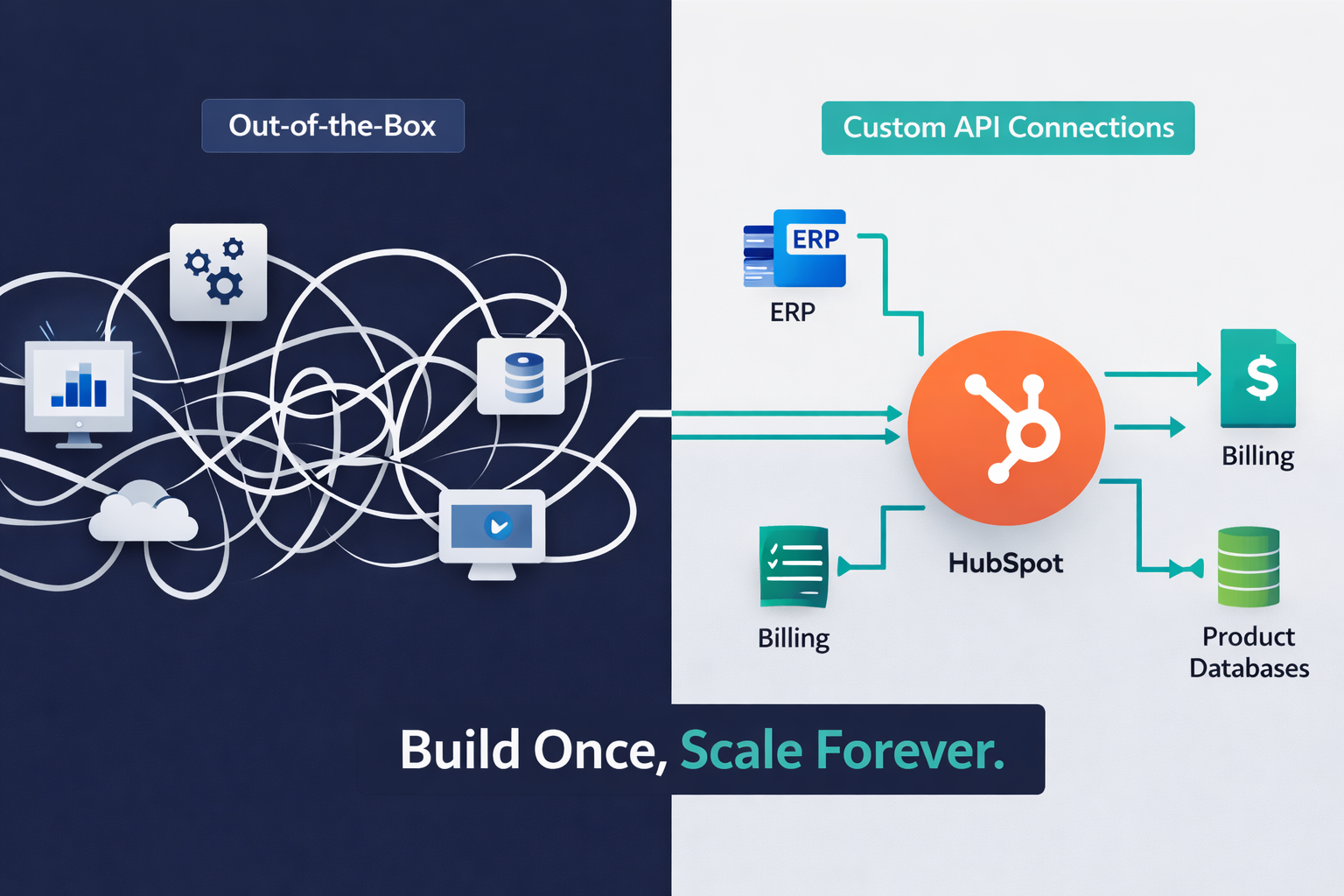
Marketing teams are drowning in manual workarounds. Sales teams toggle between three different systems to close a deal. Customer success teams can’t see product usage data without exporting CSVs. Sound familiar?
This is the Developer Gap—the chasm between what HubSpot offers out-of-the-box and what businesses actually need to operate at scale. Organizations invest heavily in HubSpot, attend the conferences, buy the seats, but somewhere along the line, hit a wall. The pre-built workflows can’t handle multi-tier pricing models. The default CRM properties don’t capture complex customer journeys. The marketplace themes break every time customization is attempted.
Here’s the uncomfortable truth: HubSpot is a platform, not a plug-and-play solution. For mid-market and enterprise companies with sophisticated go-to-market motions, the real value lies beneath the surface—in custom CRM architecture, programmatic integrations, and purpose-built development frameworks. Understanding how HubSpot’s CRM actually works is the first step toward unlocking its true potential.
This guide isn’t about adding another integration from the marketplace. It’s about understanding the technical leverage points that transform HubSpot from a marketing tool into a genuine revenue operating system. The architecture decisions that eliminate technical debt, the development patterns that scale with business growth, and the strategic investments that deliver compound ROI.
For those tired of hearing “HubSpot can’t do that,” this is the roadmap to proving otherwise.
Custom CRM Architecture—Beyond Properties and Pipelines
The Limitations of Standard CRM Objects
HubSpot’s standard objects—Contacts, Companies, Deals, Tickets—work brilliantly for straightforward B2C or simple B2B businesses. But what happens when the business model doesn’t fit that mold?
Consider these scenarios:
- Multi-location franchises that need to track individual store performance under a parent company
- Subscription businesses managing multiple product instances with different renewal dates per customer
- Manufacturing companies tracking equipment installations, maintenance schedules, and parts inventory
- Healthcare providers managing patient episodes of care across multiple providers and facilities
Standard objects force businesses into a Procrustean bed of limitations. Teams end up creating 47 custom properties on the Company object, building increasingly complex workflows to maintain data consistency, and losing sleep over data integrity issues.
The Power of Custom Objects
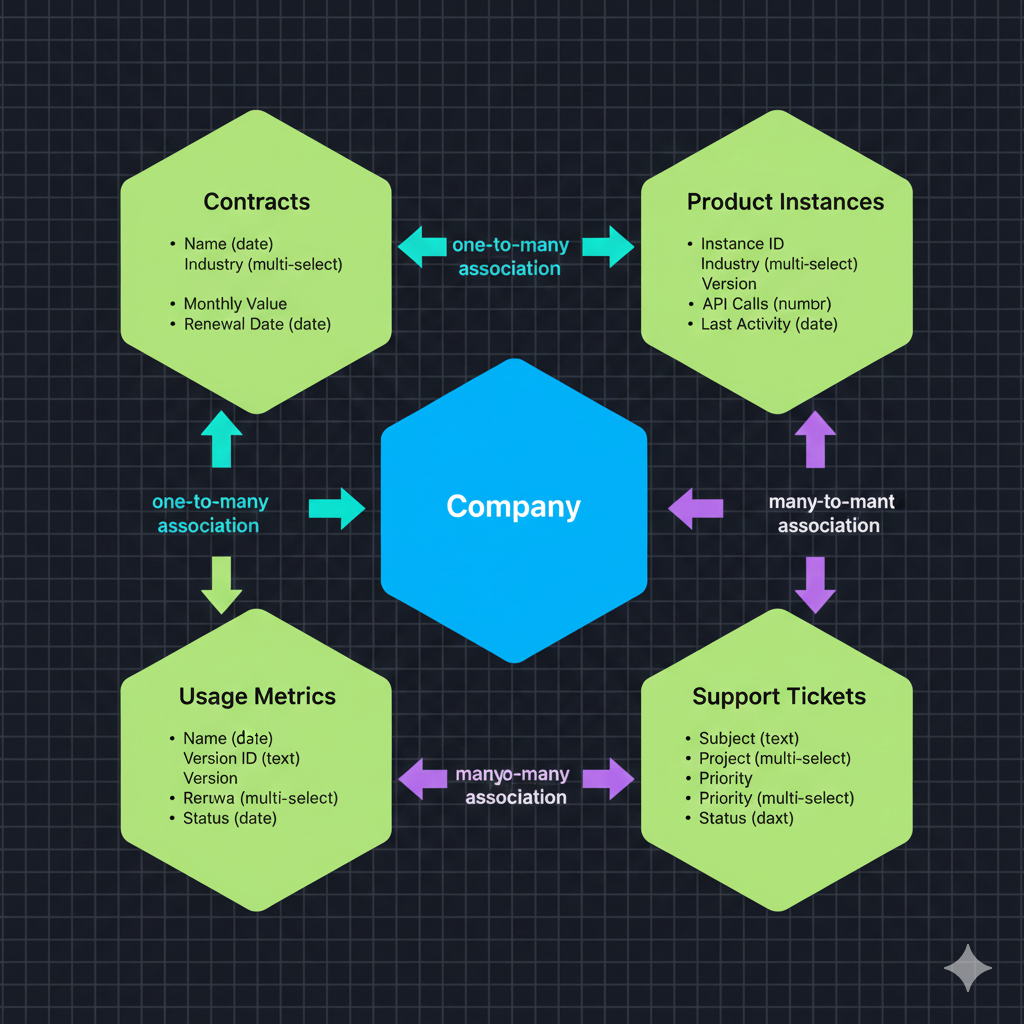
Custom Objects fundamentally change the game. They allow modeling actual business processes within HubSpot’s data architecture. This isn’t just about organization—it’s about operational intelligence. This is where hiring HubSpot dedicated developers becomes a strategic advantage rather than just a staffing decision.
Here’s what becomes possible:
1. True Relational Data Models Instead of cramming subscription data into Deal properties, a “Subscriptions” custom object can be created with properties like renewal_date, mrr_value, product_tier, and churn_risk_score. Multiple subscriptions associate to a single Company. Reporting now reflects reality, not workarounds.
2. Scalable Association Logic Custom objects support many-to-many relationships. A “Project” object can be associated with multiple Contacts (stakeholders) and multiple Deals (phases). Sales teams see the complete project context without leaving the CRM.
3. Advanced Automation Triggers Workflows can now trigger based on custom object creation or property changes. When a subscription.status changes to “at_risk,” the system automatically creates a high-priority ticket, notifies the CSM, and pauses marketing emails. This level of operational sophistication is impossible with standard objects alone.
Lessons from the Field: A Real Implementation
A custom object framework was recently architected for a cybersecurity company managing enterprise contracts. The requirements included tracking:
- Contracts (with multiple amendments)
- Covered Assets (servers, endpoints, networks)
- Security Incidents (linked to specific assets and contracts)
- Compliance Audits (scheduled per contract, associated with incidents)
Using four custom objects with strategic associations, the system enabled:
- Account executives to see contract renewal risk based on incident volume
- Security analysts to track incident patterns across the customer base
- Compliance teams to generate audit reports in seconds instead of days
- Finance to access real-time ARR forecasting with churn probability modeling
The ROI? Contract renewal prep time was reduced from 40 hours to 6 hours per enterprise customer. That’s $170K in labor savings annually, plus improved retention from better customer intelligence.
The HubSpot CMS Framework—Modular Development vs. Theme Dependency
The Hidden Cost of Theme Dependency
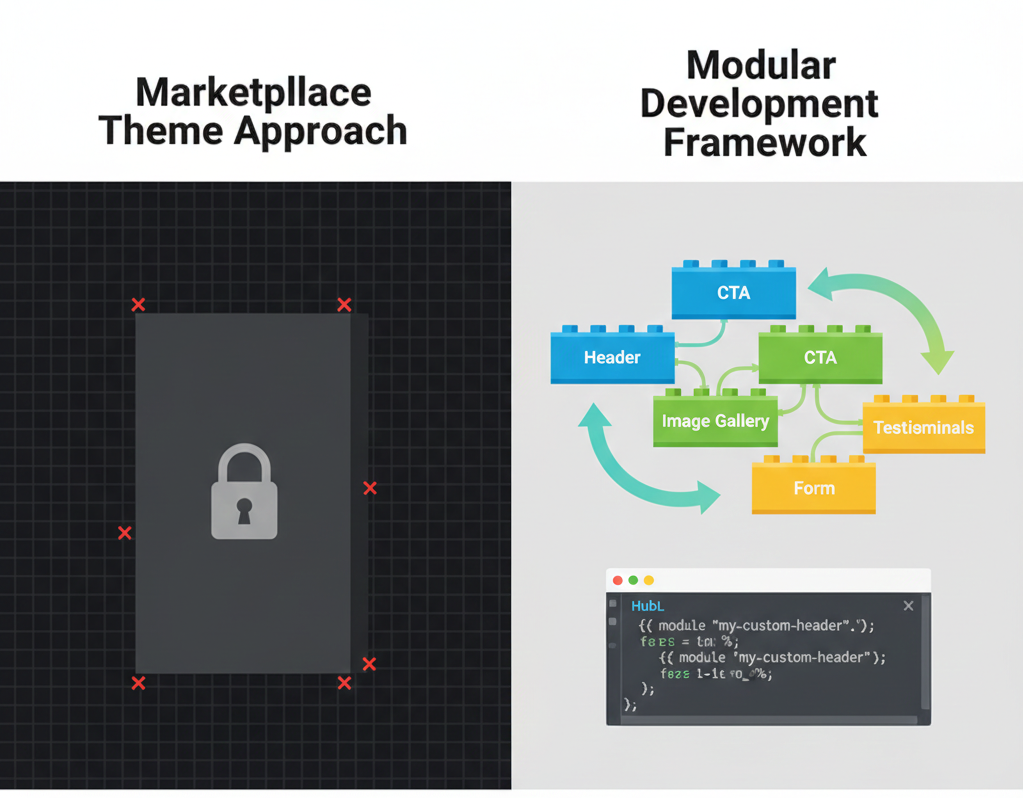
Most companies start with a marketplace theme. It looks professional, it’s “quick to deploy,” and agencies can have sites live in weeks. Fast forward six months: a custom landing page template is needed for a product launch, but the theme’s module structure won’t support it. A/B testing a new hero layout requires hacking theme CSS that breaks on mobile. Implementing a design system refresh means rebuilding everything from scratch.
This is theme dependency hell, and it’s expensive. Every customization becomes a negotiation with code that can’t be controlled. Every update risks breaking modifications. Marketing velocity slows to a crawl because even simple changes require developer intervention. For those evaluating platforms, understanding key differences between HubSpot and WordPress can help make the right choice for scalable CMS development.
Building a Custom Design System in HubSpot
The alternative is modular development—treating HubSpot CMS as a true content management platform, not a website theme marketplace. According to HubSpot’s own developer documentation, this approach aligns with modern web development best practices.
Core Principles:
1. Module-First Architecture Instead of templates with embedded code, a library of reusable modules is built. Each module is self-contained with its own HubL logic, CSS (scoped with BEM methodology), and JavaScript. A “Feature Comparison” module can be deployed on product pages, landing pages, or blog posts with zero code duplication. Professional HubSpot landing page development leverages this modular approach for maximum flexibility.
2. Design Token System A systematic approach to design tokens (colors, typography, spacing, breakpoints) is implemented using HubSpot’s theme fields. This creates a single source of truth. When the brand updates its primary color, one variable changes and the update cascades across 200 pages instantly.
3. Template Inheritance and Partials HubL’s {% extends %} and {% include %} functionality creates template hierarchies. The base template handles global structure (header, footer, metadata). Page-type templates (landing page, blog post, resource center) inherit from the base and add specific layouts. This DRY (Don’t Repeat Yourself) approach reduces maintenance dramatically.
4. Drag-and-Drop Flexibility with Guardrails Drag-and-drop areas give marketers freedom without chaos. Group modules bundle related components. Default modules and repeating sections maintain design consistency while enabling content variation.
The Long-Term Economic Advantage
Custom modular development has higher upfront investment—typically 60-90 days of development versus 14-21 days for theme implementation. But the economics flip dramatically over 24-36 months:
- Reduced ongoing development costs: Marketers can build new page variations without developer involvement
- Faster time-to-market: Campaign landing pages go from 2-week developer queue to same-day launch
- No migration debt: The next rebrand is a configuration update, not a rebuild
- Performance optimization: Custom code is lean; only what’s needed ships, not a bloated theme’s baggage
Companies have calculated 300-400% ROI on custom CMS development within 18 months, primarily from increased marketing velocity and reduced agency dependency. This is why many businesses choose to hire HubSpot developers who specialize in scalable, modular architectures.
Advanced Integrations & Middleware—The API Layer that Scales
Why Zapier Isn’t Enough Anymore
Zapier and similar iPaaS tools are excellent for simple, linear integrations. But they become liabilities when businesses need:
- Complex transformation logic (merging data from three sources before creating a record)
- Bidirectional sync with conflict resolution rules
- Real-time data requirements (sub-second latency)
- High-volume operations (10,000+ API calls per day)
- Custom error handling and retry logic specific to business rules
At scale, these limitations create data integrity issues, sync delays, and compliance risks. Programmatic control becomes essential. Whether integrating HubSpot with Webflow or connecting Wix to HubSpot, understanding the right integration architecture is crucial.
The Private Apps + Serverless Functions Pattern
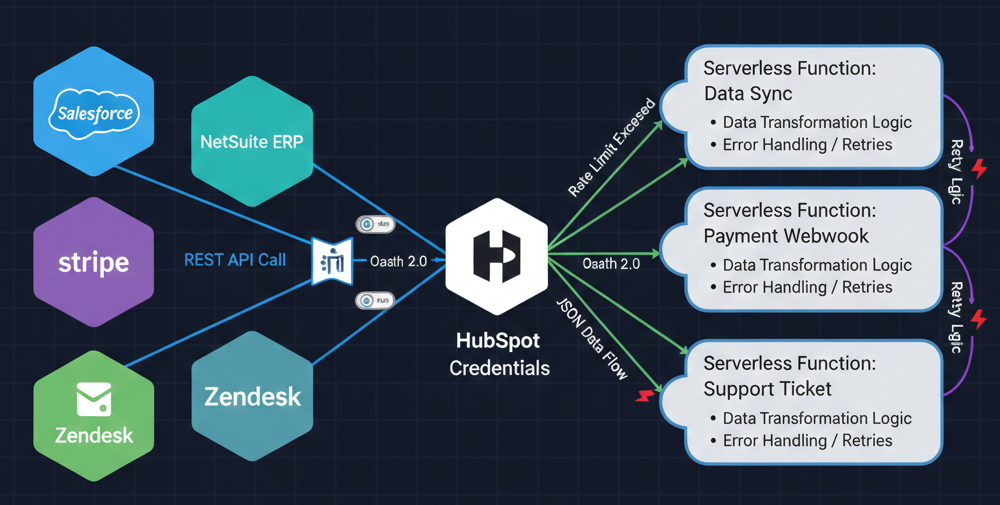
HubSpot’s Private Apps provide OAuth-free API access with granular permission scopes. Combined with serverless functions (AWS Lambda, Google Cloud Functions, or HubSpot’s own CMS Serverless Functions), a robust middleware layer emerges.
Architecture Pattern:
1. Private App for Authentication A Private App with precisely scoped permissions (read/write specific objects, not admin access) is created. This generates API keys with role-based access control, meeting security compliance requirements.
2. Serverless Functions as Middleware Lightweight functions are deployed to handle:
- Data transformation: Converting NetSuite’s financial data structure into HubSpot custom object properties
- Validation logic: Ensuring data meets business rules before creating records
- Rate limit management: Batching requests and implementing exponential backoff
- Webhook receivers: Accepting real-time events from external systems
3. Event-Driven Sync Patterns Instead of polling-based sync (resource-intensive and slow), event-driven architecture is implemented. When a deal closes in HubSpot, a webhook fires to the serverless function, which creates a customer record in the billing system and provisions the product instance—all within 2-3 seconds.
Real-World Implementation: ERP Integration
A manufacturing client needed to sync inventory levels from NetSuite ERP to HubSpot custom objects, updating available stock for 4,000+ SKUs every hour.
The solution:
- NetSuite SuiteScript: Triggered hourly, compiles inventory deltas (only changed SKUs)
- AWS Lambda Function: Receives NetSuite webhook, transforms data schema, batches updates into groups of 100
- HubSpot Private App: Creates/updates “Product Inventory” custom object records via batch API endpoint
- Error Handling: Failed records logged to DynamoDB, automatic retry after 15 minutes, Slack alert for persistent failures
Result: Real-time inventory visibility in HubSpot enabled sales to quote accurate availability. Revenue impact: $2.1M in prevented stockouts (customers who would have gone to competitors) in the first year. Development cost: $28,000. ROI: 7,400%.
Middleware Considerations for Enterprise
Security: All API keys stored in secrets managers (AWS Secrets Manager, HashiCorp Vault), never in code. Functions run in VPCs with restricted network access.
Observability: Comprehensive logging (CloudWatch, Datadog) is implemented with custom metrics for sync success rates, latency percentiles, and error patterns.
Scalability: Serverless auto-scales, but design must account for HubSpot’s API rate limits (100 requests/10 seconds for most endpoints). Queueing strategies for burst scenarios are essential.
Performance & SEO Optimization—Technical Excellence in HubSpot
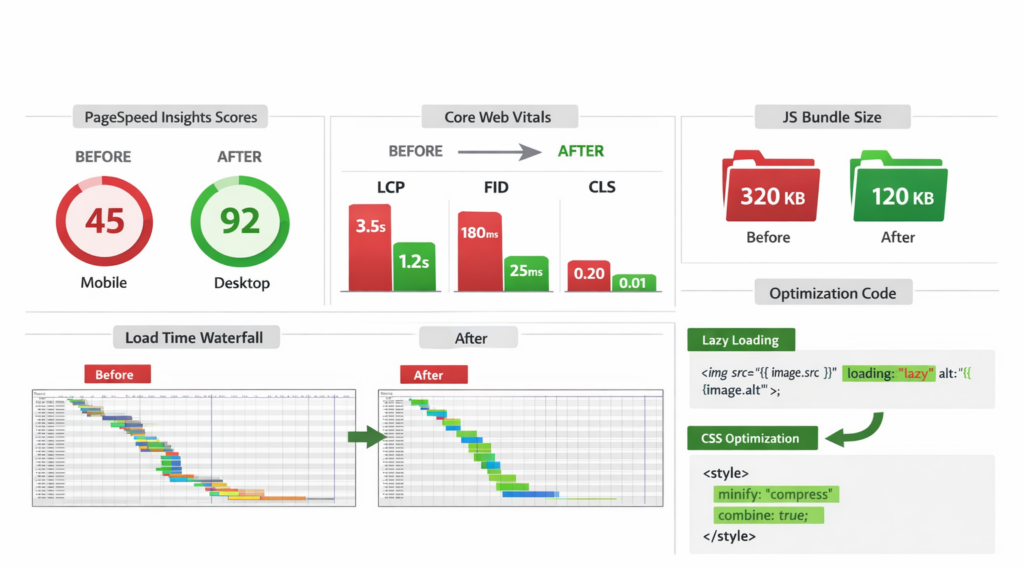
The Performance Tax of Poor Development
HubSpot CMS is fast out-of-the-box—CDN delivery, automatic image optimization, built-in caching. But poor development practices destroy these advantages. Sites have been audited with 4-second load times on 4G, 92 JavaScript files loading on every page, and 3.2MB of unoptimized images above the fold.
Performance isn’t vanity—it’s revenue. Every 100ms of delay costs 1% of conversions. For a company generating $50M ARR through their website, that’s $500K annually. Google’s Core Web Vitals have made performance a ranking factor, making optimization essential for SEO success.
HubL Optimization Techniques
1. Conditional Loading with HubL Logic Not every module’s JavaScript should load on every page. HubL conditionally includes scripts:
{% if content.widgets['my_module'].body.enable_advanced_features %}
  {% require_js %}
    <script src="advanced-module.js"></script>
  {% end_require_js %}
{% endif %}
2. Lazy Loading for Below-the-Fold Content Intersection observer patterns are implemented for modules appearing lower on the page. HubL adds data attributes for JavaScript initialization:
<div class="lazy-module" data-module-id="{{ module.id }}" data-load-when-visible="true">3. Critical CSS Extraction Above-the-fold CSS is identified and inlined in the <head>. Non-critical stylesheets are deferred:
<link rel="preload" href="main.css" as="style" onload="this.onload=null;this.rel='stylesheet'">Minimizing JavaScript Bloat
Module-Scoped JavaScript: Global JavaScript libraries shouldn’t load for modules used on 3% of pages. HubSpot’s module JavaScript fields scope dependencies appropriately.
Async/Defer Strategies: Every <script> tag is audited. Default to defer for parsing performance. Use async only for truly independent scripts (analytics).
Bundle Analysis: Regular review of what ships to browsers is essential. Clients have been found loading jQuery (87KB) just for a single form validation function—replaced with 4KB of vanilla JavaScript.
Technical SEO Wins
Structured Data Implementation: HubL dynamically generates JSON-LD structured data based on page content. For product pages, product custom object data pulls directly into Product schema.
Dynamic Meta Tag Optimization: Default templates aren’t sufficient. HubL programmatically generates meta descriptions from content summaries, ensuring uniqueness at scale.
Mobile-First Rendering: Every module is tested on mobile first. HubSpot’s responsive breakpoint system is used consistently. Touch-optimized interactions are implemented.
Performance Monitoring: HubSpot’s built-in performance tracking plus third-party monitoring (Calibre, SpeedCurve) is set up. Alerts trigger on regression. Core Web Vitals become part of the deployment checklist.
Conclusion: The Strategic ROI of Professional HubSpot Development
Companies winning with HubSpot aren’t using it as a marketing automation tool—they’re wielding it as a revenue operating system. The strategic decision to invest in underlying architecture makes go-to-market motions scalable, data trustworthy, and marketing teams autonomous.
The economics in perspective:
- Custom CRM Architecture: Typical investment of $25K-$60K, returning 3-5x in operational efficiency and revenue intelligence within 18 months
- Modular CMS Framework: Upfront cost of $40K-$80K, eliminating $100K+ in annual theme maintenance and agency dependency
- Advanced Integrations: $30K-$100K depending on complexity, often preventing $500K+ in revenue leakage from data sync failures
- Performance Optimization: $15K-$30K investment, directly impacting conversion rates worth 5-8% revenue lift
The total investment ranges from $110K to $270K for a comprehensive professional development approach. For a mid-market company doing $30M in revenue with 40% coming through digital channels, this represents a payback period of 6-14 months.
The Cost of Inaction
Consider the alternative: continuing with workarounds, manual processes, and systems held together with duct tape and prayers. Top marketing talent spends 30% of time on admin work. Sales teams miss opportunities because data isn’t synced. Customers churn because their experience is fragmented. Technical debt compounds until the only option is a painful migration.
This isn’t a development project—it’s a strategic infrastructure investment. For those still deciding between platforms, explore Webflow vs HubSpot to understand which foundation best supports growth trajectory.
Next Steps: Partner with HubSpot Development Experts
Working with an experienced HubSpot development company ensures the right architecture is built from the start. A2Z Dev Center specializes in custom CRM architecture, advanced integrations, and scalable CMS development that eliminates technical debt.
Ready to transform HubSpot from a marketing tool into a competitive advantage?
Explore HubSpot Development Services | Hire a HubSpot Developer

Ready to Get Started?
Your Details will be Kept confidential. Required fields are marked *


