

Top 10
Summarize this blog post with:
Quick Answer: What Is a Mobile UX Audit?
A mobile UX audit is a structured review of how real users experience your website or ecommerce store on a mobile device, using both quantitative data (Analytics, Core Web Vitals) and qualitative behavioral data (session replays, heatmaps, rage tap detection) to identify friction that standard analytics cannot surface. The audit produces a prioritised fix list tied directly to conversion impact, not subjective design preference.
What This Guide Covers
- GA4 and standard analytics show you what happened: exit page, bounce rate, session duration. They do not show you why. They cannot tell you that 340 users per day rage-tapped your Add to Cart button three times before leaving because the button looked tappable but had a JavaScript event listener that failed to fire on mobile. That is the blind spot this guide addresses.
- Mobile drives most ecommerce traffic but converts at a lower rate than desktop, according to benchmark providers such as Littledata. That gap is not a device preference problem. It is a specific set of mobile UX failures that are invisible in standard analytics.
- This guide names five mobile friction types (rage tap, dead tap, UI freeze, thumb zone failure, keyboard type mismatch) that no competing article on this topic has named. Each one is causing conversions to leave silently, without a single piece of evidence appearing in your GA4 dashboard.
- A2Z Dev Center’s ecommerce development services include mobile UX audits that use session replay data, Core Web Vitals, and behavioral analytics to identify exactly which invisible friction points are costing your store revenue. This guide uses the same diagnostic framework.
Your GA4 report shows a 72% bounce rate on your product detail page. Your traffic quality is fine. Your pricing is competitive. Your product photos are professional. And yet 7 in 10 mobile visitors leave without taking any action. The analytics show you the exit. They do not show you what happened in the 8 seconds before it.
What happened is this: the visitor tapped your Add to Cart button. Nothing happened. They tapped it again. Nothing. They tapped it a third time, in a slightly different location, wondering if they missed. Then they left. Your analytics recorded a bounce. What your analytics did not record is the three rage taps, the 8-second confusion, and the lost sale that a single session replay would have revealed in under 30 seconds. Understanding why ecommerce stores don’t convert on mobile begins with accepting that your current analytics tool is showing you a fraction of what is actually happening.
What Analytics Shows vs What Actually Happens on Mobile
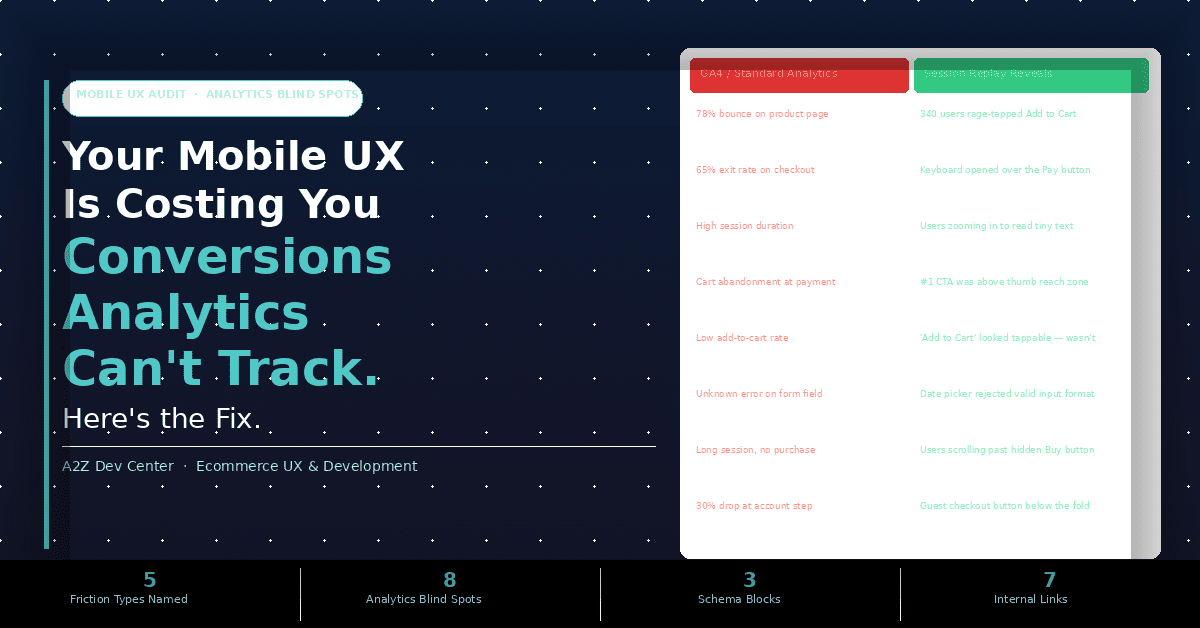
The gap between what standard analytics reports and what session replay reveals is the core problem behind almost every underperforming mobile experience. Here is the comparison that no competing mobile UX guide has built.
| What GA4 Reports | What Session Replay Actually Shows |
|---|---|
| 78% bounce on product page | 340 users/day rage-tapped Add to Cart before leaving |
| 65% exit rate at checkout payment step | Soft keyboard opened over the Pay button, hiding it |
| High average session duration on category page | Users pinch-zooming repeatedly to read 11px product titles |
| Cart abandonment at payment step | Primary Buy button sits above thumb reach zone on iPhone 14+ |
| Low add-to-cart rate on product pages | Add to Cart button appears interactive but has no tap response |
| Form field errors on checkout | Date picker rejected valid date format for international numbers |
| Long session, no purchase on homepage | Hero CTA is below the fold on 375px screens, never visible |
| 30% drop at account creation step | Guest checkout button is below the fold; users never see it |
Every row in that table represents a conversion that left silently. Analytics registered the exit. The exit had a specific, fixable cause. The cause was invisible until someone watched a session replay.
The scale of the invisible problem: Mouseflow’s 2026 behavior analytics research found that friction detection, the automatic surfacing of rage taps, dead clicks, and form abandonment from session data, reduces the time to identify high-impact UX problems from weeks of manual analysis to hours of automated flagging. Without friction detection, most teams are making UX decisions based on bounce rate and exit page data alone, which tells them what page the user left from but nothing about why.
The Mobile UX Friction Taxonomy: Naming What Is Costing You
Every competitor article on mobile UX uses the term “rage click,” which is a desktop concept. Mobile has its own friction vocabulary. These five patterns are the specific mobile UX failures that session replay data surfaces consistently across ecommerce stores, and none of them appear in a standard analytics report.
Rage Tap
High Impact
A rage tap is defined by UXCam’s mobile UX research as three or more taps within a small radius in under 300 milliseconds. It is the mobile equivalent of a rage click, and it indicates an element that looks interactive (button, product image, navigation item) but fails to respond to touch. The most common causes are JavaScript event listeners that fail on mobile touch events, touch target areas that are offset from the visual element they represent, or buttons that are obscured by an invisible z-index layer. GA4 records the session. GA4 does not record the three taps, the pause, and the departure.
Dead Tap
Medium-High Impact
A dead tap occurs when a user taps an element expecting interaction, and nothing happens because the element is not interactive but looks like it should be. Common examples are product images that look zoomable but do not open a gallery, text that is underlined or colored like a link but is not a link, and category headings styled as buttons that are actually static labels. Research on website first impressions shows that visual design strongly shapes them. When an element communicates affordance (looks like something you can do something with) but delivers nothing, users lose confidence in the entire interface.
UI Freeze
High Impact On Checkout
A UI freeze occurs when an element appears fully loaded and responsive but does not respond to touch for a measurable delay. This is distinct from page load delay. The page is visible. The button is visible. The user taps it. Nothing happens for 1 to 3 seconds because a JavaScript thread is blocked by a third-party script loading in the background. On desktop, a 1-second UI freeze is barely perceptible. On mobile, a noticeable delay between tap and response feels broken, and Google’s research shows that visitors leave pages that take more than a few seconds to load. UI freezes are most common on checkout pages that load payment processor scripts, product pages that load review widgets, and any page with more than 3 third-party JavaScript tags firing on load.
Thumb Zone Failure
High Impact, Often Invisible
UXCam’s mobile UX research and Google’s material design guidelines both establish that one-handed phone use is the majority use case for mobile interaction. The natural thumb reach on a standard phone covers approximately the bottom two-thirds of the screen. Elements in the top third require a grip shift or second-hand use, which interrupts the interaction flow and reduces tap precision. A primary Add to Cart button placed at the top of a product page on desktop, and remaining at the top in the mobile layout, sits outside the comfortable thumb zone for most users. This does not produce an error message. It does not produce a rage tap. It produces a moment of mild effort that reduces the probability of action, compounding across thousands of sessions. Your analytics shows low add-to-cart rate. The cause is invisible.
Keyboard Type Mismatch
Checkout Killer
Every mobile form field can and should specify what keyboard type opens when a user taps it. A phone number field without type="tel" opens a full QWERTY keyboard, requiring the user to manually switch to a numeric keyboard. A credit card field without inputmode="numeric" does the same. A date field without the correct input type opens a text keyboard instead of a date picker. Each keyboard switch takes 2 to 4 seconds and adds one cognitive interruption to the checkout flow. Baymard Institute’s 2025-26 checkout research found that mobile checkout abandonment is Higher, compared to Lower on desktop. The keyboard type mismatch is one of the most common, most fixable contributors to that gap, taking under 20 minutes to fix across an entire checkout form.
Why Mobile Conversion Lags Desktop
The mobile conversion gap is not a mystery. Published benchmarks differ by source, period and industry, so use these points as a direction and check your own analytics for exact figures.
Mobile Checkout Abandonment
Higher
Mobile shoppers abandon more often
Mobile drives most ecommerce traffic
Mobile converts at a lower rate
Desktop Checkout Abandonment
Lower
Desktop shoppers abandon less often
Desktop drives less traffic
Desktop converts at a higher rate
Mobile sends most traffic and converts at a lower rate than desktop. Baymard Institute’s mobile UX research finds that many mobile ecommerce sites still score poorly on mobile usability, which makes it a common problem rather than a rare one. Most mobile stores are underperforming against their own traffic potential, and most of the causes are invisible in standard analytics.
The conversion gap is not primarily a design problem. Rubyroid Labs’ case study on PathEdits, a professional photo editing studio, found 150 specific UX issues in a single audit. Reducing the checkout from 7 steps to 3 increased the conversion rate by 40%. Contentsquare and digital UX agency Turum-burum identified a filter UX problem at Intertop (a shoe retailer) through session replays, resulting in a 55% conversion rate increase. Both discoveries began with session replay data that standard analytics had missed entirely. Our checkout flow UX audit guide maps the five specific steps where checkout friction concentrates for most ecommerce stores.
The ROI case: UX work is widely reported to return several times its cost, because fixing known behavioral problems is cheaper than guessing at hypothetical ones, and it avoids wasted development time. Your own numbers will vary, so measure conversion before and after each fix. The mobile UX audit is not a design expense. It is a revenue recovery process.
The Thumb Zone Audit: The Mobile UX Check Nobody Runs
The thumb zone is the area of a mobile screen your user can comfortably reach with their thumb in one-handed use. Research from UXCam, Google’s Material Design guidelines, and Apple’s Human Interface Guidelines consistently identify the bottom two-thirds of the screen as the natural comfortable reach zone, with the top corners being the hardest to reach without a grip shift.
Top 20%, Hard to reach
20-40%, Stretch zone
40-60%, Comfortable
60-80%, PRIMARY CTAs HERE
80-100%, SECONDARY CTAs
What this means for your ecommerce store:
- Add to Cart button: should be in the bottom 60-80% of the product page viewport on mobile
- Checkout CTA: must be visible in thumb zone without scrolling
- Search icon: can sit in top right (infrequent action, acceptable reach effort)
- Primary navigation: hamburger in top left is acceptable for infrequent use
- Sticky Add to Cart bar: most effective placement is bottom of screen (always in thumb zone)
To run the thumb zone audit on your own store: open your product page on a real phone (not a browser dev tools simulation), hold the phone as you normally would in one hand, and attempt to tap your primary Add to Cart button using only your thumb without adjusting your grip. If you need to adjust your grip, the button is outside the natural thumb zone for one-handed use, which is the majority of your mobile traffic. Repeat this on your cart page and checkout page. Most stores discover that at least one critical action requires a grip adjustment. Our ecommerce SEO guide covers how mobile usability signals interact with Core Web Vitals rankings, because thumb zone failures that increase bounce rate also indirectly affect your organic visibility.
The Mobile UX Tool Stack Beyond “Use Hotjar”
Every competing article on mobile UX audits says “use Hotjar.” Hotjar is a desktop-first analytics tool that added mobile scroll and click maps. It is useful but not purpose-built for mobile behavioral analytics. Here are the tools that give you mobile-specific data that Hotjar does not.
Mobile-First Behavioral Analytics
UXCam
Purpose-built for mobile UX analysis. Automatically captures rage taps, dead taps, and UI freezes without manual event tagging. Session replays show gesture-level interactions (swipes, pinches, tap patterns) with device-specific filtering. The most important tool for diagnosing the five friction types described in this guide. Free plan covers up to 3,000 sessions/month.
Rage Tap and Friction Detection
Contentsquare
Enterprise-level behavioral analytics with dedicated rage tap detection, dead zone identification, and frustration scoring. Used by Intertop to discover the filter UX issue that produced a 55% conversion rate increase. Particularly strong on ecommerce product and category page analysis where rage taps concentrate most heavily.
Form Analytics + Friction Detection
Mouseflow
Strong form analytics specifically: shows which fields users abandon, time spent per field, and error patterns on mobile checkout forms. Friction detection surfaces rage taps, dead clicks, and JavaScript errors in real time without requiring manual session review. Most effective for diagnosing keyboard type mismatch and checkout form failures.
Performance + Core Web Vitals
Google PageSpeed Insights
Free. Run your product page, cart page, and checkout URL through PageSpeed Insights and review the mobile score specifically. LCP above 2.5 seconds on mobile means UI freezes are probable because JavaScript is loading after paint. INP (Interaction to Next Paint) above 200ms indicates tap response delays that match the UI freeze pattern on checkout and product pages. Our page speed and Core Web Vitals guide covers the specific fixes that bring mobile performance scores above 60.
For Shopify development specifically, the Shopify Analytics built-in funnel reporting shows checkout step drop-off but not the behavioral cause. Pairing Shopify’s funnel data with UXCam session replays on the highest drop-off step is the fastest path to identifying whether the issue is a rage tap on a payment button, a keyboard mismatch on a card number field, or a thumb zone failure on the checkout CTA.
Your 5-Step Mobile UX Audit: Run This on a Real Phone Today
Each step takes under 10 minutes and requires only a real mobile device and your store URL. Do not use browser dev tools device simulation. It does not replicate real touch event behavior, real keyboard types, or real thumb reach.
1
The Tap Response Test (5 minutes)
On your product page, tap Add to Cart. Count the milliseconds before any visual feedback appears (button color change, spinner, state change). If there is no visual feedback within 300 milliseconds, your button has a tap response problem that is likely producing rage taps. Tap the button again immediately. If the response is inconsistent, it is a mobile event listener issue. Test this on both iOS Safari and Android Chrome, because event listener behavior differs between browsers. Record which device and browser produced inconsistent response.
2
The Thumb Zone Check (3 minutes)
Hold your phone normally in one hand, thumb in natural position. Without adjusting your grip, attempt to reach your primary CTA (Add to Cart, Checkout, Subscribe) on your product page, cart page, and checkout page. If any of these require a grip adjustment, they are outside the comfortable thumb zone. Note which pages and which CTAs fail this test. The fix is a sticky bottom CTA bar that keeps the primary action in the bottom 20% of the screen regardless of scroll position. Apple’s Human Interface Guidelines specify 44 points as the minimum tap target size; Google’s Material Design specifies 48 density-independent pixels.
3
The Keyboard Type Audit (5 minutes)
Open your checkout form on a real mobile device. Tap each field and note what keyboard type appears. Phone number: should open numeric pad (type="tel"). Email: should open keyboard with @. Credit card number: should open numeric pad (inputmode="numeric"). Expiry date: should open numeric pad. CVV: should open numeric pad. If any of these open a full QWERTY keyboard, that field is missing its input type or inputmode attribute. This is a developer fix that takes under 20 minutes per form and immediately reduces keyboard friction for every mobile checkout user. Export the list of fields with incorrect keyboard types as the first item in your developer brief.
5
The PageSpeed Insights Mobile Score (8 minutes)
Go to pagespeed.web.dev and run your product page URL and your checkout URL through the mobile test. Look at three metrics specifically: LCP (Largest Contentful Paint) should be under 2.5 seconds for the Google “Good” threshold; INP (Interaction to Next Paint) should be under 200 milliseconds (this directly measures tap response speed); Total Blocking Time indicates whether JavaScript is blocking touch events after the page appears loaded. Any LCP above 4 seconds or INP above 500 milliseconds indicates UI freeze risk. Export the “Opportunities” section of the report as your performance fix list. Combine this with the session replay data from UXCam or Mouseflow to confirm which specific elements are causing tap delay on real user devices.
Frequently Asked Questions
Your Mobile Traffic Is Already There. Let’s Make It Convert.
Most ecommerce stores have enough mobile traffic to generate significantly more revenue. The gap is not more traffic. It is removing the invisible friction that session replay reveals and standard analytics misses. A2Z Dev Center runs mobile UX audits that identify rage taps, thumb zone failures, keyboard mismatches, and UI freezes on your specific store, then builds the fixes.
Book a Free Mobile UX Audit
Schedule a call
Talk to a subject-matter expert
Web development, SEO, or digital marketing — tell us about your project and we'll get back within one business day. No obligation.
- Free scope & strategy session
- A senior specialist, not a sales rep
- Your details stay confidential