

Top 10
Summarize this blog post with:
The honest guide for marketing teams who are tired of filing a ticket to change an H1 — and tired of watching Core Web Vitals slide every time someone installs another plugin.
If you Googled “Webflow vs WordPress SEO,” you probably already know how to install Yoast. You’re not looking for a plugin tutorial. You’re a marketer who is tired of filing a ticket to change an H1. Tired of a WordPress update breaking your homepage three days before a product launch. Tired of watching your Core Web Vitals score slide every time someone installs another plugin.
“
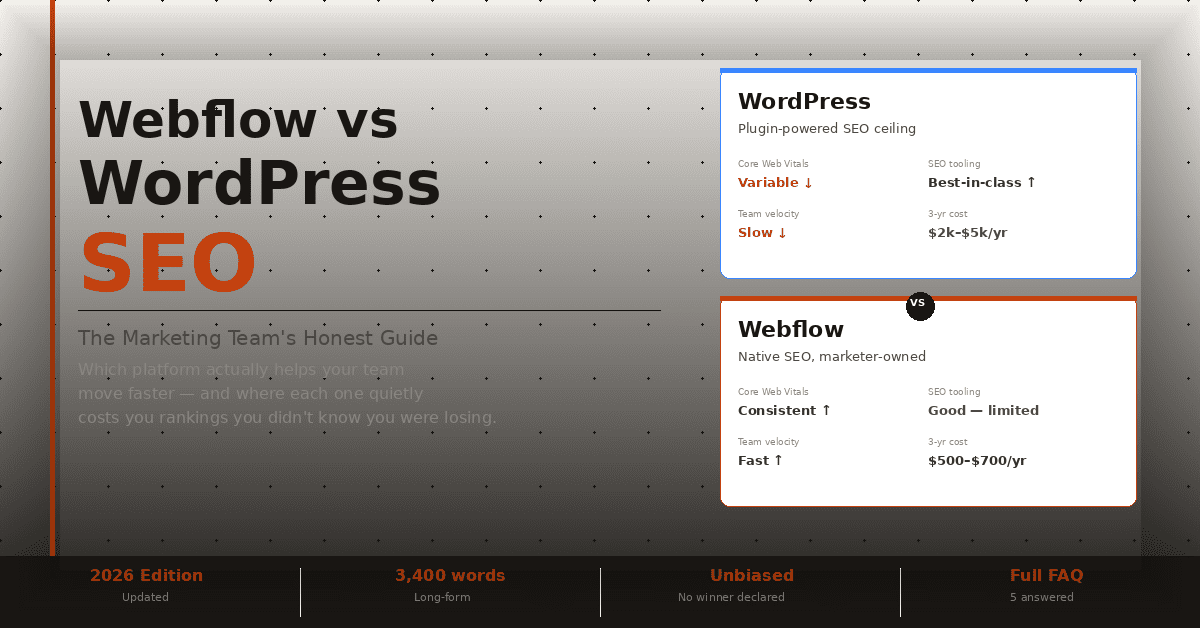
This guide doesn’t declare a winner. It tells you exactly which platform helps your marketing team move faster — and where each one quietly costs you rankings you didn’t know you were losing.
THE HONEST MARKETING TEAM’S GUIDE
WordPress vs Webflow SEO: The Short Answer
| Factor | WordPress | Webflow | Edge |
|---|---|---|---|
| Technical SEO baseline | Strong — via plugins | Strong — native, no plugins | Tie |
| Core Web Vitals | Variable — degrades with plugins | Consistently clean out of the box | Webflow |
| SEO tools | Best-in-class (Yoast, Rank Math) | Good native tools, less granular | WordPress |
| Schema / structured data | Full control | Limited without custom code | WordPress |
| Marketing team speed | Slow — developer dependent | Fast — marketers own the CMS | Webflow |
| Content at scale | Unlimited | Caps at 10,000 CMS items | WordPress |
| Security | High risk — 90%+ attacks via plugins | Low risk — SaaS, no plugin surface | Webflow |
| 3-year cost (marketing site) | $3,000–$5,000/yr | $500–$600/yr | Webflow |
| Best for | Large blogs, ecommerce, complex apps | Marketing sites, landing pages, brand.com | — |
Bottom line: For pure SEO capability, WordPress has a higher ceiling. For marketing team velocity — the thing that actually determines whether SEO gets done — Webflow wins.
Technical SEO Out of the Box
Technical SEO is the floor. Both platforms clear it. The question is how much effort it takes to get there.
WordPress Technical SEO
WordPress gives you full control over every technical SEO element — but almost none of it works properly without a plugin. Out of the box, WordPress generates:
- Duplicate content on category and tag archive pages
- No automatic XML sitemap
- No structured robots.txt management UI
- Inconsistent canonical tags across themes
Install Yoast SEO or Rank Math and most of that disappears. But now you’re paying $96–$99/year per site, managing plugin updates, and accepting that your SEO infrastructure is one version conflict away from an outage.
What WordPress does better: Redirects at scale, custom robots.txt rules, full .htaccess control, deep schema customization, and integration with every major analytics and search console tool.
Webflow Technical SEO
Webflow bakes the baseline in:
- Auto-generated XML sitemap
- Editable robots.txt
- 301 redirect manager built into the dashboard
- Clean semantic HTML — no plugin-generated div soup
- Automatic canonical tags
- Open Graph and meta tag control on every page
No plugins. No updates. No version conflicts. What Webflow does less well: Advanced schema markup requires custom code embeds. .htaccess is inaccessible (managed SaaS). Bulk redirect imports are clunky on lower-tier plans.
Verdict: Tie — WordPress has more depth, Webflow has more reliability. For a marketing team without a dedicated developer, Webflow’s out-of-the-box setup is the practical winner.
Core Web Vitals: Where the Real SEO Gap Lives
Core Web Vitals — Google’s page experience signals measuring load speed, interactivity, and visual stability — are where WordPress and Webflow diverge most sharply. Not at setup. Over time.
The Plugin Bloat → SEO Debt Spiral
Here’s what no competitor article tells you: WordPress’s Core Web Vitals problem is a lifecycle problem, not a setup problem.
A freshly installed WordPress site with a lightweight theme can score 90+ on Lighthouse. Eighteen months later, after your team added a form plugin, a chatbot widget, a cookie consent banner, a heatmap script, a countdown timer for a campaign, and three SEO add-ons — that same site is loading in 6 seconds on mobile and your LCP is failing.
WordPress LCP Score Over Time
Typical Marketing Site
Month 1 — Fresh install
LCP 1.8s ✓
Month 6 — 8 plugins added
LCP 2.9s ⚠
Month 18 — Campaign tools, chatbot, heatmap
LCP 5.8s ✕
Webflow doesn’t have this problem because Webflow doesn’t have plugins. What you ship is what you shipped.
Real Performance Data
7%
Conversion reduction per 1-second delay in page load
53%
Users who abandon a site taking more than 3 seconds to load
LCP under 2.5 seconds is the Google “good” threshold — Webflow sites hit this consistently on clean builds; WordPress sites frequently drift above it as they mature. WordPress’s mobile Core Web Vitals pass rate improved ~4 percentage points year-over-year in 2024–2025 — a sign of active optimization effort, but also a sign that a significant portion of WordPress sites are still failing.
What Webflow does differently: Webflow generates lean, semantic HTML with no unnecessary wrapper divs, no plugin-injected scripts, and hosting on a global CDN by default. There’s no WordPress equivalent of “just host it on Webflow’s CDN” — you have to configure that separately, paying for managed WordPress hosting ($25–$50/month from Kinsta or WP Engine) to get comparable infrastructure.
▶ VERDICT: WEBFLOW WINS — NOT BECAUSE IT’S FASTER BY DESIGN, BUT BECAUSE IT DOESN’T ACCUMULATE SPEED DEBT OVER TIME.
SEO Tools: Yoast and Rank Math vs Webflow’s Native Controls
WordPress: Best-in-Class SEO Tooling
Yoast SEO and Rank Math are the best SEO management interfaces on the web. Full stop. What they give you:
- Real-time on-page SEO analysis with readability scoring
- Automated schema markup (Article, FAQ, Breadcrumb, Product)
- XML sitemap with granular include/exclude controls
- Redirect manager with 301/302/410 support
- Internal linking suggestions
- Content gap analysis integrations
Rank Math PRO runs ~$96/year. Yoast Premium is $99/year per site. For serious SEO work, this investment is worth it.
Webflow: Good Native Tools, Real Limits
Webflow’s built-in SEO panel lets you edit title tags, meta descriptions, canonical URLs, indexing controls, 301 redirects, Open Graph tags, and sitemap settings. What Webflow cannot do natively:
- Schema markup beyond basic page-level types (requires custom code embed)
- Automated SEO content analysis
- Internal linking suggestions
- Bulk meta tag editing across hundreds of pages
▶ VERDICT: WORDPRESS WINS — BUT ONLY MATTERS AT CONTENT SCALE. FOR MARKETING SITES UNDER 100 PAGES, WEBFLOW’S NATIVE TOOLS COVER 90% OF WHAT YOU NEED.
The Hidden Cost: How WordPress Slows Marketing Teams Down
This is the section nobody writes. Not because it’s controversial — because most SEO content is written by developers, not marketers.
On WordPress, the following tasks typically require a developer or advanced user: changing page template structure, adding a landing page with custom sections, A/B testing headline variants, setting up campaign pages with custom URLs, fixing layouts after theme updates, implementing structured data for new content types.
On Webflow, a trained marketer can do all of these without touching code.
The cost isn’t just money — it’s calendar time. Every developer ticket adds 2–5 business days to your marketing cycle. A campaign that should launch Monday ships Thursday. The SEO page you need for an upcoming event misses the indexing window.
| TASK | WORDPRESS (NO DEV) | WORDPRESS (WITH DEV) | WEBFLOW |
|---|---|---|---|
| New landing page, custom layout |
✗ Needs dev | 3–5 days | 2–4 hours |
| Edit hero H1 + meta title | 5 min (if you find it) | — | 2 min |
| Add FAQ schema to a page |
✗ Yoast config | — | Custom code (30 min) |
| Set up 301 redirect | 5 min (with plugin) | — | 3 min (built-in) |
| Duplicate and modify campaign page |
10 min | — | 5 min |
| Fix broken layout after update |
✗ Needs dev | 1–3 days | Usually doesn’t happen |
Fivetran’s demand generation team reported a 4x increase in page production after moving off their previous CMS to a Webflow-based workflow. That’s not a Webflow ad — that’s what happens when marketers stop waiting for developers.
▶ VERDICT: THE MOST UNDERREPORTED SEO DISADVANTAGE OF WORDPRESS. SLOW PUBLISHING CYCLES MEAN FEWER PAGES INDEXED, FEWER KEYWORDS TARGETED, AND FEWER CONVERSION OPPORTUNITIES CREATED PER QUARTER.
Security, Downtime, and What It Does to Your Rankings
Google rewards sites that are consistently available, fast, and trustworthy. Security vulnerabilities threaten all three.
WordPress’s Plugin Problem: Over 90% of successful WordPress attacks exploit plugin vulnerabilities. With 59,000+ plugins in the repository — many abandoned, many poorly maintained — the attack surface is enormous. A compromised WordPress site can result in Google blacklisting your domain, malicious redirects injected into your pages, crawl budget wasted on spam pages, and hosting suspension pending malware review.
Webflow’s Advantage: Webflow is a managed SaaS platform. There are no plugins to exploit, no WordPress database to inject, no file system to compromise. Security is Webflow’s responsibility, not yours. The attack surface is fundamentally smaller, and the maintenance responsibility is almost entirely offloaded.
▶ VERDICT: WORDPRESS’S SECURITY OVERHEAD IS A REAL, RECURRING SEO RISK. WEBFLOW REMOVES IT ALMOST ENTIRELY.
Webflow’s Real Limitations for SEO
Most Webflow-vs-WordPress articles are written by Webflow advocates. Here’s what they leave out.
What Happens When Your Blog Scales Past 10,000 Posts
Webflow CMS has a hard cap of 10,000 items per site on its top Business plan. For a marketing site with 20 landing pages and a blog publishing twice a week, you won’t hit this for years. For a publishing operation, news site, or large knowledge base — you’ll hit it. And there’s no workaround other than a platform migration. If content volume is your primary SEO strategy, WordPress is the right choice. Period.
JavaScript Rendering Edge Cases
Webflow’s Interactions and some dynamic CMS features rely on JavaScript. While Googlebot renders JavaScript well in 2026, render delays can still affect time-to-index for content buried in JS-dependent components. This is edge-case territory, but worth knowing if you’re building complex dynamic templates.
Schema Markup Is Manual
Webflow has no Rank Math equivalent. If your SEO strategy depends on FAQ schema, Review schema, HowTo schema, or Product schema at scale, you’re writing JSON-LD by hand or relying on a developer for every implementation. On WordPress, Rank Math automates this across your entire site.
The Webflow + WordPress Hybrid Approach
The real-world solution for marketing teams that need both: Webflow for the marketing site, WordPress for the blog.
- Webflow handles: Homepage, product pages, landing pages, campaign pages — everything that needs marketing velocity and design control
- WordPress handles: The blog/content hub — where content volume, editorial workflow, and plugin-powered SEO tooling matter most
A subdomain (blog.yourdomain.com) or subdirectory (requires additional configuration) keeps both under one domain. This isn’t a compromise — it’s what many mature marketing organizations actually run.
Total Cost of Ownership
The sticker price of WordPress ($0) is the most misleading number in CMS marketing.
| COST ITEM | WORDPRESS | WEBFLOW |
|---|---|---|
| Platform / hosting | $25–$60/mo | $23–$39/mo |
| SEO plugin | $96–$99/yr | Included |
| Security plugin/service | $100–$300/yr | Included |
| Backup plugin | $50–$100/yr | Included |
| Performance plugin/CDN | $100–$200/yr | Included |
| Developer maintenance | $1,200–$3,600/yr | $0 |
| Annual total | $2,000–$5,000 | $500–$700 |
Over three years, the operational cost gap between a professionally maintained WordPress site and a Webflow site is $5,000–$13,000 — not counting the marketing team’s lost hours waiting on developer tickets.
Which CMS Should Your Marketing Team Choose?
Choose WordPress If…
- You’re building a content-heavy site with 500+ posts
- You need advanced schema markup at scale
- You’re running WooCommerce (no Webflow equivalent)
- You have a developer on staff or retainer
- You need deep enterprise marketing tool integrations
- You’re running a news publication or high-volume content operation
Choose Webflow If…
- Your team is primarily marketers, not developers
- Your site is a marketing/brand site under 5,000 pages
- You run frequent campaigns needing new landing pages fast
- WordPress plugin updates have burned you before
- Developer dependency is slowing go-to-market timelines
- You care about consistent Core Web Vitals without active maintenance
FAQ
Related reading: how SEO content writing drives rankings.
Schedule a call
Talk to a subject-matter expert
Web development, SEO, or digital marketing — tell us about your project and we'll get back within one business day. No obligation.
- Free scope & strategy session
- A senior specialist, not a sales rep
- Your details stay confidential