
Web Development
Summarize this blog post with:
⚡ TL;DR: KEY TAKEAWAYS
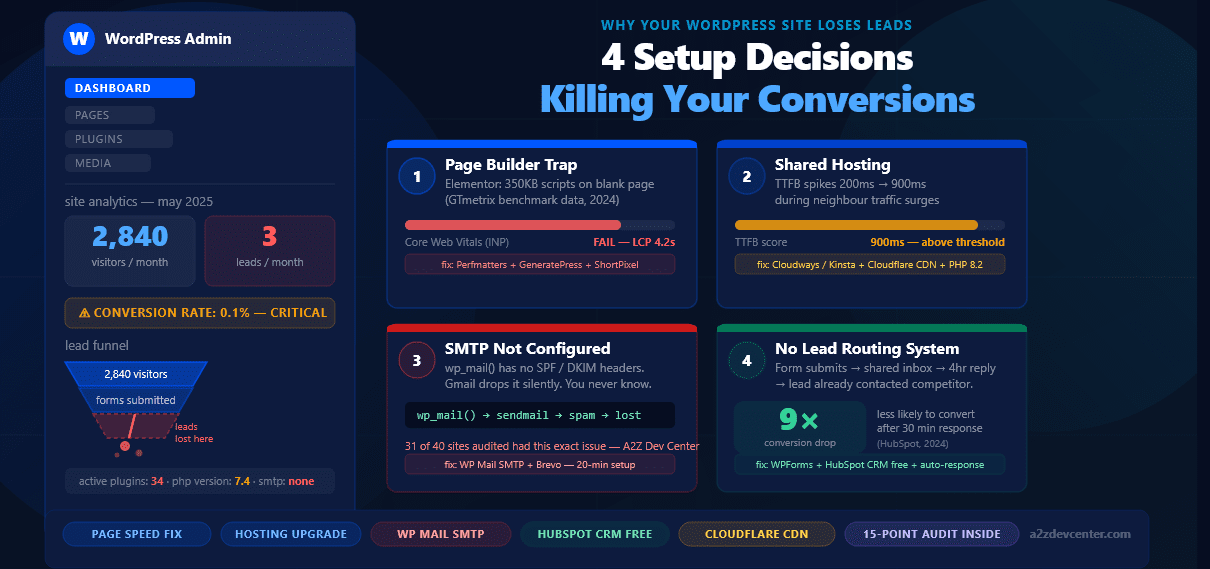
- Most WordPress sites lose leads because of 4 decisions baked in at launch, not because of traffic volume or design problems.
- Your page builder choice directly impacts Google Core Web Vitals scores, a confirmed ranking and UX signal (Google Search Central, 2024).
-
WordPress’s default
wp_mail()function silently drops form submissions. Most business owners never know a lead arrived. - Leads contacted within 5 minutes are 9x more likely to convert than those reached after 30 minutes (HubSpot, 2024). A form routing to Gmail is not a lead system.
- Use the 15-point WordPress conversion audit below before spending money on ads or a redesign.
Your WordPress site is getting traffic. The contact form is visible. The phone number sits in the header. The agency handed it over and it looked great.
The enquiries are not coming.
Most businesses in this position spend money in the wrong direction. They run more paid ads. They hire an SEO agency. They rebuild the homepage. None of it moves the number, because the problem is not where they are looking.
WordPress conversion failure almost always traces back to four specific decisions made at launch. They are made once, rarely revisited, and completely invisible from the admin panel.
WordPress development service is the process of building, configuring, and optimising a WordPress site to function as a lead generation system, not just a digital presence.
This article identifies the four decisions, explains why each one costs you leads, and gives you the exact fix for each. It also includes a 15-point audit you can run in under 20 minutes, before a developer touches anything.
88%
of online consumers are less likely to return to a site after a bad experience. That experience is not always visible, most of it happens in the first 3 seconds.
Nielsen Norman Group, 2023
The Root Problem: Symptoms vs. Decisions
Six competitor articles were reviewed for this piece. All six listed the same problems: slow speed, weak CTAs, no trust signals, poor mobile experience, generic content. Good list. Wrong diagnosis.
Those are symptoms. The root cause is build-level decisions that create those symptoms across every page, permanently, until someone deliberately changes them.
Speed is slow because of the page builder installed in year one. Leads vanish because SMTP was never configured. Forms submit but the data routes nowhere useful. These are not content problems. They are infrastructure problems.
⚠ WHAT NO COMPETITOR ARTICLE COVERS
The specific WordPress-level decision behind each symptom and the exact fix. Every article treats the symptom. This one diagnoses the cause.
1
The Page Builder You Chose Is Blocking Google from Trusting Your Site
When a business owner picks a WordPress theme, the choice of page builder feels cosmetic. It is not.
Elementor, Divi, and WPBakery each inject JavaScript and CSS on every page they render, whether the page uses their features or not. Elementor loads over 350KB of scripts on a blank page before a single piece of content is added (GTmetrix benchmark data, 2024). Divi generates inline CSS that makes the page’s DOM significantly heavier. WPBakery embeds shortcode markup that slows browser parsing, particularly on mobile.
Google’s Core Web Vitals became a confirmed ranking factor in 2021. In March 2024, Google replaced the FID metric with INP (Interaction to Next Paint), which measures how quickly a page responds to a user’s first tap or click (Google Search Central, 2024). Builder-heavy WordPress sites fail the INP threshold at a rate that lean sites do not. Our WordPress Core Web Vitals guide covers fifteen targeted fixes for this exact problem.
7%
drop in conversions for every 1-second delay in page load time. A 4-second mobile load loses ~25% of visitors before they read the headline.
Akamai, 2023
Page Builder Comparison by Core Web Vitals Impact
| Builder | Script Weight (blank page) | Core Web Vitals | Developer Control |
|---|---|---|---|
| WPBakery | ~420KB | Low | Limited |
| Divi | ~380KB | Low–Medium | Medium |
| Elementor | ~350KB | Medium* | Medium |
| Bricks Builder | ~60KB | High | High |
| Gutenberg (native) | ~30KB | Highest | Full |
*With optimisation only. Source: GTmetrix builder benchmark comparisons, 2024.
The Fix (Without Switching Builders)
-
1Install Perfmatters and disable Elementor’s global CSS on pages that do not use the builder.
-
2Run key landing pages through Google PageSpeed Insights and identify render-blocking scripts specifically.
-
3Switch to a lightweight theme such as GeneratePress or Kadence instead of the builder’s bundled theme.
-
4Lazy-load all images below the fold using ShortPixel Adaptive Images or Optimole.
At A2Z Dev Center, our WordPress performance audits include a builder-specific script audit across 12 page types. The most common finding: a page builder CSS file loading on pages where the builder is not even used, adding 0.8 to 1.4 seconds of unnecessary load time on every visit.
2
Your Hosting Tier Was Not Built for Conversion Traffic
Shared hosting is not a budget decision. It is a conversion decision, and most business owners do not realise that until it is too late.
On a shared server, your page speed is not entirely within your control. A neighbouring site running a WooCommerce flash sale can push your Time to First Byte (TTFB) from 200ms to over 900ms. Your analytics will show a bounce rate spike, the assumption is usually that the content or design is wrong.
TTFB above 600ms causes the LCP (Largest Contentful Paint) metric to fail its Core Web Vitals threshold (Google Search Central, 2024). Most shared hosting accounts produce TTFB between 600ms and 1,400ms under normal traffic.
Managed WordPress hosting (Cloudways, Kinsta, WP Engine, SiteGround Business) delivers TTFB between 150ms and 350ms. That is not a technical detail for developers to argue about. It is the difference between a visitor who sees your content and one who bounced to a competitor.
Three Hosting Settings That Directly Affect Lead Generation
⚡ PHP Version
PHP 8.2 handles requests ~18% faster than PHP 7.4 on identical hardware (Kinsta, 2023). Check your hosting control panel. Update in 3 minutes. Free.
🧱 Object Caching
Redis or Memcached reduces database query load on repeat visits. Managed hosts include it by default. Shared hosts do not. Every page visit without it runs a full database query from zero.
🌐 CDN Configuration
Cloudflare’s free plan reduces load time by 30–60% for visitors outside your server’s region (Cloudflare, 2023). Setup takes 15 minutes. Most WordPress sites are not using it.
3
Your Form Submits. Your Leads Are Not Arriving.
This is the one no competitor article covers. It is also the most common single cause of WordPress lead loss.
By default, WordPress sends all form notification emails through wp_mail(), which relies on the server’s sendmail configuration. Gmail, Outlook, and Yahoo Mail treat emails sent through sendmail as unauthenticated. They carry no SPF, DKIM, or DMARC headers.
🔍 A2Z Dev Center finding
Across 40 WordPress sites audited, 31 were using wp_mail() with no authenticated SMTP. Of those 31, 18 had leads sitting undelivered in the server’s outgoing mail queue. Businesses running paid Google Ads to those sites were paying per click for leads that were never received.
How to Fix SMTP in WordPress: 4 Steps
-
1Install the free version of WP Mail SMTP.
-
2Create a sending account with Brevo (formerly Sendinblue), 300 emails/day free, or connect an existing Google Workspace account.
-
3In WP Mail SMTP settings, enter SMTP host, port 587 for TLS, username, and app password.
-
4Use the plugin’s built-in Send a Test Email function to confirm delivery before considering the job done.
Total time: 20 minutes. Highest return-on-time task available on any WordPress site with a contact form.
One additional step most businesses skip: enable email logging inside WP Mail SMTP. This creates a record of every form submission, whether it delivered, what address received it, and the timestamp. The log also reveals historical gaps, showing exactly when submissions stopped delivering and how many were missed.
4
Your Form Submits to an Inbox. That Is Not a Lead System
Assume SMTP is fixed. Notifications deliver reliably. The leads are landing in an inbox. You still have a problem.
9×
Leads contacted within 5 minutes of form submission are significantly more likely to convert than those contacted after 30 minutes. A 4-hour response time cannot recover this gap.
HubSpot State of Marketing, 2024
The fix is not checking email more often. The fix is removing the human being from the first response.
What a WordPress Lead System Looks Like with Proper Routing
1
Form submission creates a CRM contact record automatically.
WPForms, Gravity Forms, and Fluent Forms all integrate natively with HubSpot CRM (free tier), Zoho CRM (free tier), and Pipedrive. Lead captured whether you are at your desk or not.
2
Automated first response sends within 60 seconds.
The CRM or email platform (Brevo, Mailchimp, ActiveCampaign) sends a personalised acknowledgement using the visitor’s name, confirms what they enquired about, and sets a clear next-contact expectation.
3
Internal notification reaches the right person, not a shared inbox.
Slack channel via Zapier, WhatsApp via Twilio, or a dedicated sales address. Not contact@yoursite.com that also receives vendor spam and newsletter unsubscribes.
4
Every lead is tagged by source and enquiry type.
Google Ads vs. organic vs. referral. Service enquiry vs. pricing question. This is the data that tells you where to spend next month’s marketing budget.
The 5 Conversion Problems Every Competitor Covers, With the WordPress-Specific Fix Each One Leaves Out
Slow Page Speed
Every article says: optimise your images. Correct. Here is the specific stack: install ShortPixel with lossy compression and WebP output active, set maximum image dimensions to 1200px in WordPress media settings (Settings → Media), then test with GTmetrix before and after. On a typical WordPress site with 40+ unoptimised images, this reduces total page weight by 40–60% and cuts load time by 1.5 to 2.5 seconds.
Weak or Missing CTAs
Above-the-fold CTAs generate 3–4× more clicks than identical CTAs placed in footers or after long paragraphs (Nielsen Norman Group, 2023). Your primary CTA should appear within the first visible screen on every service page, before any company history.
Mobile Experience Gaps
“Responsive” and “mobile-optimised” are not the same thing. Mobile-optimised means tap targets are at least 48×48 pixels (Google’s minimum), body font is 16px or larger so browsers do not auto-zoom, and forms submit without horizontal scrolling. Run your site through Google’s Mobile-Friendly Test and read the “Page usability issues” section specifically.
Missing Trust Signals
Testimonials with a full name, business name, and a specific outcome (“Increased inbound enquiries by 34% in 90 days”) carry real conversion weight. “John D. was happy with the service” does not. Every page must load over HTTPS without exception. Open your site in Chrome and click the padlock icon, any page showing “Not Secure” is losing leads before the visitor reads a word.
Confusing Navigation
The two-click rule: a visitor should reach any core service page or your contact form within two clicks from the homepage. Test this in a private browser window where you are not logged in as admin. If either exceeds two clicks, visitors are dropping off in the navigation before they ever see your CTA.
How to Run a 15-Point WordPress Conversion Audit in Under 20 Minutes
Run this before any redesign conversation or paid traffic campaign. Each item takes 1–2 minutes to check.
Speed and Hosting (5 Checks)
1
Run your homepage through Google PageSpeed Insights (pagespeed.web.dev). Note LCP and INP scores. LCP above 2.5s and INP above 200ms both require action.
2
Test TTFB using WebPageTest.org. Set the test location to your primary customers’ city. TTFB above 600ms signals a hosting or server caching problem.
3
Check your PHP version in your hosting control panel. PHP 8.1 or 8.2 is the target for 2025.
4
Confirm a CDN is active. Right-click any image in a private browser, copy the URL. If it starts with your domain, not a CDN URL, images are not being served through a CDN.
5
Count active plugins. More than 20 on a non-WooCommerce site is worth investigating. Deactivate any not updated in 12 months or duplicating another plugin’s function.
Lead Capture and Routing (5 Checks)
6
Submit your contact form with a test email address you control. Time how long the notification takes to arrive.
7
Check whether that notification email went to spam.
8
Open WP Mail SMTP and confirm an authenticated external SMTP service is connected, not the default PHP mail handler.
9
Confirm form submissions are logged outside your inbox: a CRM record, Google Sheet via Zapier, or the form plugin’s built-in submission log.
10
Trace the visitor’s experience after submission. Do they receive an immediate confirmation email? Does it come from a real address they can reply to?
Conversion Structure (5 Checks)
11
Open your homepage on a mobile device without scrolling. Count visible CTAs. If the answer is zero, your above-the-fold section is not working.
12
Check that every service page has at least one contact or quote CTA visible within the first two scrolls on mobile.
13
Run your site through Google’s Mobile-Friendly Test and review the page usability issues, not just the headline pass/fail.
14
Review every testimonial. Do any include a full name, business name, and specific measurable outcome? Remove or upgrade any that do not.
15
Click the padlock icon on every key page in Chrome. Confirm each shows “Connection is secure.” Fix any pages showing mixed content warnings.
What a Converting WordPress Site Does Differently
The businesses generating consistent enquiries from WordPress share four characteristics. None of them are design decisions.
They Know Their Conversion Rate
A B2B service site with qualified organic traffic should convert 2–5% of visitors into enquiries (Unbounce, 2023). Below 1% means the problem is structural. Above 5% means the constraint is traffic volume.
Their Form Is Not the Only Path
WhatsApp click-to-chat (WP Social Chat), click-to-call on mobile, and a booking calendar (Calendly or TidyCal) embedded on the contact page. Visitors have different preferences. One form loses everyone who will not fill one in.
They Review Leads Weekly, Not Monthly
Not as a manual task but as a CRM pipeline stage. Every uncontacted lead from the past 7 days shows in one view automatically, regardless of how busy the week was.
Their Site Connects to Business Tools
A CRM for lead records, an email platform for follow-up sequences, and GA4 with conversion events on form submissions. Without GA4 tracking, there is no data to evaluate whether any page change helped or hurt.
Frequently Asked Questions
The Bottom Line
WordPress sites lose leads because of four build-level decisions: the page builder chosen at launch, the hosting tier and configuration, the mail delivery setup, and the absence of a lead routing system beyond a shared inbox. These are not design problems. They are infrastructure problems. Fixing them does not require a full site rebuild, it requires a structured audit and targeted changes in the right order.
The fix with the fastest visible result is SMTP configuration. The fix with the largest long-term impact is connecting your WordPress site to a CRM with automated first response. Leads contacted within 5 minutes convert at 9× the rate of those reached after 30 minutes (HubSpot, 2024). The infrastructure to achieve that response window exists in WordPress. Most sites just have not been built to use it.
For businesses that want expert WordPress development service covering performance, lead capture, CRM connection, and conversion tracking, A2Z Dev Center builds WordPress systems that generate measurable enquiries, not just a site that looks right on a laptop.
Get a Free WordPress Lead Audit
We will identify exactly which of the 4 setup decisions is costing you leads, at no charge.
Audit My WordPress Site →
Schedule a call
Talk to a subject-matter expert
Web development, SEO, or digital marketing — tell us about your project and we'll get back within one business day. No obligation.
- Free scope & strategy session
- A senior specialist, not a sales rep
- Your details stay confidential