
Content Marketing
Summarize this blog post with:
QUICK ANSWER: WHAT IS CHECKOUT ABANDONMENT?
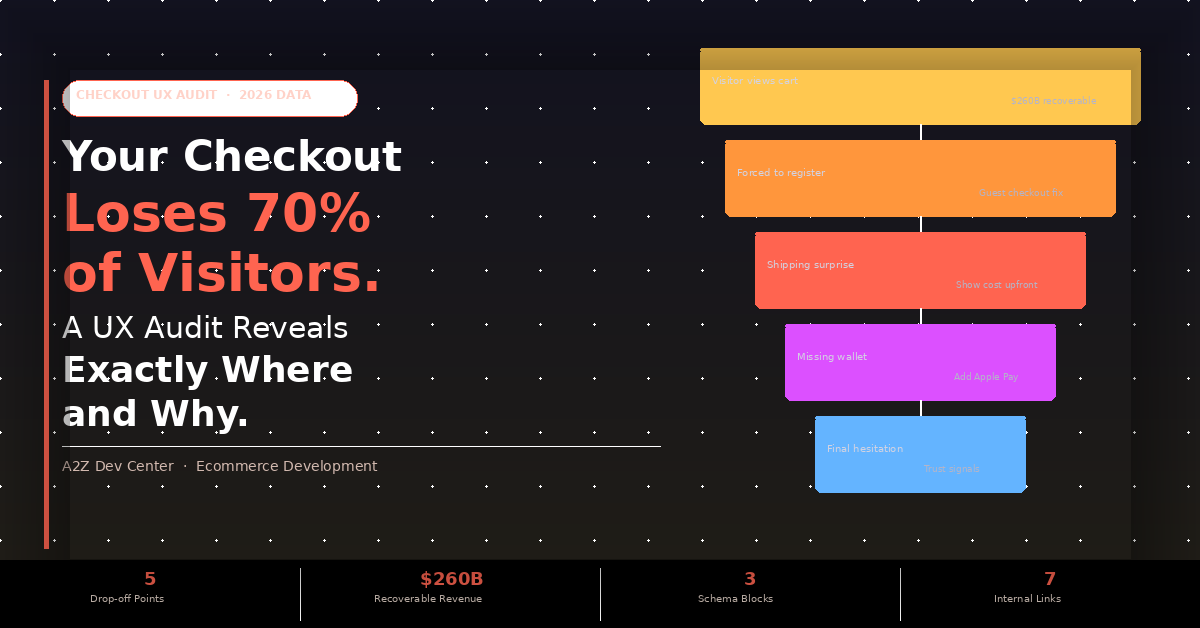
Checkout abandonment is when a visitor adds a product to their cart, begins the ecommerce checkout process, and leaves before completing the purchase. The global average abandonment rate is 70.19%, according to Baymard Institute’s meta-analysis of 49 independent studies. This is not a single event. It happens at five specific decision points in your checkout flow, each with a measurable cause.
WHAT YOU WILL KNOW AFTER READING THIS
- Your ecommerce checkout optimization journey starts by understanding that you do not lose 70% at one moment. It loses visitors at five specific decision points: the cart page, the account wall, the cost reveal, the payment step, and the order review. Each has a distinct cause and a specific fix.
- The #1 cause of checkout abandonment has not changed in six years: unexpected costs at checkout, cited by 48% of US shoppers who abandoned a purchase (Baymard Institute, 1,026 adults).
- Mobile checkout abandons at 80.02% vs 66.41% on desktop despite mobile driving 72% of all ecommerce traffic (Statista 2025). If you have not run your checkout on a real phone recently, you are flying blind on your biggest traffic source.
- A2Z Dev Center’s ecommerce development services include checkout UX audits and conversion-focused rebuild engagements. This guide uses the same audit framework we run on client stores before touching a single line of code.
THE REVENUE FRAME: WHAT CHECKOUT ABANDONMENT ACTUALLY COSTS
US annual revenue lost to cart abandonment
$260 billion
Average abandonment rate (Baymard, 49 studies)
70.19%
Mobile abandonment rate
80.02%
Desktop abandonment rate
66.41%
Conversion lift from better checkout design (Baymard)
Up to 35%
Leading ecommerce sites with “mediocre” or worse Checkout UX
65%
Cart abandonment is not a traffic problem. You already paid for those visitors. They found your product, decided it was worth adding to their cart, and began checking out. At that point you lost them to a UX decision your team made during development. The $260 billion figure from ZeroCart AI’s 2025 analysis is not lost marketing spend. It is recoverable revenue sitting behind fixable friction points.
This guide maps exactly where your checkout loses visitors and delivers the specific ecommerce checkout optimization audit your team needs to run before changing anything. The audit data throughout comes from Baymard Institute’s 16-year checkout usability research program, the industry’s most authoritative dataset on checkout behavior.
Where Exactly in Your Checkout Do Visitors Drop Off?
Checkout abandonment research consistently identifies the same five decision points where visitors choose to leave. Understanding why ecommerce stores don’t convert starts with knowing which step is the bottleneck in your specific funnel, not applying generic advice to all five at once.
Step 1: The Cart Page
~15% leave here
This is the “I changed my mind” decision. The visitor sees their items, the subtotal, and stops. The most common causes are an unexpected subtotal (before shipping is calculated), no visible trust signals on the cart page, or a session timeout that cleared their cart. Fix: show a shipping cost estimator on the cart page based on the user’s detected region. Show the estimated total including tax before they click “Proceed to Checkout.” If they know the full cost here, the cost reveal step later cannot surprise them.
Step 2: The Account Wall
19% abandon
19% of US online shoppers report abandoning an order specifically because they did not want to create an account, according to Baymard Institute’s survey of 1,026 US adults. That is almost 1 in 5 buyers stopping cold at a screen you designed to help yourself, not them. Baymard’s benchmark study found that 62% of sites fail to make Guest Checkout the most prominent option on the account selection step, meaning many users never find it even when it exists. The fix is not adding a guest checkout button. It is making that button the primary action on the page, visually larger and placed first before the account login option.
Step 3: The Shipping and Cost Reveal
48% abandon
Unexpected extra costs at checkout have been the number one cause of cart abandonment for six consecutive years, cited by 48% of US shoppers who abandoned a purchase (Baymard Institute). This is the moment most multi-step checkout flows reveal the shipping cost for the first time, often after the buyer has entered their address and is committed enough to feel the betrayal of a surprise fee. Capital One Shopping’s 2025 research found that 80% of Americans expect free shipping above a certain threshold, and 93% actively shop to qualify for it. The fix is showing estimated shipping and tax on the cart page, before checkout begins. Not at the payment step. Not on the order review page. On the cart page, before the buyer commits to the funnel at all.
Step 4: The Payment Step
13% abandon for missing payment method
13% of shoppers abandon a purchase specifically because their preferred payment method is not available. In 2025, digital wallets accounted for 49 to 56% of global ecommerce transaction value, and 65% of US adults use a digital wallet, per Capital One Shopping’s 2025 data. A checkout that does not offer Apple Pay, Google Pay, or Shop Pay is turning away the majority of mobile buyers at the exact moment they are ready to complete the purchase. The Shopify development team at A2Z configures digital wallet integration as a standard component of every checkout engagement, because the conversion data is unambiguous on its impact.
Step 5: The Order Review
~8% abandon (final hesitation)
The order review page is the last moment before purchase. Visitors who reach here have passed every earlier friction point. The abandonment at this step is almost entirely driven by trust failure: no visible security indicators, an unfamiliar payment processor logo, no visible returns policy link, or a total that looks slightly different from what they expected. Fix: add security badges, your money-back guarantee statement, and a one-click link to your returns policy directly on the order review page. The buyer is already sold on the product. They just need confirmation that completing the purchase is safe.
Why Does Mobile Checkout Fail at Almost Twice the Desktop Rate?
Mobile drives 72% of all ecommerce traffic. It converts at less than half the desktop rate. That gap is the single largest revenue opportunity on most ecommerce stores, and it is entirely a UX problem, not a traffic problem.
MOBILE ABANDONMENT RATE
80.02%
8 in 10 mobile checkout sessions end without a purchase. Drives 72% of traffic. Converts at ~1.0%.
DESKTOP ABANDONMENT RATE
66.41%
2 in 3 desktop sessions abandon. Converts at ~2.3%. Receives only 28% of traffic.
The mobile checkout gap is not caused by user intent differences. Baymard’s 2025 Mobile UX Benchmark, which covers 52,000 usability scores across 150 leading ecommerce sites, found that 81% of mobile sites score “mediocre” or worse. The specific UX failures driving mobile abandonment are structural.
Tap targets below 48×48 pixels force users to pinch and re-tap form elements, adding frustration to every field. Input fields that open a QWERTY keyboard instead of a number pad for phone number or card number entry require an extra manual tap to switch keyboard type on every mobile device. Forms that do not auto-fill from saved browser credentials (no autocomplete attribute on address and payment fields) require 2 to 3 times as much manual typing on a phone as on a desktop keyboard. And checkout flows that do not offer one-tap digital wallet payments force mobile buyers through 8 to 12 form fields instead of the 2 to 3 confirmation taps a wallet requires. Our ecommerce SEO guide covers how mobile page speed also drives mobile abandonment through Google’s Core Web Vitals ranking signals.
The 120-Click Problem: How Your Payment Step Is Losing Buyers
Google’s research found that a traditional ecommerce checkout requires an average of 120 user actions to complete. Apple Pay and Google Pay complete the same purchase in 4 actions. Stripe’s research on Apple Pay adoption found that businesses that offered Apple Pay saw an average 22.3% increase in conversion rate and a 22.5% boost in revenue.
TRADITIONAL CHECKOUT
120
user actions to complete purchase
(name, address, card, CVV, expiry…)
(name, address, card, CVV, expiry…)
APPLE PAY / GOOGLE PAY
4
user actions to complete purchase
(tap, confirm, Face ID, done)
(tap, confirm, Face ID, done)
The 120-click figure explains why mobile checkout converts at half the desktop rate. Mobile users are completing all 120 actions on a touchscreen with a soft keyboard, no cursor precision, and a smaller display. Every additional form field is disproportionately more frustrating on mobile than on desktop.
The payment gap: Digital wallets accounted for 49 to 56% of global ecommerce transactions in 2025 (industry composite data). If your checkout does not offer at least one digital wallet option, you are declining the preferred payment method of the majority of online buyers. And page speed compounds this: stores with LCP above 4 seconds on mobile lose buyers before the payment step is even reached. The page speed and Core Web Vitals guide covers the technical fixes that cut mobile load time below 2.5 seconds.
The 6 Ecommerce Checkout Optimization Fixes That Move Conversion the Most
These six ecommerce checkout optimization fixes are ranked by Baymard Institute’s impact data, not by implementation effort. Fix them in this order. The first two alone recover a large portion of checkout abandonment for most stores.
1
Make Guest Checkout the primary option, not the secondary
62% of sites fail to make Guest Checkout the most prominent option at the account selection step (Baymard). Move it above the sign-in form. Make it the large primary button. Remove the word “Guest” if your research shows it reads as lower-priority. The label “Continue as Guest” outperforms “Guest Checkout” in A/B tests because “Continue” implies forward momentum rather than a compromised experience.
2
Show the total cost including estimated shipping on the cart page
48% of abandonment is caused by unexpected costs revealed at checkout, according to Baymard’s six-year running data. Show a shipping cost estimator on the cart page based on the user’s detected IP location. Show the estimated tax. Display a “Estimated Total” that the buyer can trust before they click into the checkout funnel. Capital One Shopping’s research confirms that 93% of shoppers actively add items to qualify for free shipping thresholds, meaning a free shipping threshold display on the cart page also increases average order value by an average of 30%.
3
Add Apple Pay, Google Pay, and Shop Pay as primary payment options
Apple Pay delivers a 22.3% average conversion increase according to Stripe’s adoption research, and reduces the checkout action count from 120 to 4. Enable all three digital wallets. Display them at the top of the payment step, before the credit card form. For Shopify stores, Shop Pay enables one-tap checkout for returning Shopify customers across the entire network. For WooCommerce, Stripe’s payment element supports all three with a single API integration.
4
Add autocomplete attributes to every address and payment form field
HTML autocomplete attributes (autocomplete=”given-name”, “address-line1”, “cc-number”, “cc-exp”) allow browsers and password managers to fill form fields from saved data with a single tap on mobile. The correct input types (inputmode=”numeric” for card numbers, type=”tel” for phone fields) trigger the right mobile keyboard without requiring users to switch manually. These are HTML attributes, not design changes. They take 20 minutes to implement per form and consistently improve mobile conversion rate by reducing manual typing by 60 to 80%.
5
Add trust signals directly on the payment step page
Most stores place trust badges (SSL seal, payment processor logos, money-back guarantee) on the homepage or product pages. Baymard’s research on checkout trust found that the payment page is where trust signals have the highest conversion impact, because it is the exact moment buyers are asked to enter financial information. Add your SSL badge, your payment processor logo (Visa/Mastercard/Amex), and a visible returns policy link directly above or below the payment form. Not in the footer. On the page, adjacent to the card entry fields.
6
Implement a one-page or two-step checkout flow
Baymard’s research found that the average large ecommerce site can achieve a 35% conversion rate improvement through better checkout design, and checkout step reduction is consistently among the highest-impact changes. A one-page checkout that shows all fields simultaneously outperforms a 5-step wizard on desktop. A two-step flow (contact and shipping on step one, payment on step two) outperforms longer flows on mobile. Run this as an A/B test: send 50% of your traffic to your current flow and 50% to a simplified version, then measure checkout completion rate, not conversion rate, to isolate the checkout UX effect from traffic quality differences.
Your Checkout UX Audit Checklist (Run This Before Changing Anything)
This ecommerce checkout UX audit is what the blog title promises and every competitor article on this topic skips. These five tests take under 20 minutes each and give you the data to prioritize which of the six fixes above has the highest impact on your specific store. Run them on a mobile device, not a desktop.
1
The Guest Checkout Prominence Test (3 minutes)
Add a product to your cart, click Checkout on a mobile device, and measure: how many seconds does it take you to find the Guest Checkout option? If it takes more than 3 seconds or requires scrolling, 62% of users will not find it in time, per Baymard’s finding. Check whether Guest Checkout is visually larger than or equal to the Sign In option. If Sign In is the primary button and Guest is the secondary link, you have an account wall problem. Record the time it takes and take a screenshot for your dev team.
2
The Cost Transparency Test (5 minutes)
Add a product to your cart and stop at the cart page. Is shipping cost visible? Is tax estimated? Does the cart show a total that includes estimated shipping? Open the browser developer tools on desktop and change your IP geolocation to a different US state. Does the estimated shipping cost change? If your cart page shows only subtotal and says “Shipping calculated at checkout,” you are hiding the number that 48% of buyers say causes them to abandon. The fix requires showing an estimated shipping range or a free shipping threshold indicator before checkout begins.
3
The Payment Options Audit (5 minutes)
Go to your payment step on a mobile device. Count the payment methods visible. Do you see Apple Pay, Google Pay, or Shop Pay? Are they displayed above the credit card form? Open your checkout on an Android device and confirm Google Pay appears. Open on an iPhone and confirm Apple Pay appears. If your checkout shows the credit card form first with digital wallets hidden below a fold or below a divider, the order is wrong. Digital wallet options must appear at the top of the payment step because they eliminate the card entry form entirely for buyers who use them. Check your Shopify store launch checklist to confirm payment configuration was completed at setup.
4
The Mobile Form Test (5 minutes)
Complete your checkout on a mobile device manually, without autofill. Tap each form field and note: does the keyboard that appears match the field type? Phone number fields should trigger a number pad (inputmode=”numeric”). Email fields should trigger a keyboard with @. Card number fields should trigger a numeric keyboard. Tap target check: using a finger rather than a stylus, can you reliably tap each field without accidentally hitting an adjacent field? If any field is smaller than approximately 44 pixels tall, it fails the tap target test. Record which fields cause typing errors or keyboard switching.
5
The Trust Signal Audit (2 minutes)
On the payment step of your checkout, look at the content visible without scrolling on a mobile screen. Can you see: an SSL or secure checkout indicator? At least one payment method logo (Visa, Mastercard)? A link to your returns policy? A money-back guarantee statement if you offer one? If none of these appear above the payment form on mobile without scrolling, you have a trust gap at the highest-stakes moment in your checkout. Compare this against your Google Analytics checkout funnel: the step where you see the steepest drop-off between initiated payment and completed purchase is almost always correlated with trust signal absence.
Frequently Asked Questions
Your Checkout Is Losing Revenue at Specific, Fixable Points. Let’s Find Them.
A2Z Dev Center runs checkout UX audits that use your Google Analytics funnel data, heatmaps, and the five-test framework in this guide to identify exactly which abandonment point is costing you the most revenue. Then we build the fix.
Book a Free Checkout Audit
Schedule a call
Talk to a subject-matter expert
Web development, SEO, or digital marketing — tell us about your project and we'll get back within one business day. No obligation.
- Free scope & strategy session
- A senior specialist, not a sales rep
- Your details stay confidential