
Technical SEO Audit Checklist for 2026: What to Check and How to Fix It
Most websites have technical SEO problems. Not a few. Most. The difference between websites that rank well and websites that struggle despite having good content and reasonable link profiles is frequently a collection of technical issues that prevent search engines from properly crawling, understanding, and ranking the pages that should be performing.
A technical SEO audit is the systematic process of identifying those issues, prioritizing them by their likely ranking impact, and implementing fixes in an order that produces the greatest improvement in organic search performance per unit of effort. It is not a one-time project. Technical issues accumulate as sites grow, CMS updates introduce new configurations, content is added and reorganized, and search engine requirements evolve. The most effective SEO programs treat technical auditing as a recurring discipline rather than a diagnostic done once and filed away.
This guide provides a complete technical SEO audit checklist for 2026 covering every major audit category, the specific checks within each, and the step-by-step fixes for the most common issues found in each area.
What Is a Technical SEO Audit?
What is a technical SEO audit and what does it check?
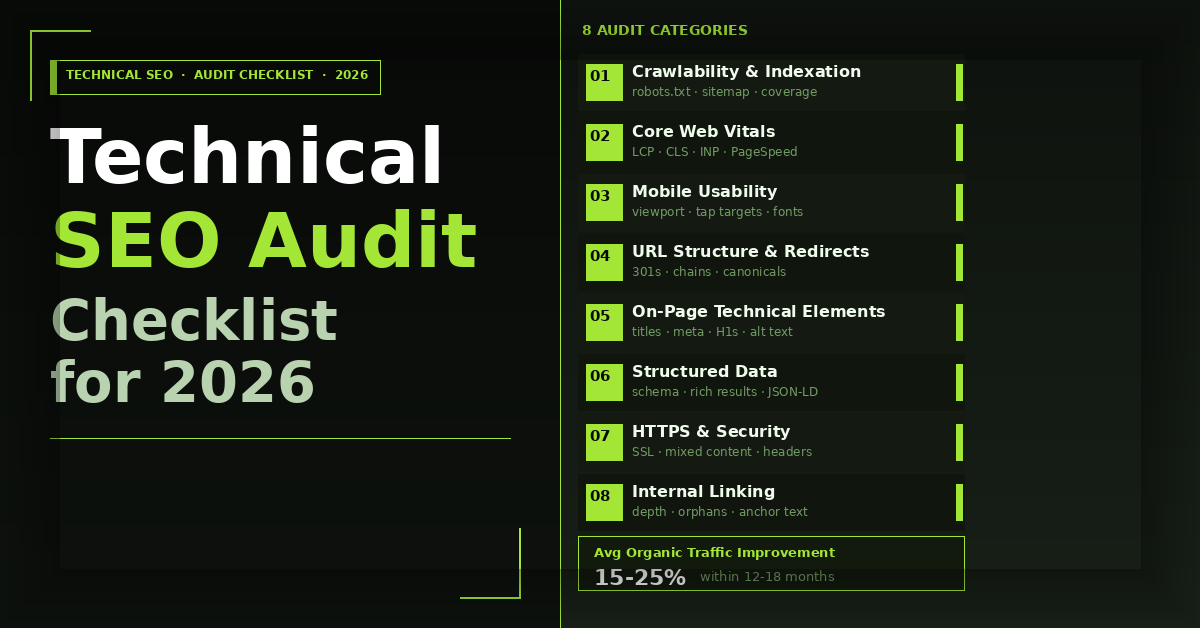
A technical SEO audit is a systematic review of a website’s technical infrastructure to identify issues that prevent search engines from properly crawling, indexing, and ranking its pages. It covers crawlability and indexation, page speed and Core Web Vitals, mobile usability, site architecture and internal linking, structured data implementation, HTTPS and security signals, duplicate content, and URL structure. A complete technical SEO audit produces a prioritized list of issues with specific fixes, typically revealing improvements that contribute to 15 to 25% organic traffic gains within 12 to 18 months when addressed systematically.
Key Takeaways
- Technical SEO issues are cumulative. A site with five minor technical problems will underperform significantly more than a site with one, because each issue compounds the others in how search engines evaluate and rank the site
- Crawlability problems are always the highest priority fix because no amount of content quality or link authority helps a page that search engines cannot reach or index
- Core Web Vitals are both a ranking signal and a conversion variable. Fixing them improves organic ranking and landing page conversion rates simultaneously
- Structured data implementation is one of the most underutilized technical SEO opportunities in 2026, particularly for local businesses, service providers, and content-heavy sites
- A technical SEO audit without a prioritized remediation plan is just a list of problems. The value is in the fix sequence, not the issue discovery
- Google Search Console is the most authoritative source of technical SEO data available for any site and should be the first tool opened in every technical audit, not a secondary validation step
Tools You Need Before Starting a Technical SEO Audit
Before running any checks, set up access to the tools that provide the data each audit category requires.
Google Search Console is mandatory. It provides crawl error reports, indexation status, Core Web Vitals field data, mobile usability issues, manual action notifications, and search performance data segmented by page, query, and device. If the site does not have Search Console configured, setting it up is the first step before any audit work begins.
Google Analytics 4 provides traffic segmentation by channel, page-level engagement data, and conversion attribution that contextualizes technical issue impact against actual business outcomes.
Screaming Frog SEO Spider crawls the site from the perspective of a search engine and returns a comprehensive dataset covering response codes, title tags, meta descriptions, heading structure, canonical tags, internal linking, redirect chains, and page depth. The free version crawls up to 500 URLs. Paid license removes the limit.
Google PageSpeed Insights and Chrome DevTools Lighthouse provide lab-based Core Web Vitals scores and specific optimization recommendations for individual pages.
Ahrefs or Semrush provide backlink profile data, keyword ranking tracking, site audit functionality that complements Screaming Frog, and competitive gap analysis.
Ahrefs Webmaster Tools provides a free alternative for site audit and backlink data for site owners who have verified Search Console access.
Audit Category 1: Crawlability and Indexation
Crawlability and indexation are the foundation of technical SEO. If search engines cannot reach your pages or choose not to index them, every other optimization is irrelevant.
Check 1.1: Robots.txt configuration
How to check: Navigate to yourdomain.com/robots.txt and review the file directly. Also use Google Search Console’s robots.txt tester under Settings.
What to look for: Disallow directives blocking important page categories, disallow directives accidentally blocking CSS or JavaScript files that are required for rendering, missing sitemap declaration, and overly broad wildcard rules blocking unintended URL patterns.
How to fix: Remove disallow directives from any URL pattern that should be indexed. Add a Sitemap: directive pointing to your XML sitemap URL at the bottom of the file. Test changes using the robots.txt tester in Search Console before deploying. Never block CSS or JavaScript files from crawling as this prevents Google from rendering pages correctly.
Check 1.2: XML sitemap accuracy and submission
How to check: Navigate to yourdomain.com/sitemap.xml and review which URLs are included. Cross-reference against Search Console under Index, then Sitemaps.
What to look for: Non-canonical URLs included in the sitemap, noindex pages included in the sitemap, 4xx or 5xx URLs included in the sitemap, sitemap not submitted to Search Console, and sitemap last modification dates that are months out of date for actively updated content.
How to fix: Configure your sitemap to include only canonical, indexable, 200-status URLs. Submit the sitemap in Search Console. For large sites, use a sitemap index file that references multiple category-specific sitemaps rather than a single file exceeding 50,000 URLs or 50MB.
Check 1.3: Indexation coverage
How to check: In Search Console, navigate to Index, then Pages. Review the Not Indexed reasons list and the Indexed count against the total number of pages on the site.
What to look for: Pages with the Crawled but not indexed status, which indicates Google reached the page but chose not to index it due to thin content or quality signals. Pages with the Discovered but not crawled status, which indicates crawl budget exhaustion. Pages with Duplicate without user-selected canonical status, which indicates unresolved canonicalization issues.
How to fix: For Crawled but not indexed pages, improve content depth and quality or consolidate thin pages into stronger ones. For Discovered but not crawled pages on large sites, reduce crawl budget waste by blocking low-value URL patterns in robots.txt and fixing redirect chains that consume crawl budget. For duplicate content issues, implement correct canonical tags.
Check 1.4: Crawl depth and orphan pages
How to check: In Screaming Frog, filter pages by crawl depth. Any page deeper than four clicks from the homepage is at risk of being crawled infrequently. Run a comparison between Screaming Frog’s crawled URL list and your XML sitemap to identify orphan pages that are in the sitemap but not internally linked.
How to fix: Add internal links from high-authority pages to important pages buried deep in the site hierarchy. Remove orphan pages from the sitemap or add internal links to them. Flatten site architecture where possible so important pages are reachable within three clicks from the homepage. The SEO service provider guide covers how site architecture decisions connect to the broader SEO strategy that should guide crawl depth prioritization.
Audit Category 2: Core Web Vitals and Page Speed
Core Web Vitals are Google’s user experience metrics used as ranking signals. All three must reach the Good threshold for a page to benefit from the Page Experience ranking signal.
Check 2.1: Largest Contentful Paint (LCP)
What it measures: How quickly the largest visible content element in the viewport loads. Good is under 2.5 seconds. Needs Improvement is 2.5 to 4 seconds. Poor is above 4 seconds.
How to check: Google Search Console Core Web Vitals report shows field data from real users segmented by mobile and desktop. PageSpeed Insights shows both field data and lab data for individual URLs.
Most common causes of poor LCP: Unoptimized hero images served at larger dimensions than displayed, render-blocking scripts preventing early page rendering, slow server response time (TTFB above 600ms), and web fonts without font-display: swap causing layout shifts that delay LCP element rendering.
How to fix step by step:
- Identify the LCP element on the page using Chrome DevTools Performance panel or PageSpeed Insights
- If the LCP element is an image, compress it to WebP format, serve it at the exact display dimensions, and add a preload link tag in the document head
- If TTFB is above 600ms, upgrade hosting to managed WordPress hosting or a faster server tier and implement page caching
- Defer all non-critical JavaScript using the defer or async attribute
- Preconnect to third-party domains including Google Fonts using link rel=”preconnect” tags
Check 2.2: Cumulative Layout Shift (CLS)
What it measures: Visual stability during page loading. Good is below 0.1. Needs Improvement is 0.1 to 0.25. Poor is above 0.25.
Most common causes: Images without explicit width and height attributes causing layout reflow when they load, web fonts causing text reflow when they load and replace fallback fonts, dynamically injected content above existing page content, and embeds without reserved space.
How to fix step by step:
- Add explicit width and height attributes to all images in HTML
- Add font-display: swap to all @font-face declarations
- Reserve space for all dynamic content including ads, cookie banners, and chat widgets using CSS min-height
- For late-loading embeds, use aspect-ratio CSS to reserve the correct proportional space before the embed loads
Check 2.3: Interaction to Next Paint (INP)
What it measures: Responsiveness to user interactions. Good is below 200 milliseconds. Needs Improvement is 200 to 500 milliseconds. Poor is above 500 milliseconds.
Most common causes: Long JavaScript tasks blocking the main thread, heavy event handler code running on scroll or click, third-party scripts with synchronous execution patterns.
How to fix: Break long JavaScript tasks into smaller chunks using scheduler.yield() or setTimeout with zero delay. Defer non-critical third-party scripts. Audit all event listeners for unnecessary computation and optimize heavy handlers. The what are core web vitals and why they impact your SEO rankings post covers the organic ranking implications of each metric in detail.
Audit Category 3: Mobile Usability
Google uses mobile-first indexing, meaning the mobile version of your site is what Google primarily crawls and indexes. Mobile usability issues are therefore indexation issues, not just UX issues.
Check 3.1: Mobile usability errors
How to check: Search Console under Experience, then Mobile Usability, shows pages with specific mobile usability errors including text too small to read, clickable elements too close together, content wider than screen, and viewport not configured.
How to fix: Ensure the viewport meta tag is present in every page head with content=”width=device-width, initial-scale=1″. Set base font size to at minimum 16px for body text. Ensure tap targets including buttons, links, and form fields are at minimum 44×44 pixels with adequate spacing between adjacent targets. Fix any horizontal overflow issues causing content wider than screen by auditing fixed-width elements in CSS.
Check 3.2: Mobile page speed
Mobile connections are slower and more variable than desktop connections. A page that loads acceptably on desktop may produce poor Core Web Vitals scores on mobile because of network constraints.
How to fix: Check PageSpeed Insights mobile scores separately from desktop scores for key landing pages. Prioritize image optimization and server response time improvements as these have the largest mobile-specific impact. Implement responsive images using the srcset attribute to serve appropriately sized images for each screen density and size rather than scaling large desktop images down in CSS.
Audit Category 4: URL Structure and Redirect Management
Check 4.1: Redirect chains and loops
How to check: In Screaming Frog, run a crawl and filter by redirect chains under the Reports menu. Redirect chains of three or more hops waste crawl budget and dilute link equity passed through the chain.
How to fix: Update redirect chains to point directly to the final destination URL. Each redirect in a chain should be replaced with a direct 301 from the original URL to the final destination, eliminating intermediate hops.
Check 4.2: 4xx errors
How to check: Search Console Coverage report shows pages returning 4xx errors that Google has encountered. Screaming Frog’s response codes filter shows all 4xx URLs discovered during the crawl.
How to fix: For pages that have moved permanently, implement 301 redirects from the old URL to the new location. For pages that no longer exist and have no relevant replacement, return a clean 404 rather than redirecting to the homepage, which creates a soft 404 that Google treats as a low-quality signal.
Check 4.3: Canonical tag implementation
How to check: In Screaming Frog, the Canonicals tab shows which pages have canonical tags and what they point to. Filter for pages where the canonical does not match the page URL to identify non-self-referencing canonicals, and pages with missing canonical tags.
What to look for: Pages with no canonical tag, pages whose canonical points to a different URL than the page itself without a clear reason, canonical tags pointing to noindex pages, and canonical tags on paginated content pointing to the first page rather than each page self-canonicalizing.
How to fix: Add self-referencing canonical tags to all indexable pages. Ensure canonical tags on paginated content point to the correct URL for each page in the series. Remove canonical tags pointing to noindex pages and resolve the underlying duplication issue instead. The why responsive web design is critical for SEO in 2026 post covers how URL structure decisions connect to mobile indexation.
Audit Category 5: On-Page Technical Elements
Check 5.1: Title tags
How to check: Screaming Frog’s Page Titles tab shows all title tags, their lengths, and flags duplicates, missing tags, and tags over 60 characters.
What to look for: Missing title tags, duplicate title tags across multiple pages, title tags over 60 characters that will be truncated in search results, title tags under 30 characters that are too short to be descriptive, and title tags that do not contain the primary target keyword.
How to fix: Write unique title tags for every indexable page containing the primary keyword near the beginning of the tag, within 50 to 60 characters, and formatted as Primary Keyword Modifier | Brand Name.
Check 5.2: Meta descriptions
How to check: Screaming Frog’s Meta Description tab flags missing, duplicate, and length-violating meta descriptions.
What to look for: Missing meta descriptions on important pages, duplicate meta descriptions, and descriptions over 160 characters that will be truncated.
How to fix: Write unique meta descriptions for every important page within 150 to 160 characters, including the primary keyword naturally and a clear value proposition or CTA. While meta descriptions are not a direct ranking signal, they affect click-through rate from search results, which influences traffic volume from existing rankings.
Check 5.3: Heading structure
How to check: Screaming Frog’s H1 tab shows pages with missing H1s, multiple H1s, and H1 length issues.
What to look for: Pages with no H1, pages with multiple H1 tags, H1s that do not contain the primary keyword, and heading hierarchy that skips levels (H1 followed by H3 with no H2).
How to fix: Every indexable page should have exactly one H1 containing the primary keyword. Heading hierarchy should follow a logical H1, H2, H3 structure without skipping levels. Headings should reflect the content structure of the page rather than being used for styling purposes.
Check 5.4: Image alt text
How to check: Screaming Frog’s Images tab shows images with missing alt text across all crawled pages.
How to fix: Add descriptive alt text to all informational images that includes relevant keywords where natural. Decorative images that convey no information should have empty alt attributes (alt=””) rather than no attribute, which signals to assistive technologies and search engines that the image is decorative.
Audit Category 6: Structured Data
Structured data is one of the most underutilized technical SEO opportunities in 2026. It helps search engines understand page content, enables rich result features in search results, and is increasingly important for AI Overview citation eligibility.
Check 6.1: Existing structured data validity
How to check: Google’s Rich Results Test tool validates structured data on individual pages. Search Console’s Enhancements section shows structured data errors and warnings across the whole site.
What to look for: Required properties missing from existing schema markup, deprecated schema types that are no longer supported, and schema markup that does not match the visible page content (which violates Google’s guidelines and can produce manual actions).
How to fix: Use Google’s Rich Results Test to validate every page type that contains structured data. Fix all errors before addressing warnings. Ensure all schema properties reflect the actual visible page content.
Check 6.2: Missing structured data opportunities
How to check: Review each page type against the schema types that are eligible for rich results in Google Search. Cross-reference the site’s page types against Google’s Search Gallery to identify eligible schema types not currently implemented.
Priority schema types for service business websites in 2026:
- FAQPage schema on all blog posts and service pages with FAQ sections
- HowTo schema on tutorial and checklist content
- LocalBusiness schema on location and contact pages
- Service schema on service description pages
- BreadcrumbList schema on all pages with navigational hierarchy
- Article schema on all blog posts with author, datePublished, and dateModified
- Review schema on testimonial pages with verified reviews
How to fix: Implement schema markup using JSON-LD format in the document head rather than microdata or RDFa in the body HTML. JSON-LD is Google’s preferred format and is easier to maintain because it is separated from the page HTML. The SEO content writing services guide covers how structured data connects to AI Overview citation eligibility for content-focused pages.
Audit Category 6: Structured Data
Structured data is one of the most underutilized technical SEO opportunities in 2026. It helps search engines understand page content, enables rich result features in search results, and is increasingly important for AI Overview citation eligibility.
Check 6.1: Existing structured data validity
How to check: Google’s Rich Results Test tool validates structured data on individual pages. Search Console’s Enhancements section shows structured data errors and warnings across the whole site.
What to look for: Required properties missing from existing schema markup, deprecated schema types that are no longer supported, and schema markup that does not match the visible page content (which violates Google’s guidelines and can produce manual actions).
How to fix: Use Google’s Rich Results Test to validate every page type that contains structured data. Fix all errors before addressing warnings. Ensure all schema properties reflect the actual visible page content.
Check 6.2: Missing structured data opportunities
How to check: Review each page type against the schema types that are eligible for rich results in Google Search. Cross-reference the site’s page types against Google’s Search Gallery to identify eligible schema types not currently implemented.
Priority schema types for service business websites in 2026:
- FAQPage schema on all blog posts and service pages with FAQ sections
- HowTo schema on tutorial and checklist content
- LocalBusiness schema on location and contact pages
- Service schema on service description pages
- BreadcrumbList schema on all pages with navigational hierarchy
- Article schema on all blog posts with author, datePublished, and dateModified
- Review schema on testimonial pages with verified reviews
How to fix: Implement schema markup using JSON-LD format in the document head rather than microdata or RDFa in the body HTML. JSON-LD is Google’s preferred format and is easier to maintain because it is separated from the page HTML. The SEO content writing services guide covers how structured data connects to AI Overview citation eligibility for content-focused pages.
Audit Category 8: Internal Linking
Check 8.1: Internal link distribution
How to check: In Screaming Frog, the Inlinks column shows how many internal links point to each page. Sort by ascending to identify important pages with few internal links.
What to look for: Important service or product pages with fewer than five internal links from other site pages, pillar pages that are not linked from their cluster content, and orphan pages with zero internal links.
How to fix: Add contextual internal links from high-traffic blog content to relevant service pages. Ensure every cluster blog post links to its pillar page. Use descriptive anchor text that includes the target page’s primary keyword rather than generic “click here” or “read more” anchor text. The how to build a content marketing strategy that works post covers how internal linking strategy connects to topic cluster architecture and topical authority building.
Check 8.2: Broken internal links
How to check: Screaming Frog’s Response Codes tab filtered to 4xx shows all internal links pointing to broken URLs.
How to fix: Update broken internal links to point to the correct current URL. If the target page has been permanently removed, update the link to point to the most relevant existing page rather than removing the link entirely.
Technical SEO Audit Priority Matrix
| Issue Category | Priority | Ranking Impact | Fix Complexity |
|---|---|---|---|
| Crawlability blocks in robots.txt | Critical | Very High | Low |
| Indexation errors in Search Console | Critical | Very High | Medium |
| Core Web Vitals failures | High | High | Medium-High |
| Redirect chains and 4xx errors | High | High | Low-Medium |
| Missing or duplicate title tags | High | High | Low |
| Canonical tag errors | High | High | Low |
| Mobile usability errors | High | High | Medium |
| Missing structured data | Medium | Medium-High | Medium |
| Image alt text gaps | Medium | Medium | Low |
| Broken internal links | Medium | Medium | Low |
| Missing meta descriptions | Medium | Medium | Low |
| Security headers | Low | Low | Low |
Frequently Asked Questions
About Author



Ready to Get Started?
Your Details will be Kept confidential. Required fields are marked *


