
Wordpress
Summarize this blog post with:
⚠ Correction: Real-Time Collaboration Was Removed From WordPress 7.0
Multiple third-party articles published before May 8, 2026 state that real-time collaboration ships in WordPress 7.0. It does not. The official WordPress Developer Blog confirmed on May 8, 2026 that real-time collaboration (RTC) was removed from the 7.0 release due to race conditions, server load issues, and memory efficiency concerns surfacing through fuzz testing. RTC remains a development priority and will ship in a future release. Everything else in this guide accurately reflects the WordPress 7.0 final release.
What Ships May 20
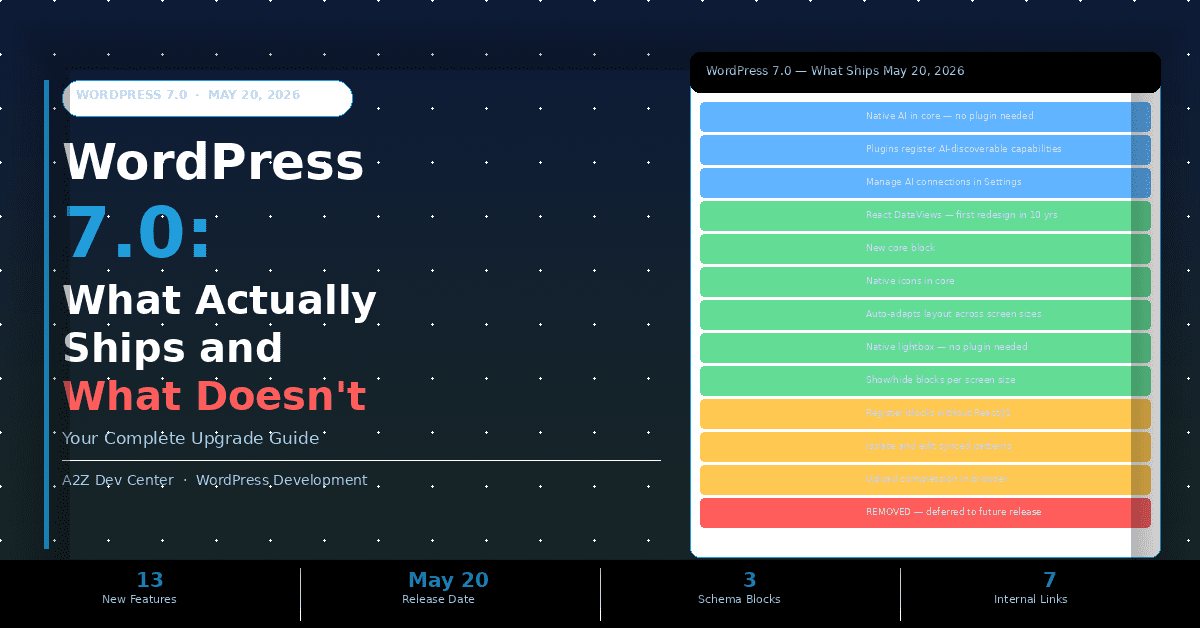
- WordPress 7.0 is the first major release of 2026 and marks the official launch of Phase 3 of the Gutenberg roadmap, the collaboration phase, even though the headline real-time editing feature did not make the cut.
- Native AI integration ships. The WP AI Client and Abilities API let you adjust text tone, summarize content, and generate block patterns directly in the editor without installing a third-party AI plugin.
- The admin dashboard gets its first visual redesign in over a decade. React-based DataViews replace the static list tables you have been looking at since WordPress 3.x.
- New blocks, responsive Grid, native lightbox, PHP-only block registration, and browser-side image compression all ship as confirmed features. This guide covers each one with what it means for your site.
- A2Z Dev Center’s WordPress development services cover WordPress 7.0 upgrades, compatibility audits, and post-update performance checks for agencies and businesses who need their site to stay live through the transition.
WordPress 7.0 was originally scheduled for April 9, 2026, as the headline announcement at WordCamp Asia in Mumbai. The core team discovered a critical architectural flaw in the real-time collaboration system: it was storing sync data using post meta and was inadvertently disabling WordPress query caches sitewide whenever the block editor opened. The fix required building a new dedicated database table from scratch, pushing the release to May 20 and adding three extra release candidates to the schedule. RC3 was released May 8. The stable release follows on May 20.
This is the first WordPress release built around Gutenberg plugin versions 22.0 through 22.6 merged into core. That range spans several months of editor work across collaboration tooling, AI integration, new blocks, and developer APIs. Here is what each of those months produced that is actually in the release you will receive on May 20.
The AI Integration Layer: WP AI Client and Abilities API
WordPress 7.0 ships with a native AI layer for the first time. Not a plugin. Not a third-party integration. A built-in interface that connects to external AI providers through a standardized API that WordPress core now owns.
AI Feature 1
WP AI Client
A built-in interface in the block editor that connects to external AI models. Out of the box, it handles text tone adjustment, content summarization, and block pattern generation. No plugin installation required. Connect your preferred AI provider (OpenAI, Anthropic, or others) through Settings, Connectors.
AI Feature 2
Abilities API
Plugin developers can now register their plugin’s specific capabilities so AI assistants within WordPress can discover and use them. A form plugin could register “create a contact form” as a capability. An SEO plugin could register “audit this page.” This is the scaffolding for AI-to-plugin communication inside WordPress.
AI Feature 3
Connectors UI Dashboard
Find this at WP-Admin, Settings, Connectors. It is a centralized panel for managing all external AI connections. Add, remove, and update connections to AI providers without hunting through plugin settings or editing wp-config.php. This was testable in WordPress 7.0 Beta and ships in the final release.
AI Feature 4
Block Comments and Notes
The Notes feature ships in 7.0 with a new keyboard shortcut for adding inline comments on specific blocks. While real-time syncing was part of the planned RTC system that was removed, the Notes feature itself ships as a single-user editorial tool. Teams can annotate blocks before publishing without the collaborative sync layer.
The Abilities API matters most to plugin developers. Before 7.0, AI integrations in WordPress were fragmented: each AI plugin created its own isolated interface. The Abilities API creates a standard that lets any AI assistant inside WordPress understand what other plugins can do. Theme developers gain a parallel benefit: the system allows AI to leverage block theme patterns rather than requiring new theme builds for custom layouts.
Context: WordPress powers 43.4% of all websites globally as of 2026. Native AI integration in core means the world’s most widely deployed CMS now has an AI framework that plugin developers can build on without maintaining separate AI SDKs per provider.
The Admin Dashboard Redesign
This is the first visual update to the WordPress admin dashboard in over a decade. The change is structural, not cosmetic. Static HTML list tables, which have displayed posts, pages, users, and plugins in the same format since WordPress 3.x, are replaced by React-based DataViews components.
What DataViews actually changes: you can filter, sort, and navigate admin lists without page reloads. Switching between Grid view and List view in your Posts screen is instantaneous. Bulk actions apply without a full-page refresh. The WordPress admin has always felt slower than modern web apps because it was built with server-rendered HTML tables. DataViews moves those interfaces to client-side rendering, which is what every modern SaaS dashboard has been doing since 2018.
If your site uses plugins that heavily customize the WordPress admin (custom post type list views, WooCommerce product tables, or custom dashboard widgets built on the WP_List_Table class), test them in a staging environment before updating. The DataViews migration affects any plugin that extends or replaces the native list table rendering system.
New and Updated Blocks
New Block
Breadcrumbs Block
Finally a native breadcrumb solution in WordPress core. Previously every theme or plugin team implemented breadcrumbs differently. The core Breadcrumbs block uses standard WordPress navigation hierarchy and outputs schema-friendly markup. For ecommerce sites, this replaces the Yoast or WooCommerce breadcrumb shortcodes for theme-based layouts.
New Block
Icons Block
A native icon library block lands in core. No more loading a full icon font (Font Awesome, Dashicons with custom loading) just to display a checkmark or arrow. The Icons block outputs inline SVG, which is faster than font-based icons and does not trigger a separate font file HTTP request. Particularly useful for feature lists and service cards built in the block editor.
Updated Block
Responsive Grid Block
The Grid block is now responsive. It automatically adapts its column layout across screen sizes without custom CSS or JavaScript. Before 7.0, responsive grid layouts required a page builder or custom block CSS. After 7.0, you set the grid, and WordPress handles the breakpoint behavior natively. This directly affects how ecommerce product grids built with the block editor behave on mobile.
Updated Block
Gallery Block: Native Lightbox
Gallery images now open in a full-screen lightbox when clicked, without any plugin. The lightbox is keyboard-accessible and handles focus management correctly. Previously, every gallery lightbox in WordPress required a JavaScript plugin (Jetpack’s Carousel, FooGallery, or custom implementation). For photography sites, portfolio pages, and product galleries, this removes a plugin dependency entirely.
Updated Block
Cover Block: Video Background
The Cover block can now use an embedded video as its background instead of a static image. The video is set directly in the block settings without custom code or a separate video background plugin. This ships with sensible defaults: the video autoplays muted and respects prefers-reduced-motion accessibility settings.
Updated Block
Responsive Block Visibility
Editors can now mark any individual block to show or hide based on screen size, directly from the block’s settings panel. This was previously achievable only with custom CSS classes or a dedicated plugin. The practical use: hiding a desktop-optimized table on mobile and showing a simplified card layout instead, without duplicating content or installing a visibility plugin.
Developer Features: PHP-Only Blocks and Pattern Editing
WordPress 7.0 introduces PHP-only block registration. Before 7.0, creating even a simple custom block required a JavaScript build pipeline: Node.js, npm, @wordpress/scripts, a webpack configuration, and a compiled JavaScript bundle. For simple display blocks that render static output, this was significant overhead. The new register_block_type() path in 7.0 allows blocks that only need PHP to be registered without any JavaScript at all. Developers who build plugins with custom display blocks will ship smaller plugin packages and eliminate the JavaScript build step entirely for blocks that do not need client-side interactivity.
Pattern editing sees two notable improvements. Spotlight mode isolates the content you are editing within a pattern from the surrounding layout, so you can focus on a specific area without accidentally selecting parent containers. Isolated Editor mode lets you modify synced patterns, template parts, and navigation menus without affecting the surrounding page layout while you edit. Both features address a real usability problem: synced patterns were difficult to edit without accidentally breaking the surrounding page structure.
For plugin developers, the Abilities API also means you can now register plugin capabilities that AI assistants inside WordPress will discover automatically. The practical implication: as more AI integrations are built on the WP AI Client, plugins with registered abilities will be usable by those AI workflows without needing custom integration code per AI provider. See the technical WordPress development guide for implementation context on block registration and API changes.
Performance: Browser-Side Image Processing
Image resizing and compression in WordPress 7.0 now runs in the browser rather than on the server. When you upload an image, the browser compresses and resizes it before sending the file to the server. This change reduces upload time for large images, lowers server CPU usage during media uploads, and cuts the file size hitting your server before any server-side processing runs.
The practical effect on upload speed depends on the user’s hardware. On modern devices with strong CPUs, browser-side compression is fast. On older mobile devices, the compression step may add a second or two to the upload. For sites where media uploads happen from controlled desktop environments (newsrooms, agency workflows), this is a net improvement. For sites where uploads happen from mobile devices (field reporting, user-submitted content), test the upload experience before confirming the upgrade.
The WordPress Core Web Vitals and speed optimisation guide covers how server-side changes like this interact with your site’s existing image optimization stack (Imagify, Smush, ShortPixel). Browser-side compression may change how much additional optimization your existing image plugin applies after upload.
What You Must Do Before Upgrading to WordPress 7.0
1
Check your PHP version now, not after the update
WordPress 7.0 requires a minimum of PHP 7.2, but PHP 8.3 or 8.4 is strongly recommended for performance and security. Check your current PHP version in WP-Admin, Tools, Site Health. If you are on PHP 7.2 or 7.3 (combined usage below 4% of monitored WordPress installations according to DreamHost’s PHP usage data), contact your hosting provider about upgrading before May 20. PHP version changes require testing for plugin compatibility separately from the WordPress upgrade.
2
Take a full site backup before updating
This is not optional for a major version upgrade. Use UpdraftPlus, Duplicator, or your hosting provider’s backup tool to create a complete backup of your database and files before applying the update. Major WordPress releases, including fully stable ones, can surface plugin or theme conflicts that are not visible until the update is live. A backup you can restore in under 10 minutes is worth more than any amount of pre-update testing.
3
Test on a staging environment before updating production
WordPress 7.0 touches the admin dashboard rendering, the block editor API, image upload handling, and plugin capability registration. Any plugin that customizes these areas may behave unexpectedly after the update. Use the WordPress Beta Tester plugin against RC3 (available now) to test your specific plugin stack before May 20. Page builders, SEO plugins (especially those with custom admin table columns), multilingual tools, and WooCommerce extensions are the highest-risk categories per the official release notes.
4
Wait 48-72 hours after May 20 before updating production
Major WordPress releases typically receive rapid point patches in the first 48 to 72 hours as edge cases surface from the broader community’s upgrade. If your site is not on a critical upgrade timeline, waiting until WordPress 7.0.1 or 7.0.2 is available gives you the benefit of those post-launch fixes. This is particularly true for high-traffic sites, WooCommerce stores processing orders, or sites with complex plugin stacks. WordPress site speed and stability guide covers the post-upgrade checks that should run before you re-enable full traffic on a production site.
5
Audit your plugin stack for DataViews compatibility
The React-based DataViews admin redesign is the most likely source of visual or functional conflicts in WordPress 7.0. Any plugin that customizes admin list tables (WooCommerce product tables, custom post type managers, user management plugins, or plugins that use WP_List_Table) should be tested against RC3 before the final release. Check each plugin’s changelog or support forum for confirmed 7.0 compatibility before upgrading production.
Plugin Compatibility Risk by Category
| Plugin Category | 7.0 Risk Level | Specific Risk | What to Test |
|---|---|---|---|
| Page Builders (Elementor, Divi) | HIGH | Block API changes, DOM structure shifts | All template layouts, custom block rendering |
| WooCommerce + Extensions | HIGH | DataViews admin tables, product grid blocks | Product admin, checkout, order management |
| SEO Plugins (Yoast, Rank Math) | MEDIUM | Admin column customization, DataViews | Post list columns, meta box rendering |
| Multilingual (WPML, Polylang) | MEDIUM | Pattern editing, template part syncing | Translated patterns, navigation blocks |
| Caching (WP Rocket, LiteSpeed) | LOW | Minimal, cache layer sits outside editor | Verify cache clear after update |
| Security (Wordfence, iThemes) | LOW | Minimal, security layer is file/request level | Confirm firewall rules update |
| Contact Forms (CF7, Gravity) | LOW | Low editor dependency | Submit a test form post-update |
| AI Plugins (pre-7.0) | HIGH | Conflict with native WP AI Client and Abilities API | Check plugin developer statement on 7.0 compatibility |
The highest risk category is existing AI plugins. Any plugin that currently embeds its own AI interface inside the WordPress editor will need to audit how it interacts with the native WP AI Client. The Abilities API creates a standard, but plugins that implemented custom AI UIs before 7.0 will need updates to integrate with or gracefully coexist with the native system rather than duplicating it.
If your agency or business relies on WordPress for content publishing, ecommerce, or client delivery, and you want a compatibility audit before May 20, the WordPress development team at A2Z Dev Center runs pre-upgrade compatibility checks and can manage the upgrade on a staging environment before it touches your production site. Review whether WordPress remains the right platform for your specific use case alongside this upgrade decision. Our SEO service team also verifies that post-upgrade Core Web Vitals and structured data remain intact, since major WordPress updates sometimes shift theme rendering in ways that affect page speed scores.
Frequently Asked Questions
Upgrading to WordPress 7.0? Get a Compatibility Audit First.
A2Z Dev Center runs pre-upgrade compatibility checks for WordPress 7.0 covering your plugin stack, PHP version, DataViews admin conflicts, and block API changes. We test on a staging environment, identify every conflict, and manage the upgrade so your production site stays online.
Book a WordPress 7.0 Compatibility Check
Schedule a call
Talk to a subject-matter expert
Web development, SEO, or digital marketing — tell us about your project and we'll get back within one business day. No obligation.
- Free scope & strategy session
- A senior specialist, not a sales rep
- Your details stay confidential