

Web Development
Summarize this blog post with:
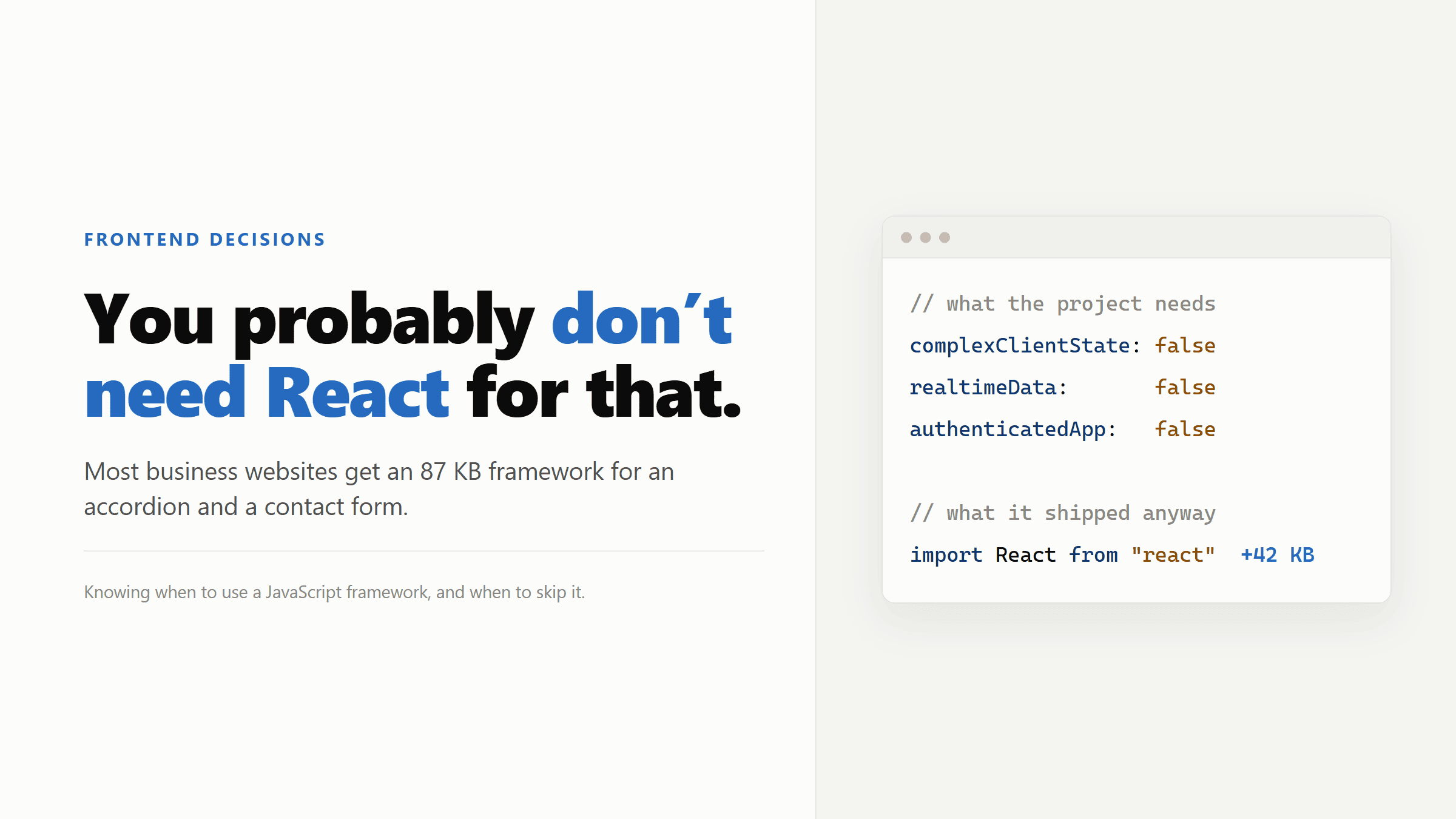
I’ve been writing React for over ten years. I know the ecosystem, the patterns, the footguns. And I’ll tell you something that took me longer to admit than it should have: most of the business websites I built with React didn’t need React.
They needed HTML, some CSS, maybe a bit of vanilla JavaScript for an accordion or a form. Instead they got an 87KB baseline bundle, a Node.js server dependency, and a codebase the client could never touch without calling me.
Knowing when to use a JavaScript framework is one of the most underrated decisions in frontend development. It affects performance, maintenance cost, hosting requirements, and whether your client can update their own site in two years without hiring you again.
What Frameworks Are Actually For
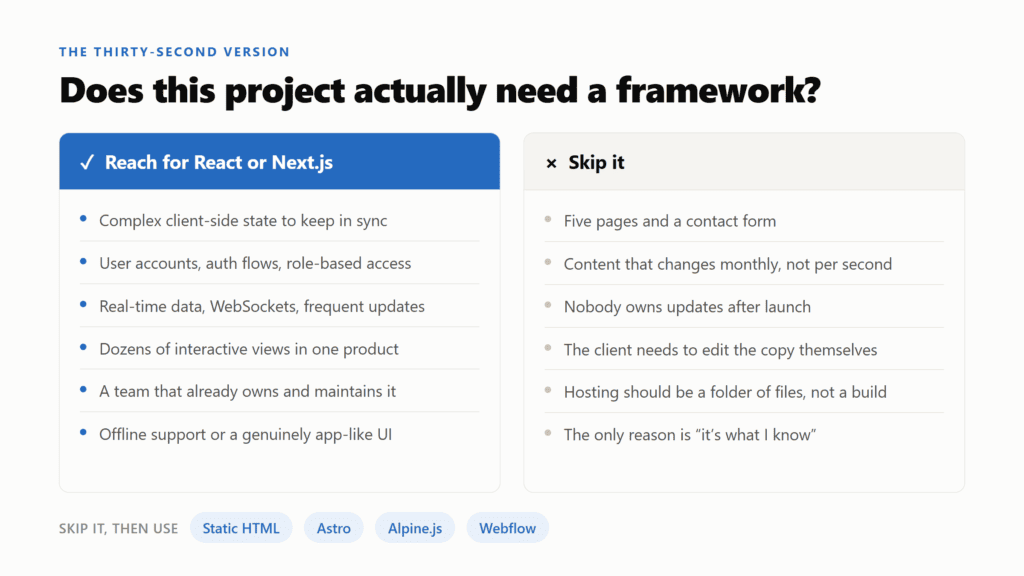
React, Next.js, Angular, Vue: these tools exist to solve specific, well-defined problems. They manage complex client-side state. They synchronise UI with rapidly-changing data. They make large teams productive by enforcing structure across thousands of components. They handle authentication flows, real-time updates, and interactions that would be genuinely painful to build in vanilla JavaScript.
A dashboard where data updates every few seconds. A SaaS product with role-based access and dozens of interactive views. A real-time collaboration tool. These are the right use cases.
A five-page business website with a contact form is not.
The problem isn’t that frameworks are bad. The problem is that developers reach for them by default, regardless of what the project actually needs. I did it for years. You build in the tools you know, you ship the project, you move on. The hidden cost doesn’t show up until later.
The Numbers Nobody Shows the Client
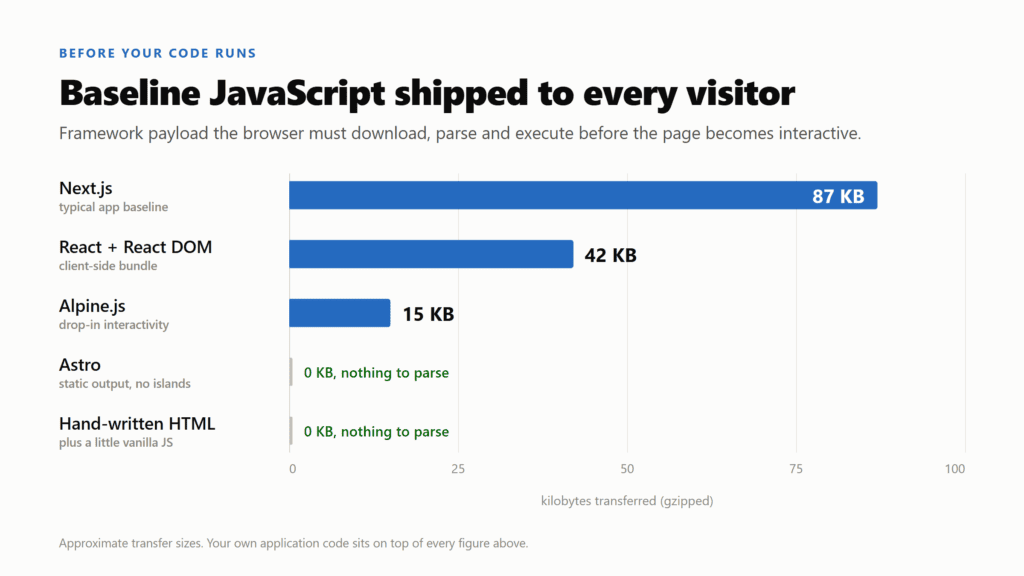
A typical Next.js application ships around 87KB of baseline JavaScript to every visitor before a single line of your code runs. A plain React bundle is roughly 42KB. That bundle has to download, parse, and execute before the page becomes interactive.
On a fast connection in a city, this is invisible. On a mobile connection, it’s a meaningful delay. And Time to Interactive is one of the metrics that directly affects both user experience and search rankings.
Compare that with a static HTML page. Zero framework overhead. The browser reads the file, renders it, done. There’s nothing to parse except your content.
A detailed breakdown of Next.js trade-offs (https://pagepro.co/blog/pros-and-cons-of-nextjs/) puts it directly: skip Next.js for a brochure site, for a team still learning React, or if nobody will own updates after launch. Those three conditions describe a significant majority of agency projects.
The Real Cost Shows Up After Launch
The performance numbers are one problem. The maintenance burden is the bigger one.
A Next.js site isn’t a folder of HTML files you upload to a server. It’s an application with a build process, Node.js dependencies, and a deployment pipeline. The framework releases updates. Some of those updates are security patches. Dependencies go stale. The React ecosystem moves fast enough that a two-year-old Next.js project can require significant work just to get onto current versions.
For an agency or freelancer, this creates a specific situation: either you stay on retainer maintaining something that didn’t need to be this complex, or the client is left with a codebase nobody wants to touch. I’ve seen both outcomes more than once.
There’s also the content editing problem. With a framework-based site, the client usually can’t change anything without a developer. You need a CMS on top of the framework to make content editable, which adds another layer, another potential failure point, another thing to maintain. A simpler site is a more maintainable site. That’s not a trade-off developers like to highlight, but it’s real cost to the client.
The Habit Nobody Talks About
There’s a term in developer culture: CV-driven development. Building with tools that look impressive on a resume rather than tools that fit the problem.
I’m not going to pretend I’ve never done this. When React was becoming the dominant framework, reaching for it on every project made sense partly because it was the thing to know. Learning it on client projects is how you get good at it.
But at some point the habit outlives the justification. You use React because it’s what you know, not because the project needs it. The client gets a more complex, harder to maintain site than they needed. You’ve optimised for your own learning curve, not their long-term outcome.
The honest version of a technology decision sounds like this: “This project needs X capability, and this framework provides it. Here’s what it costs in complexity and here’s why that trade-off is worth making.” Most framework decisions for business websites don’t survive that sentence.
When You Actually Do Need a Framework
To be clear: I still reach for React and Next.js regularly. For the right projects, they’re the correct choice.
If you’re building an authenticated SaaS product with user accounts, complex state, and multiple interactive views, you need a proper framework. Managing that kind of application in vanilla JavaScript is genuinely painful and doesn’t scale.
If you’re working on something with real-time data, WebSocket connections, or frequent state updates, frameworks handle the rendering complexity in ways that would take weeks to replicate from scratch.
I built a full agency management app in Next.js and Supabase for my own workflow: dashboard, project stats, file storage, Slack integration. That genuinely needed a framework. The decision took about thirty seconds because the requirements were obvious. The requirements for a business website with five pages and a contact form are equally obvious in the other direction.
What to Use Instead
The alternative to a framework isn’t doing everything manually. There are better options depending on what the project actually needs.
For content sites with minimal interactivity, Astro ships zero JavaScript by default () and only sends JavaScript for the parts of the page that genuinely need it. You get component-based development without the runtime overhead. It’s excellent for marketing sites and blogs.
For sites that need some interactivity but not full SPA complexity, Alpine.js gives you reactive behaviour in a few kilobytes. You can drop it into a static HTML page and have working dropdowns, tabs, and form validation without a build step.
For design-heavy projects where the client needs to edit content independently, a visual tool like Webflow produces cleaner output than most hand-coded sites and removes the maintenance dependency entirely. You can see how it compares to WordPress if you’re evaluating that direction.
The right tool is the one that solves the actual problem without creating problems you’ll have to solve later. Sometimes that’s React. More often than developers admit, it isn’t.
FAQ
Is React bad for SEO?
Client-side rendered React can hurt SEO because search engines may not fully execute JavaScript before indexing. Next.js addresses this with server-side rendering, but it’s worth noting that the problem only exists because you introduced a framework that required a solution. A static HTML page has no rendering issue to solve in the first place.
Can a simple business website benefit from Next.js?
Rarely. The main features Next.js provides over static HTML are server-side rendering, API routes, and complex routing for large applications. If your site doesn’t need any of those things, you’re adding build complexity for no gain. The exception is if your team already works in Next.js and the maintenance cost is fully absorbed.
What’s the performance difference between a React site and a static HTML site?
On fast connections the difference is often invisible. On slower connections and lower-end devices it can be significant. React and Next.js add 40–90KB of JavaScript that has to download and execute before the page is interactive.
A static HTML page has no such overhead. For Core Web Vitals and Time to Interactive, simpler usually wins.
Should junior developers avoid React?
No, but they should understand what problem it solves before reaching for it. Learning React is genuinely valuable. The issue is using it on every project without asking whether the project needs it. The best developers know multiple approaches and choose based on requirements, not habit.
How do I explain this to a client who specifically asks for React?
Ask them why. Usually the answer is that someone told them React is what modern websites are built with. Explain that React is a tool for web applications, not websites, and that a simpler build means a faster site, lower hosting cost, and content they can manage themselves. Most clients are happy to trade framework prestige for those outcomes.
Schedule a call
Talk to a subject-matter expert
Web development, SEO, or digital marketing — tell us about your project and we'll get back within one business day. No obligation.
- Free scope & strategy session
- A senior specialist, not a sales rep
- Your details stay confidential