

SEO
Summarize this blog post with:
WHAT IS GOOGLE ADS MANAGEMENT?
Google Ads management is the ongoing, systematic process of building, monitoring, and optimizing Google Ads campaigns to maximize return on ad spend and minimize wasted budget. It includes keyword strategy, match type management, negative keyword curation, bid strategy configuration, ad copy testing, landing page alignment, conversion tracking, and regular performance analysis. Google Ads is not a set-it-and-forget-it platform. Every week without active management is a week of compounding budget waste.
THE SHORT VERSION
- The average Google Ads account wastes 20 to 40% of its budget on irrelevant search traffic, poorly timed impressions, and campaign cannibalization that goes unnoticed for weeks or months, according to get-ryze.ai’s April 2026 audit analysis. At $3,000 per month in ad spend, that is $600 to $1,200 per month in clicks that convert no one.
- CPC rose for 87% of industries in 2025 and continues rising 10-15% annually across most sectors, per industry benchmarks reported by Payline Data in February 2026. You are paying more per click in 2026 than you were in 2023, which means DIY Google Ads management mistakes cost proportionally more now than they did then.
- In 2026, the platform itself actively works against DIY managers. Google’s automated recommendations, broad match defaults, and Performance Max push are designed to expand your spend, not optimize your return. Without expert oversight, these features inflate your budget without improving profitability, according to paid media campaign audit benchmarks and account review data.
- A2Z Dev Center’s digital marketing services include full Google Ads management covering campaign architecture, weekly optimization, negative keyword management, conversion tracking, landing page alignment, and monthly performance reviews. This guide reflects the exact audit process we run on every new account.
Google Ads does not waste money. Poorly managed Google Ads campaigns do. The distinction matters because it means the bleeding is fixable, but only if you know where it is coming from. This guide diagnoses the five specific sources of Google Ads wasted spend in unmanaged accounts, tells you exactly when the math changes and you need professional Google Ads management, and gives you the weekly and monthly workflow that professional account managers actually use.
Where Is Your Google Ads Budget Actually Going?
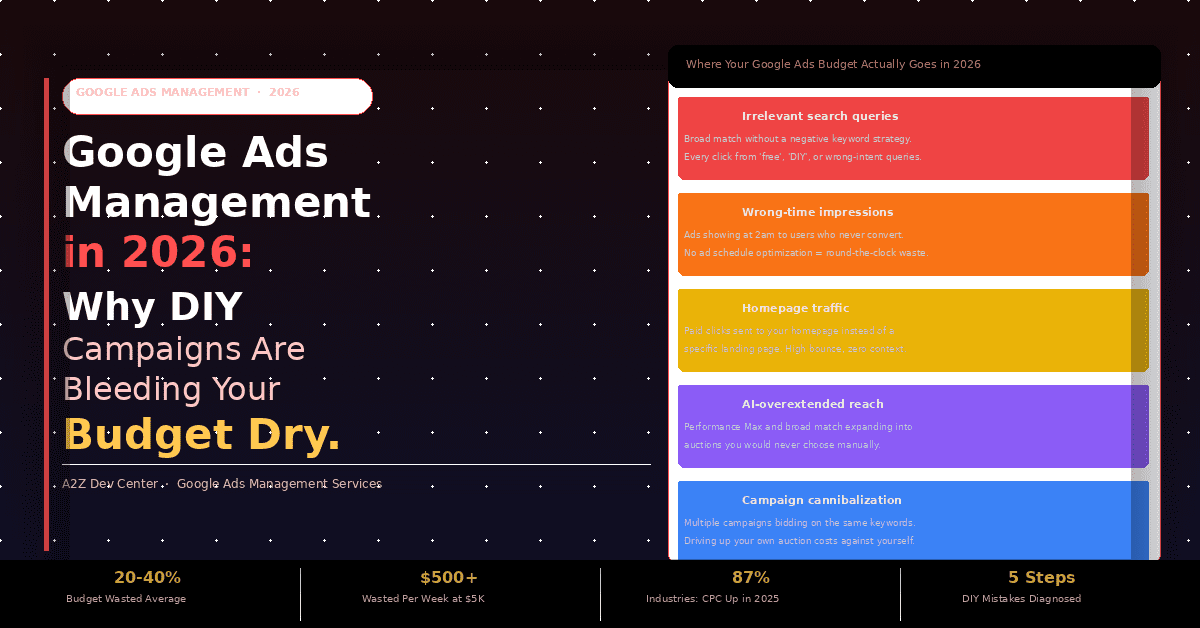
Before diagnosing the DIY mistakes, you need to know what waste actually looks like in a Google Ads account. Here are the five specific mechanisms that drain budget in most unmanaged accounts, with the percentage ranges from get-ryze.ai’s 2026 wasted spend analysis.
20-40%
Irrelevant search queries
Broad match keywords without a negative keyword strategy match to queries that have nothing to do with your offer. Every click from “free,” “DIY,” “review,” or wrong-intent queries drains budget without conversion potential. One paid ads consultant documented a single client losing over $4,000 in 90 days from “free” and “DIY” modifier queries alone.
15-25%
Wrong-time impressions
Without an ad schedule, your ads run 24 hours a day. Most industries have hours where cost per conversion is dramatically above average. Budget spent at 2am or on weekends in a B2B account is almost entirely wasted. No ad schedule optimization means round-the-clock spend with no return.
10-20%
Homepage traffic
Sending paid search traffic to your homepage is one of the most costly and common Google Ads mistakes. If your ad says “HVAC repair in Austin” and the click lands on a generic homepage, the user has no context and no clear next action. High bounce, zero conversion, full cost.
8-15%
AI-overextended reach
In 2026, Performance Max and broad match AI expansion push ads into auctions you would never manually choose. The query targeting becomes broader, the creative combinations multiply, and the budget flows into placements with low commercial intent. Wrong setup = silent, invisible waste across channels.
5-12%
Campaign cannibalization
When multiple campaigns target overlapping keywords, they bid against each other in the same auctions, driving up your own CPCs. Poor account structure is what get-ryze.ai calls “the silent waste multiplier.” It does not show as one line item. It shows up everywhere: higher CPCs, inconsistent conversion rates, Smart Bidding that never learns.
These five leaks compound. A $3,000 per month account with all five active is wasting $900 to $1,500 per month on clicks that produce nothing. The average CPC across all industries is $5.26, per WordStream’s 2025 benchmark study of 16,000+ Google Ads campaigns. At that CPC, $1,500 per month in waste equals roughly 285 wasted clicks every month, every month, accumulating in an account nobody is systematically reviewing.
Why Does DIY Google Ads Management Fail at Scale?
There is a budget threshold at which DIY Google Ads management stops being a reasonable cost-saving decision and starts being a measurably expensive mistake.
DIY IS REASONABLE
Under $1,500/mo
At this spend level, the stakes are low enough that mistakes are part of the learning curve. You are not burning enough per click for a poorly structured campaign to cost more than a professional manager would. Learning by doing is a defensible approach when the monthly budget is under $1,500 per month in ad spend.
DIY IS COSTING YOU MORE THAN HELP WOULD
$3,000-5,000+/mo
At $3,000 to $5,000 per month, a poorly structured campaign can waste $500 or more in a single week on irrelevant clicks, per Payline Data’s February 2026 Google Ads budget analysis. At this level, the cost of not having expert oversight exceeds the cost of hiring it. The math has changed. You are past the DIY threshold.
The threshold problem is compounded by what Payline Data calls the “Google Recommendations Trap.” Google can spend up to twice your daily budget on high-traffic days. Following Google’s automated recommendations blindly, which push toward broader match types, higher bids, and expanded campaigns, inflates spend without improving profit. Paid ads consultant Sarah Stemen’s 2026 campaign analysis puts it directly: “Google’s AI features still need human judgment. A big part of managing Google Ads is knowing what to accept, what to ignore, and how to keep automation aligned with actual business goals, not Google’s revenue goals.”
Understanding what performance marketing actually delivers requires separating Google’s optimization targets from your business’s optimization targets. These are not the same objective, and DIY Google Ads management rarely makes this distinction explicitly.
The 2026 AI complication: Performance Max is now Google’s default push for all campaign types. When set up correctly with strong creative assets, meaningful conversion data, and proper exclusions, PMax can be powerful. When set up incorrectly, it burns budget across Search, Display, YouTube, Gmail, and Maps simultaneously with minimal visibility into where the money went. For SMBs running DIY campaigns, incorrect PMax setup is now the highest-risk single configuration error in Google Ads management. Our guide on how AI is changing digital advertising covers the specific PMax setup requirements that separate effective campaigns from expensive ones.
The 5 Most Expensive DIY Google Ads Mistakes in 2026
These are not hypothetical mistakes. They are the five most consistently found issues across Google Ads account audits in 2025 and 2026, with documented cost data from named sources.
1
Broad match keywords without a negative keyword strategy
Highest Impact
Brent Harwood, Google Ads specialist at Arachnid Works, names this as the number one setup mistake found in small business Google Ads audits in 2026: “Broad match keywords without a comprehensive negative keywords list.” Broad match in 2026 uses AI to match your ads to queries semantically related to your keywords. The AI is good at finding queries. It is not designed to filter for commercial intent. Without an active negative keyword strategy, the AI will serve your “roofing repair” ad against “roofing repair DIY tutorial” queries, “how to roof a house for free” queries, and competitors’ brand names. Sarah Stemen’s audit documentation records a single client losing over $4,000 in 90 days from “free” and “DIY” modifier queries alone, with no negative keyword list in place.
2
Conversion tracking not set up, broken, or measuring the wrong events
High Impact
Google Ads Smart Bidding optimizes for conversions. If your conversion tracking is broken, measuring the wrong actions (page views instead of form submissions), or not tracking phone calls, then Smart Bidding is learning from noise, not signal. It will optimize for whatever you are measuring, not what actually generates revenue. HawkSEM’s CEO Sam Yadegar identifies this exact problem: “Too often, businesses don’t take into account, or have a process for, tracking conversions from webinar sign-ups, phone calls, and other actions.” Every DIY Google Ads account audit should start with conversion tracking verification before any other change is made. Smart Bidding without clean conversion data will spend your budget efficiently toward the wrong goal.
3
Sending paid traffic to the homepage instead of a dedicated landing page
High Impact
The most commonly cited and consistently documented Google Ads mistake is routing paid clicks to the homepage. A paid search visitor has just signaled specific intent with a specific query. If they search “emergency HVAC repair Austin” and land on your homepage, they must then hunt for the emergency service information, a friction point most do not complete. WordStream’s 2025 benchmark shows average search conversion rates of approximately 7.5% across industries. Well-structured campaigns with dedicated landing pages consistently outperform this benchmark. The industry rule is direct: if your ad makes a specific promise, the page people land on must fulfill that specific promise, not your general brand story. For ecommerce businesses, this means sending product ad clicks to the exact product page, not the category page or homepage.
4
Following Google’s automated recommendations without expert review
Compounding Impact
Google’s Recommendations tab generates automated suggestions for your campaigns. Many of them are genuinely useful: adding negative keywords, updating ad copy, enabling extensions. Many of them serve Google’s revenue rather than your ROI: expanding to broader match types, raising bids, enabling broad match on exact-match campaigns, suggesting larger budgets. Accepting all recommendations without evaluation consistently inflates spend without proportionally improving performance. The ALM Corp December 2025 analysis of Google Ads updates names this specifically: automated recommendations need human evaluation, not blanket acceptance. In 2026, with AI Max and Smart Bidding Exploration as additional recommendation layers, this problem is worse than it was in 2024. The platform is more capable of spending your budget efficiently. Whether it is spending it toward your goals requires someone who can audit the outcomes.
5
Fragmenting a limited budget across too many campaigns
Structural Impact
Stub Group’s March 2026 Google Ads analysis gives the clearest quantification of this mistake: a $1,500 per month budget split across five campaigns gives each campaign $10 per day. At the average CPC of $5.26, that is one to two clicks per campaign per day. Smart Bidding cannot exit its learning phase without sufficient conversion data, which typically requires 30 or more conversions per month per campaign. One to two clicks per day produces zero conversions, so Smart Bidding never learns, bids remain suboptimal, CPCs stay high, and no single campaign ever accumulates enough data to optimize. The correct approach for limited budgets is to concentrate spend on the highest-intent campaign until it generates enough data to optimize, then expand. Distributing a small budget across many campaigns is the structure that looks most complete but performs worst.
Step-by-Step Google Ads Management Process: Weekly and Monthly
This is the section missing from every competitor article on Google Ads management. HawkSEM gives you the topics. SEJ gives you an audit checklist. Neither gives you the actual workflow with timing. Here is the process a professional Google Ads management team runs every week and every month.
Weekly Tasks (Monday or Tuesday)
1
Review the Search Terms Report and Add Negatives
Pull the search terms report for the past 7 days. Identify every query that triggered your ads but has no conversion value. Add these as negative keywords immediately. This is the single highest-ROI task in weekly Google Ads management and takes 15 to 30 minutes. Missing this step for two consecutive weeks compounds your broad match waste significantly.
2
Check Budget Pacing and Spend Rate
Verify that each campaign is on pace to spend its full budget without overspending or underspending. Google can spend up to twice your daily budget on high-traffic days. If a campaign consistently overspends or underspends, either the budget or the bid strategy needs adjustment. Underspending means your targeting is too narrow. Overspending signals your bids or match types are too aggressive.
3
Review Conversion Volume and Verify Tracking Accuracy
Confirm conversions fired correctly in the past 7 days. If conversion volume dropped sharply without a corresponding drop in clicks, your tracking tag may have broken. Conversion tracking failures are silent: the campaign keeps spending, Smart Bidding keeps optimizing, but the signal feeding the algorithm is gone. Check in Google Tag Manager or the Google Ads conversion action diagnostic weekly.
4
Check Ad Performance and Flag Underperformers
Review each ad variant’s CTR and conversion rate over the last 7 days. Flag any ad with CTR below 2% on Search or conversion rate more than 30% below the campaign average. Do not pause underperformers immediately on weekly data, as weekly variance is high. Flag them for the monthly review decision on whether to pause, rewrite, or test against a new variant.
Monthly Tasks (First Week of Month)
1
Audit Account Structure and Campaign-Level Budget Allocation
Review whether your current campaign structure still matches your business priorities. If a high-value service or product category has been relegated to a small ad group inside a large campaign, it may be getting insufficient budget relative to its revenue potential. Monthly is also when you decide whether to consolidate fragmented campaigns that lack the conversion volume to optimize Smart Bidding effectively. Combining low-volume campaigns gives Smart Bidding a larger data pool to learn from. Good SEO services inform which organic keywords are producing conversions, which then suggests which paid campaign types are redundant versus complementary.
2
Review Quality Scores by Ad Group
Quality Score determines how much you pay relative to competitors for the same keyword. A Quality Score of 5 means you pay market rate. A score of 3 means you pay up to 50% more than a competitor with a score of 7 for the same keyword position. Monthly Quality Score review identifies which ad groups need tighter keyword-to-ad-copy relevance, which landing pages have low expected CTR, and which keywords should be paused or moved to tighter thematic ad groups. Improving a Quality Score from 4 to 7 on a $5 CPC keyword reduces that CPC by approximately $1.50 per click across your entire click volume for that term.
3
Run an Ad Copy Test Review and Pause or Promote Variants
Google Responsive Search Ads require a minimum of 30 days and a reasonable impression volume before drawing conclusions about which headlines and descriptions perform best. Monthly is when you review the asset performance report, identify “Poor” rated assets, replace them with new variants, and promote “Best” rated headlines to pinned positions where appropriate. The goal is continuous creative refresh without abandoning statistically significant positive signals.
4
Review Audience Performance and Adjust Bid Strategies
Audience observation data shows how different segments (remarketing lists, in-market audiences, customer match lists) perform relative to your campaign baseline. Monthly audience review identifies segments converting at significantly higher or lower rates than average and applies bid adjustments: typically +20% to +50% for high-converting segments and -20% to -30% for segments that consistently convert below your target CPA. Our content marketing team produces the blog and landing page content that feeds remarketing audiences, giving paid campaigns a warmer, higher-converting audience pool to bid up on.
What Does a Professional Google Ads Manager Do That You Cannot Do Yourself?
The question every business owner managing their own campaigns asks before hiring professional Google Ads management services. The honest answer is: most of the tactical tasks above, you can do yourself with enough time and attention. What you cannot replicate without dedicated focus is the consistent execution cadence, the pattern recognition from managing multiple accounts simultaneously, and the institutional knowledge of what has changed on the platform.
In 2026 specifically, professional Google Ads management adds value in three areas that DIY managers consistently miss. First, AI configuration: knowing which Smart Bidding targets to set and when, how to structure Performance Max asset groups to guide the AI rather than leaving it to run unconstrained, and how to evaluate AI Max campaign performance against standard Search campaigns running in the same account. Second, negative keyword architecture: building and maintaining the layered negative keyword lists (account-level, campaign-level, ad group-level) that prevent match type expansion from burning budget on irrelevant queries. Third, signal quality management: ensuring conversion tracking is accurate, that Google is receiving the right signals for Smart Bidding to optimize against, and that your first-party data (customer match lists, Enhanced Conversions) is feeding the AI systems that determine your ad performance.
Professional Google Ads management fees typically run $500 to $2,000 per month for SMB accounts, or a percentage of ad spend (10% to 20%). Based on the documented waste data above, a $3,000 per month account wasting 30% of budget is losing $900 per month. A $1,000 management fee that reduces waste to 5% recovers $750 per month in net spend efficiency before any performance improvement from better targeting or creative. The math supports professional Google Ads management at almost any budget above $2,500 per month in ad spend, provided the management is actually being done, not just billed.
Frequently Asked Questions
Stop Paying for Clicks That Convert No One.
A2Z Dev Center runs Google Ads audits that identify exactly where your budget is leaking, whether it is broad match without negatives, broken conversion tracking, or Performance Max without proper asset structure. We fix the waste and build the ongoing management workflow that keeps it from coming back.
Book a Free Google Ads Audit
Schedule a call
Talk to a subject-matter expert
Web development, SEO, or digital marketing — tell us about your project and we'll get back within one business day. No obligation.
- Free scope & strategy session
- A senior specialist, not a sales rep
- Your details stay confidential