

Hubspot
Summarize this blog post with:
Quick Answer: What Is a HubSpot CRM Migration?
A HubSpot CRM migration is the end-to-end transfer of your contacts, companies, deals, activities, workflows, and integrations from your existing CRM into HubSpot, while maintaining data integrity and rebuilding automation logic so your team can operate without disruption from Day 1. A HubSpot CRM migration is not just a data import. It is a revenue operations redesign project.
What This Guide Gives You That No Competitor Does
- The honest answer about what you will actually lose. Activity history does not migrate natively. Lead scores reset. Create dates become import dates unless you handle them specifically. Every migration guide skips this. This one does not.
- The fear map for every team on your staff. Sales, Marketing, Ops, IT, and Leadership each have a different specific fear about HubSpot CRM migration. This guide names each one and gives the specific reassurance that removes it.
- A 6-phase roadmap with realistic week-by-week timelines. 62% of CRM migration projects fail to meet their business outcomes due to poor planning and underestimated complexity, per CUBE84’s March 2026 analysis of Validity’s 2025 enterprise data. The roadmap below changes that for your project.
- A2Z Dev Center’s digital marketing services include HubSpot CRM migration strategy, data architecture, workflow rebuilds, and post-migration revenue operations. For context on why disconnected systems are the underlying problem this migration solves, read our guide on how HubSpot integration stops revenue leaks before starting any migration project.
Executives rarely reject HubSpot because they doubt the platform. 78% of salespeople say their CRM improves alignment between sales and marketing, per HubSpot’s own research. Yet 27% of marketers still report alignment as a top challenge despite having a CRM in place. The problem is not HubSpot. The problem is that migrating to HubSpot feels like it could make things worse before they get better. That fear is not irrational. CRM migration done poorly does make things worse. This guide gives you the roadmap that makes it better.
What Will You Actually Lose During a HubSpot CRM Migration?
Every competing guide on HubSpot CRM migration starts with the benefits of moving. This one starts with what you will lose, because if you do not plan for the losses, they become surprises that destroy confidence in the migration before it has a chance to work. The data below comes from JetStack AI’s February 2026 HubSpot migration audit, the most forensic independent analysis of HubSpot data migration outcomes available.
| What You Lose | What Happens Instead | How To Mitigate It |
|---|---|---|
| Rich activity history | Emails, calls, page views become static text notes: “Email sent 2025-06-15” , not clickable records | Export and archive in a shared drive. Brief your sales team before go-live so the productivity dip is expected, not alarming. |
| Accumulated lead scores | Lead scoring models transfer as property configurations but accumulated scores reset. The score is gone even if the logic is preserved. | Document your current scoring thresholds. Plan a 60-day period for scores to rebuild before relying on them for sales prioritization. |
| Original create dates | When you import a record, HubSpot sets “Create Date” to the import date , not the original. A 2022 contact shows as created in 2026. | Before import, create a custom property “Original Create Date” and populate it from your export. This preserves the data even if native Create Date changes. |
| Workflow logic (native import) | No CRM workflows import directly into HubSpot. Every automation must be rebuilt inside HubSpot natively, from scratch. | Use migration as a redesign opportunity. Document all existing workflows first, then rebuild only those actively used , not every workflow that ever existed. |
| Interactive activity records | Sales reps face a 2 to 4 week productivity dip without the contextual activity history they relied on for follow-up conversations. | Plan the go-live for a lower-pressure period. Communicate the expected dip to leadership before migration so it is not misread as a system failure. |
This is what you gain that you cannot get without migrating: a unified platform where marketing, sales, and customer success share a single data model. One contact record with the full lifecycle from first ad click to renewal conversation. Built-in reporting that does not require manual reconciliation across four dashboards every Monday morning. The HubSpot CRM migration is worth the losses. But the losses are real, and planning for them is what separates migrations that succeed from the 62% that do not. For context on what happens after a successful migration, our guide on what performance marketing attribution looks like on a clean, unified HubSpot setup shows what becomes possible once the migration is done right.
The Emotional Map , What Every Team on Your Staff Is Really Afraid Of
A HubSpot CRM migration is as much an emotional project as a technical one, a framing MarCloud Consulting correctly identifies in their 2025 research on CRM migration psychology. Different teams have different specific fears. The same reassurance does not work for everyone. Map the fear before you start.
Sales Team
Fear: “We will lose our deal history and forecast will be empty on Day 1”
Reassurance: Deal pipeline stages, close dates, deal values, and deal owners all migrate with correct mapping. Forecast is intact on Day 1. What is missing is the activity history (call logs, email threads) associated with those deals, which becomes static text. Plan a 2 to 4 week adjustment period and brief reps that they will need to rely on deal records and notes rather than clickable email threads initially. This is a productivity adjustment, not a data loss crisis.
Marketing Team
Fear: “We will lose historical segments and attribution data built over years”
Reassurance: Contact properties, list membership data, and campaign association fields migrate as custom properties. Historical segment definitions can be rebuilt using migrated property data. Attribution resets are the genuine concern: GA4 must be aligned with HubSpot from Day 1, or first-touch attribution data will be lost as the new portal has no history of previous web sessions. Set up GA4 and HubSpot integration before go-live, not after.
Ops Team
Fear: “There are undocumented workflows in our current CRM that nobody remembers building”
Reassurance: This fear is valid and it is the reason the pre-migration audit exists. The audit phase identifies every active workflow, every trigger, every branch, and every integration dependency before a single record moves. The CRM migration to HubSpot forces documentation of the undocumented. MarCloud’s research identifies this as one of the four migration traps: teams discover their processes were more fragile than they realized, not because of HubSpot, but because of years of undocumented workarounds in their existing system.
IT / Security
Fear: “Data could be exposed or breached during transfer, and compliance obligations could be violated”
Reassurance: HubSpot’s data import system uses encrypted transfer and stores data in SOC 2-compliant infrastructure. The real compliance risk is not the transfer itself. It is the opt-in consent data that can be silently dropped during migration (covered in the compliance section below). IT’s focus should be on GDPR/CCPA audit before migration, not during. Involve your data protection officer in the pre-migration audit, not after the migration is complete.
Leadership / Finance
Fear: “This project will cost twice as much and take twice as long as planned, and we will have nothing to show for it”
Reassurance: The 62% failure rate for CRM migrations comes from poor planning and underestimated complexity, not from HubSpot itself. Leadership’s role in migration success is approving realistic timelines, protecting the project from scope creep during the audit phase, and communicating the 2 to 4 week productivity adjustment to board and investor audiences before go-live so it is not misread as a migration failure. The phase-by-phase roadmap below gives leadership the project visibility they need to sponsor this effectively.
Before You Move a Single Record , The Pre-Migration Audit Checklist
70% of HubSpot migration issues come from poor data quality, per HubSpot’s official migration guidance. This is not a data migration problem. It is a pre-migration preparation problem. Every week spent on this checklist reduces the migration timeline by reducing post-import errors.
Contacts and Companies
- Remove duplicate contacts (merge or delete before export, not after import)
- Standardize email format (all lowercase, remove spaces, validate format)
- Verify phone number format consistency (international vs local format)
- Check for contacts with no email address (HubSpot uses email as primary identifier)
- Remove inactive contacts not engaged in the last 24 months unless specifically needed
- Map your company/account object structure to HubSpot’s Company object
Deals and Pipeline
- Document every existing deal stage with its name, probability percentage, and definition
- Recreate pipeline stages in HubSpot before importing any deals
- Identify deals with no associated contact or company (orphaned deals will not associate correctly)
- Note “Closed Lost” reasons , this historical data is vital for future pipeline analysis
- Map deal owner names to HubSpot user accounts (users must exist before deals import)
Custom Properties and Fields
- List every custom field in your current CRM with its data type and field name
- Identify which custom properties are actively populated vs legacy fields nobody uses
- Create equivalent custom properties in HubSpot before importing (import will fail for unmapped fields)
- Create “Original Create Date” as a custom date property before importing contacts
Workflows and Automation
- List every active workflow with its trigger, conditions, and actions documented
- Identify workflows that have not triggered in 90+ days (consider retiring, not rebuilding)
- Flag integrations that feed data into workflows (these need separate integration rebuild planning)
The data quality test: Before exporting from your current CRM, run a report showing: percentage of contacts missing email, percentage of deals missing a close date, percentage of contacts with duplicate email addresses. If any of these is above 10%, your data quality work will take longer than planned. Build extra time into Phase 1.
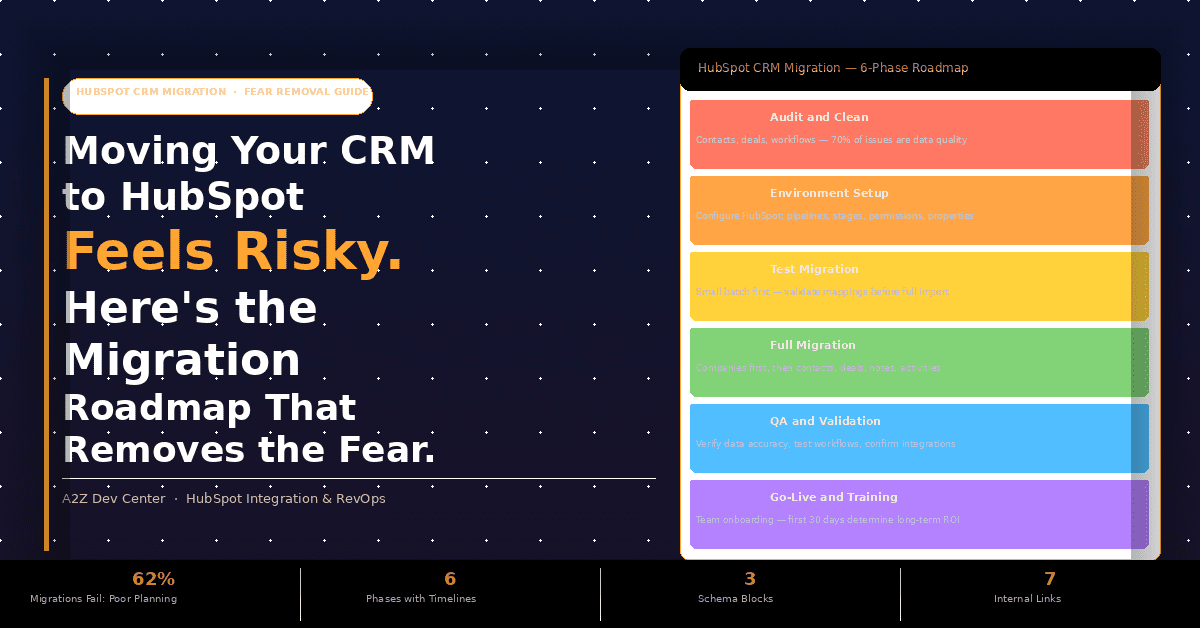
The HubSpot CRM Migration Roadmap: 6 Phases With Realistic Timelines
No competitor guide on HubSpot CRM migration gives realistic time estimates per phase. This is the gap that causes the most planning failures. Here is the honest phase-by-phase roadmap with timelines calibrated by team size and complexity.
1
Weeks 1-2
Audit and Data Clean
Run the pre-migration audit checklist above. Export your full CRM dataset and run deduplication, standardize formats, and remove inactive records. Create a data quality report showing record counts, field completion rates, and duplicate percentages. This phase takes longer than most teams expect because the data quality problems discovered during this phase are usually worse than initial estimates. Do not compress this phase to meet a launch deadline. Poor data quality going in creates poor data quality coming out, and cleaning bad data inside HubSpot after migration is significantly harder than cleaning it in your source system first.
2
Weeks 2-3
HubSpot Environment Setup
Configure your HubSpot portal before a single record moves. Create deal pipelines with stages that match your documented deal structure from Phase 1. Set up lifecycle stages reflecting your actual buyer journey, not HubSpot’s defaults. Configure custom properties for every field that does not exist natively. Set user permissions and team access by role. Configure default currency, time zone, and date format. Create HubSpot users for every team member who will own records, because contacts, companies, and deals imported without a valid HubSpot user assigned to them will orphan. Lifecycle stages are the most frequently misconfigured element in new HubSpot portals, per MarCloud Consulting’s portal audit data, and misconfigured stages affect reporting accuracy immediately.
3
Week 3
Test Migration with a Small Batch
Import 50 to 200 records across contacts, companies, and deals, and validate every mapped field before running the full import. Use HubSpot’s import preview feature to check field mapping before uploading each object. Verify that contacts associate correctly to companies, that deals link to their correct contacts, and that custom property values appear exactly as they did in your source CRM. Check that the ‘Original Create Date’ custom property populated correctly. Identify any fields that mapped to the wrong property type (a text field importing into a number property will fail silently in some cases). The test migration is not optional. It catches mapping errors that would corrupt hundreds or thousands of records in the full import.
4
Week 4
Full Migration by Object Order
Import in the correct order: Companies first (so contacts can associate on import), then Contacts, then Deals linked to their contacts and companies, then Notes and Activities as static records. Never import all objects simultaneously. HubSpot requires parent objects to exist before child objects can associate. A contact imported before its company record exists will fail to associate and require manual correction at scale. Use HubSpot’s batch import API for large datasets (over 10,000 records per object) rather than the native CSV uploader, which has row limits and slower processing. Our web application development team builds custom HubSpot API migration scripts for large-scale imports that include error handling, retry logic, and row-level validation logging.
5
Week 5
QA and Data Validation
Verify data accuracy across a statistically meaningful sample (minimum 5% of each object type). Check contact-to-company associations, deal-to-contact associations, and custom property values. Test that key workflows trigger correctly on test records. Confirm that integrated systems (email, calendar, Slack, billing tools) are reconnecting to HubSpot correctly. Review the import error log in detail, HubSpot generates an error file for every failed record, and these often reveal systematic mapping issues that need correction across the dataset before go-live. Have your sales and marketing team leads review their own records in the test environment and sign off before Phase 6.
6
Week 6
Go-Live and Team Training
The first 30 to 60 days after go-live determine long-term adoption and ROI, per HubJoy’s 2026 HubSpot migration analysis. Do not conflate go-live with done. Schedule team training by role (sales reps need different training than marketing managers) in the week before go-live. Create a Slack channel or internal channel for migration questions in the first month, because questions will come and they need fast answers that build confidence rather than erode it. Set a 90-day adoption review checkpoint to identify teams or individuals who have reverted to pre-migration habits, which is the most common indicator that training was insufficient.
What Cannot Be Migrated , Rebuild or Redesign It?
Workflows cannot be imported into HubSpot from any other CRM. Every automation must be rebuilt inside HubSpot natively. This is the most common source of timeline overruns in CRM migration to HubSpot projects because teams underestimate how many workflows they have and how long rebuilding them takes.
Rebuild (Lift and Shift)
Replicate in HubSpot exactly as-is
- Workflows actively used and producing correct outcomes
- Lead assignment rules with no known problems
- Deal stage change notifications working as intended
- Onboarding sequences with proven engagement rates
- SLA escalation workflows with no reported failures
Redesign (Improve, Not Replicate)
Rebuild with better logic in HubSpot
- Workflows nobody can explain the purpose of
- Automations with known logic problems tolerated but never fixed
- Lead scoring workflows with scores that do not correlate to close rates
- Notification workflows that generate complaints about too many alerts
- Any workflow built before your current sales process existed
MarCloud Consulting frames this well: “Avoid a lift and shift. It is the perfect time to fix what was not working before.” CRM migration to HubSpot forces a process audit. Every workflow that gets rebuilt is a workflow that gets reviewed. Use this as the redesign opportunity it is, not just a technical replication exercise.
The Compliance Risk Most Teams Overlook During HubSpot CRM Migration
GDPR and CCPA Risk , This Affects Every Team Moving Contact Data
Opt-in consent records, GDPR processing timestamps, and CCPA opt-out flags can be silently dropped during a HubSpot CRM migration if they are not specifically mapped and preserved as part of the data migration plan. A contact who consented to marketing communication in your previous CRM may arrive in HubSpot without that consent record, creating a compliance exposure that is both invisible and significant.
Before migrating any contact data, audit your opt-in status and data origin for all records. Identify the field in your source CRM that stores consent status and map it to HubSpot’s Subscription Type framework. Use HubSpot’s privacy and consent settings to configure communication subscription types before importing contacts. Import contacts with their consent status populated on import, not as a cleanup task afterward. Involve your legal or data protection officer in the pre-migration audit, particularly if your contact database spans multiple regions under different privacy frameworks. Our approach to building an effective organic growth strategy after migration includes ensuring your consent infrastructure is correct so that HubSpot email workflows do not trigger to non-consenting contacts from Day 1.
This is the compliance risk that MarCloud Consulting’s “7 Sins of HubSpot Data Migration” article identifies as the most serious and the most commonly overlooked. It has no dramatic warning sign during migration. The drop happens silently, and the exposure only becomes apparent when a compliance audit or a regulatory inquiry surfaces it.
Your First 30 Days After HubSpot CRM Go-Live
The first 30 to 60 days post-migration determine long-term adoption and ROI. Teams that treat go-live as the finish line consistently see adoption decay and reversion to pre-migration habits within 90 days. The 30-day guide below treats go-live as the beginning of the project, not the end.
Week 1: Validate
- Confirm all import error records have been corrected
- Verify 10 deals per salesperson are correctly associated
- Test 5 key workflows with real records
- Confirm GA4 and HubSpot attribution are aligned
- Monitor support channel for data issues daily
- Check integration sync rates for all connected tools
Month 1: Optimize
- Review lead score accumulation for first 30 days
- Identify any workflows that triggered incorrectly
- Run first post-migration pipeline review with sales leadership
- Compare MQL volume in HubSpot to previous CRM baseline
- Identify users not logging into HubSpot daily
- Survey team: what is missing from their previous workflow?
Day 90: Review
- Lead score correlation: are high-scorers converting at expected rates?
- Attribution integrity: is content-to-pipeline reporting accurate?
- User adoption: is every team member using HubSpot as primary system?
- Integration health: any disconnections or sync failures since go-live?
- ROI baseline: document the metric baselines for 12-month ROI measurement
- Our content marketing team sets Day 90 baselines for content-to-pipeline attribution before building the first post-migration content reporting layer
Frequently Asked Questions
Your HubSpot CRM Migration Does Not Have to Be the 62% That Fails.
A2Z Dev Center runs HubSpot CRM migration projects from pre-migration audit through 90-day post-go-live validation. We map your data, rebuild your workflows, configure your compliance settings, and make sure your team is actually using HubSpot on Day 30, not reverting to spreadsheets.
Book a Free HubSpot Migration Audit
Schedule a call
Talk to a subject-matter expert
Web development, SEO, or digital marketing — tell us about your project and we'll get back within one business day. No obligation.
- Free scope & strategy session
- A senior specialist, not a sales rep
- Your details stay confidential